10
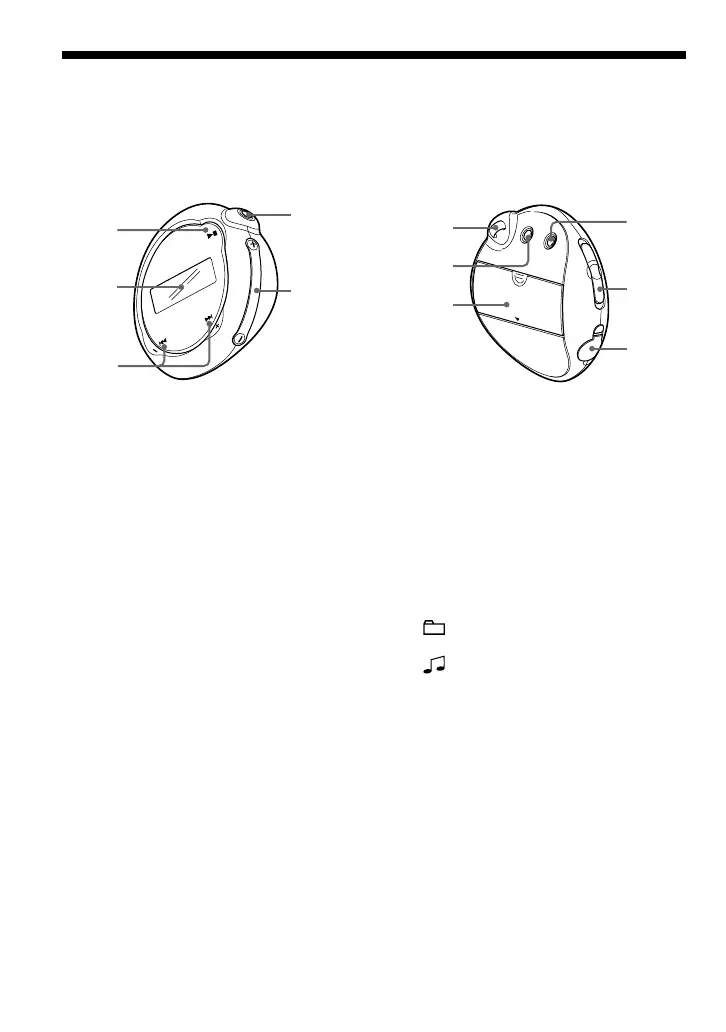
Locating controls
For details about each part, refer to the pages in parentheses.
Rear sideFront side
2
1
3
4
5
7
6
8
9
0
qz
1 Nx button
(page 14, 16 to 17, 19 to 22, 24, 26 to
33)
2 Display (page 11, 18, 43)
For details on the display and icons,
refer to page 11.
3 .–/+> button
(page 16 to 17, 19 to 22, 24, 26 to 33)
4 i (headphone) jack (page 14)
5 VOLUME +/– button
(page 14, 28 to 29)
6 Strap hole for attaching a strap
7 MENU button (page 16 to 22, 24, 26 to
33)
You can switch to the Time display by
pressing and holding the MENU button.
8 Battery compartment (page 9)
9 REPEAT/SOUND button
(page 18 to 20, 23)
q; GROUP/HOLD switch
(page 15 to 16, 23, 25)
: Group mode. Play or search songs
by group (page 23).
: Normal mode. Play songs by track
name (page 16).
HOLD: Protect the Network Walkman
against accidental operation (page 25).
qa USB jack (page 12)



 To Next Page