EasyManua.ls Logo

Sony EV-S900 - Playing Back a Tape; Stopping and Adjusting Playback; Troubleshooting Playback Issues

Sony EV-S900
60 pages
Print Icon
To Next Page IconTo Next Page
To Previous Page IconTo Previous Page
Loading...
42
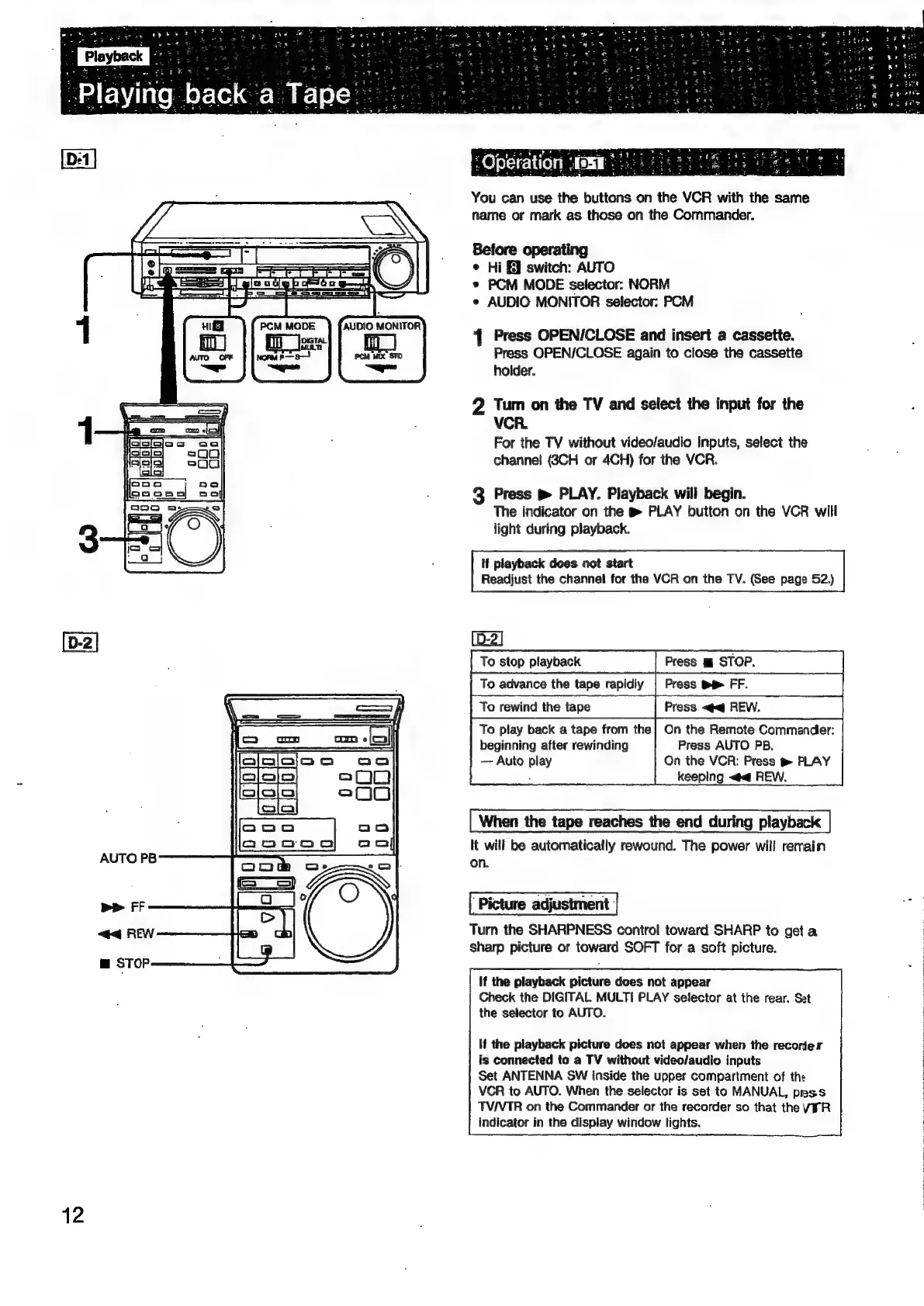
You
can
use
the
buttons
on
the
VCR
with
the
same
name
or
mark
as
those
on
the
Commander.
Before
operating
¢
Hi
E]
switch:
AUTO
®
PCM
MODE
selector:
NORM
e
AUDIO
MONITOR
selector:
PCM
Press
OPEN/CLOSE
and
insert
a
cassette.
Press
OPEN/CLOSE
again
to
close
the
cassette
holder.
2
Tum
on
the
TV
and
select
the
input
for
the
VCR.
For
the
TV
without
video/audio
Inputs,
select
the
channel
(8CH
or
4CH)
for
the
VCR.
3
Press
m
PLAY.
Playback
will
begin.
The
indicator
on
the
@
PLAY
button
on
the
VCR
will
light
during
playback.
If
playback
does
oot
start
Readjust
the
channel
for
the
VCR
on
the
TV.
(See
page
52.)
(D-2]
To
stop
playback
Press
m
STOP.
To
advance
the
tape
rapidly
|
Press
mp
FF.
To
rewind
the
tape
Press
<q
REW.
To
play
back
a
tape
from
the}
On
the
Remote
Commander:
beginning
after
rewinding
Press
AUTO
PB,
Auto
play
On
the
VCR:
Press
t
PLAY
keeping
<4
REW.
When
the
tape
reaches
the
end
during
playback
It
will
be
automatically
rewound.
The
power
will
remain
on.
‘Picture
adjustment:
Turn
the
SHARPNESS
control
toward
SHARP
to
get
a
sharp
picture
or
toward
SOFT
for
a
soft
picture.
If
the
playback
picture
does
not
appear
Check
the
DIGITAL
MULTI
PLAY
selector
at
the
rear.
Set
the
selector
to
AUTO.
If
the
playback
picture
does
not
appear
when
the
recorier
is
connected
to
a
TV
without
video/audio
inputs
Set
ANTENNA
SW
inside
the
upper
compartment
of
the
VCR
to
AUTO.
When
the
selector
is
set
to
MANUAL,
prss
TVIVTR
on
the
Commander
or
the
recorder
so
that
the
VFR
indicator
in
the
display
window
lights.
j
3
3
3

Related product manuals