EasyManua.ls Logo

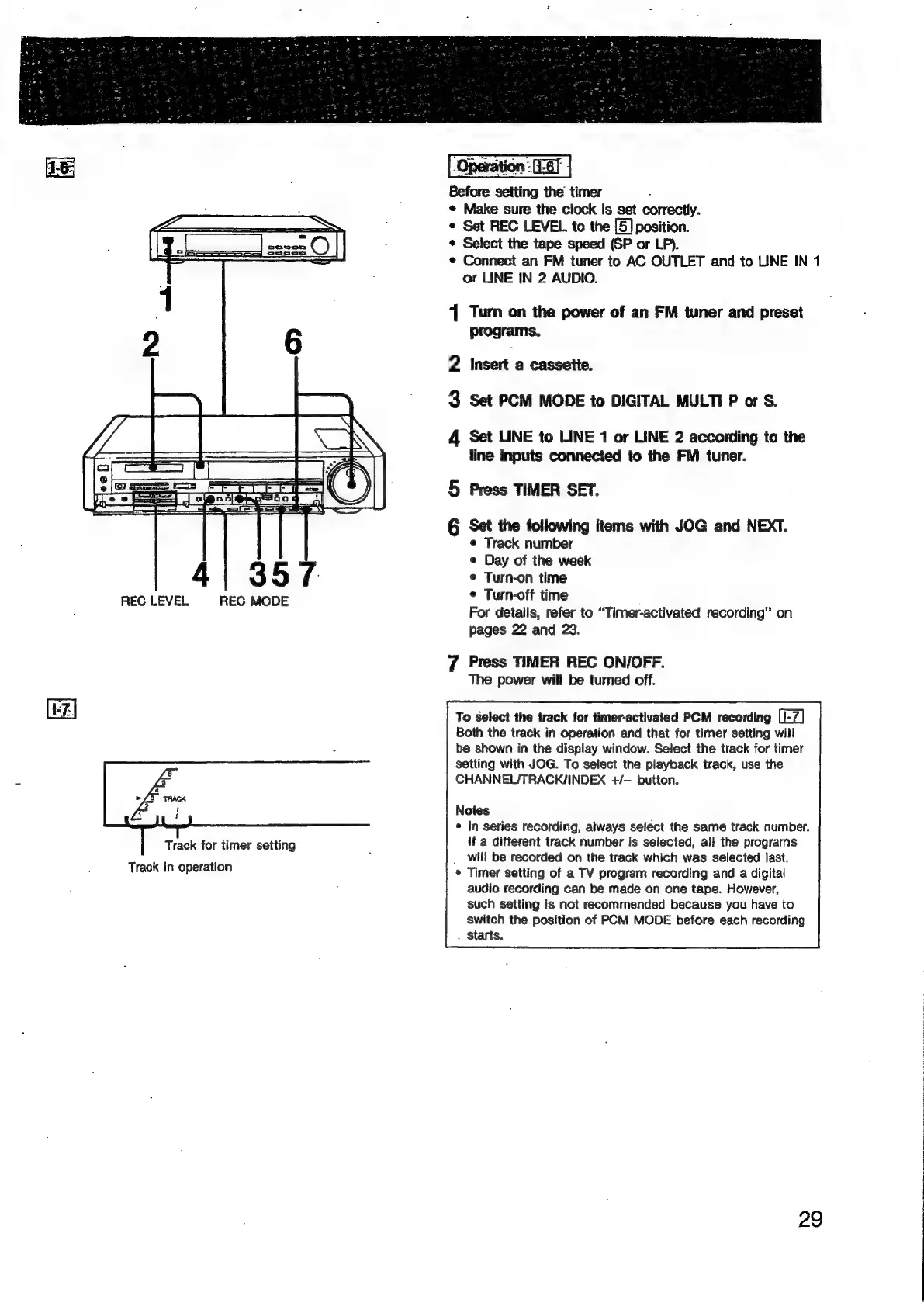
Sony EV-S900 - Timer-Activated FM Recording Operation; Selecting PCM Recording Tracks

Sony EV-S900
60 pages
Print Icon
To Next Page IconTo Next Page
To Previous Page IconTo Previous Page
Loading...
LF
-eeeen
e222
O|
CS
2
SSS)
CVeoos
REC
LEVEL
REC
MODE
Track
for
timer
setting
Track
in
operation
¢
Make
sure
the
clock
is
set
correctly.
¢
Set
REC
LEVEL
to
the
[5]
position.
*
Select
the
tape
speed
(SP
or
LP).
Connect
an
FM
tuner
to
AC
OUTLET
and
to
LINE
IN
1
or
LINE
IN
2
AUDIO.
1
Turn
on
the
power
of
an
FM
tuner
and
preset
programs.
2
insert
a
cassette.
3
Set
PCM
MODE
to
DIGITAL
MULTI
P
or
S.
4
Set
LINE
to
LINE
1
or
LINE
2
according
to
the
line
inputs
connected
to
the
FM
tuner.
5
Press
TIMER
SET.
6
Set
the
following
items
with
JOG
and
NEXT.
¢
Track
number
e
Day
of
the
week
¢
Turn-on
time
©
Turn-off
time
For
details,
refer
to
“Timer-activated
recording”
on
pages
22
and
23.
7
Press
TIMER
REC
ON/OFF.
The
power
will
be
turned
off.
To
select
the
track
for
timer-activated
PCM
recording
Both
the
track
in
operation
and
that
for
timer
setting
will
be
shown
in
the
display
window.
Select
the
track
for
timer
setting
with
JOG.
To
select
the
playback
track,
use
the
CHANNEUTRACK/INDEX
+/—
button.
Notes
*
in
series
recording,
always
select
the
same
track
number.
if
a
different
track
number
is
selected,
all
the
programs
_
will
be
recorded
on
the
track
which
was
selected
last.
*
Timer
setting
of
a
TV
program
recording
and
a
digital
audio
recording
can
be
made
on
one
tape.
However,
such
setting
is
not
recommended
because
you
have
to
switch
the
position
of
PCM
MODE
before
each
recording
.
Starts.
29

Related product manuals