EasyManua.ls Logo

Sony EV-S900 - Recording Level Adjustment; Timer-Activated FM Recording; Parallel and Series Recording Options

Sony EV-S900
60 pages
Print Icon
To Next Page IconTo Next Page
To Previous Page IconTo Previous Page
Loading...
“PCM
Recording
and
Playback
Digital
Multi
Audio
System’
13:
Recording
level:
adjustment.
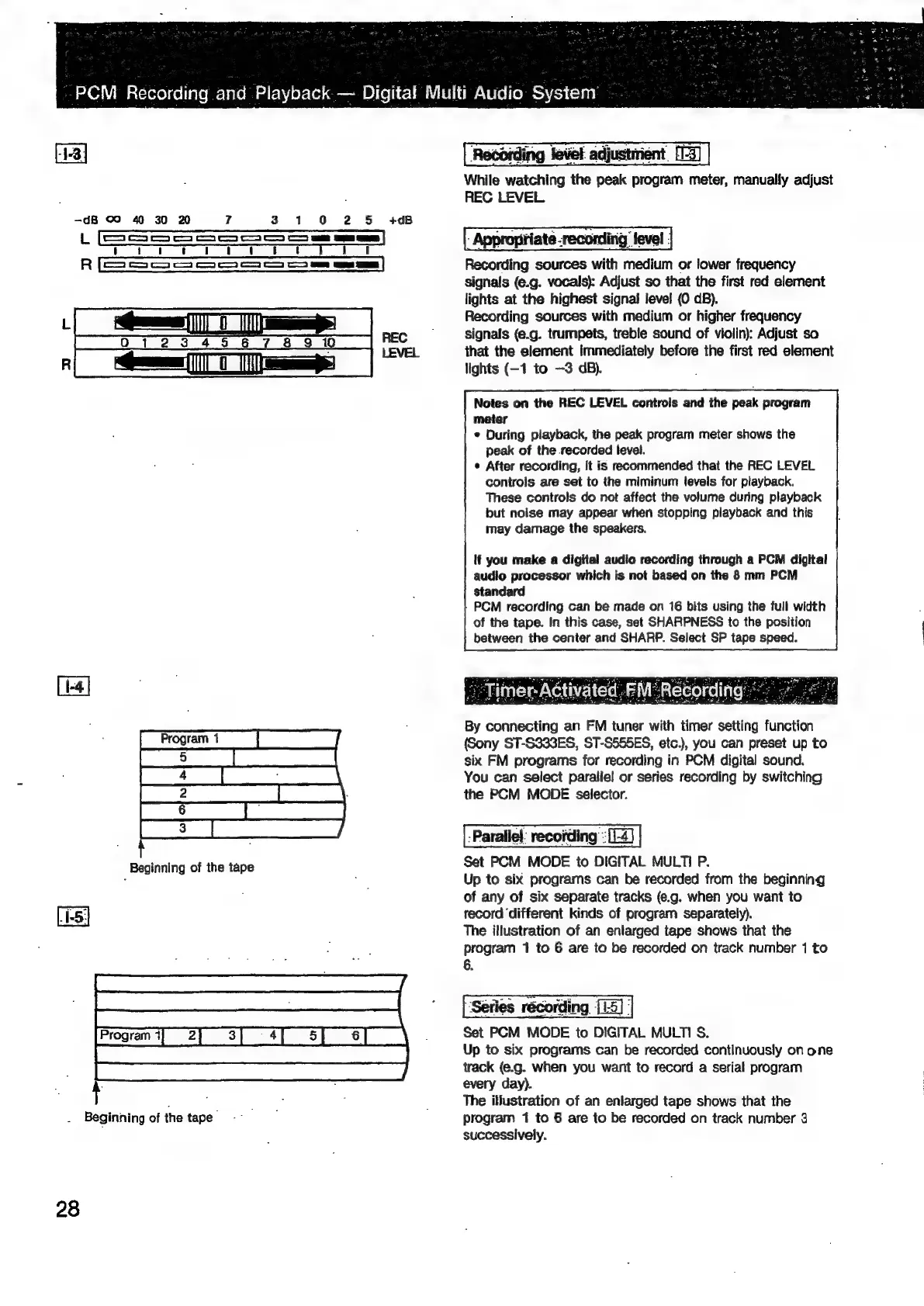
While
watching
the
peak
program
meter,
manually
adjust
REC
LEVEL.
-dB
oO
40
30
20
?
3
1
0 2 5
+08
\SSsSSSS
oS]
Appropriate
recording
level
R
Recording
sources
with
medium
or
lower
frequency
signals
(¢.g.
vocals):
Adjust
so
that
the
first
red
element
lights
at
the
highest
signal
level
(0
dB).
Recording
sources
with
medium
or
higher
frequency
~
———_)
ff]
||
=
ri
DTD
ali
3
an
70
REC
signals
(e.g.
trumpets,
treble
sound
of
violin):
Adjust
so
LEVEL
that
the
element
immediately
before
the
first
red
element
Gees
0
=
lights
(-1
to
—3
dB).
Notes
on
the
REC
LEVEL
controls
and
the
peak
program
meter
«
During
playback,
the
peak
program
meter
shows
the
peak
of
the
recorded
level.
¢
After
recording,
it
is
recommended
that
the
REC
LEVEL
controls
are
set
to
the
miminum
tevels
for
playback.
These
controls
do
not
affect
the
volume
during
playback
but
noise
may
appear
when
stopping
playback
and
this
may
damage
the
speakers.
tf
you
make
a
digital
audio
recording
through
a
PCM
dicital
audio
processor
which
is
not
based
on
the
8
mm
PCM
standard
PCM
recording
can
be
made
on
16
bits
using
the
full
width
of
the
tape.
In
this
case,
set
SHARPNESS
to
the
position
between
the
center
and
SHARP.
Select
SP
tape
speed.
By
connecting
an
FM
tuner
with
timer
setting
function
(Sony
ST-S333ES,
ST-S555ES,
etc.),
you
can
preset
up
to
six
FM
programs
for
recording
in
PCM
digital
sound.
You
can
select
parallel!
or
series
recording
by
switching
the
PCM
MODE
selector.
-Parallel:
recording
“:[1-4)
Set
PCM
MODE
to
DIGITAL
MULTI
P.
Up
to
six
programs
can
be
recorded
from
the
beginning
of
any
of
six
separate
tracks
(e.g.
when
you
want
to
record
‘different
kinds
of
program
separately).
The
illustration
of
an
enlarged
tape
shows
that
the
program
1
to
6
are
to
be
recorded
on
track
number
1
to
6.
‘Series
récording
[1-5]:
Set
PCM
MODE
to
DIGITAL
MULTI
S.
Up
to
six
programs
can
be
recorded
continuously
on
one
track
(e.g.
when
you
want
to
record
a
serial
program
every
day).
: : :
The
illustration
of
an
enlarged
tape
shows
that
the
Beginning
of
the
tape
,
program
1
to
6
are
to
be
recorded
on
track
number
3
successively.
28

Related product manuals