EasyManua.ls Logo

Sony EV-S900 - Preparation for Recording; Recording Operation

Sony EV-S900
60 pages
Print Icon
To Next Page IconTo Next Page
To Previous Page IconTo Previous Page
Loading...
Recording
TV
Programs
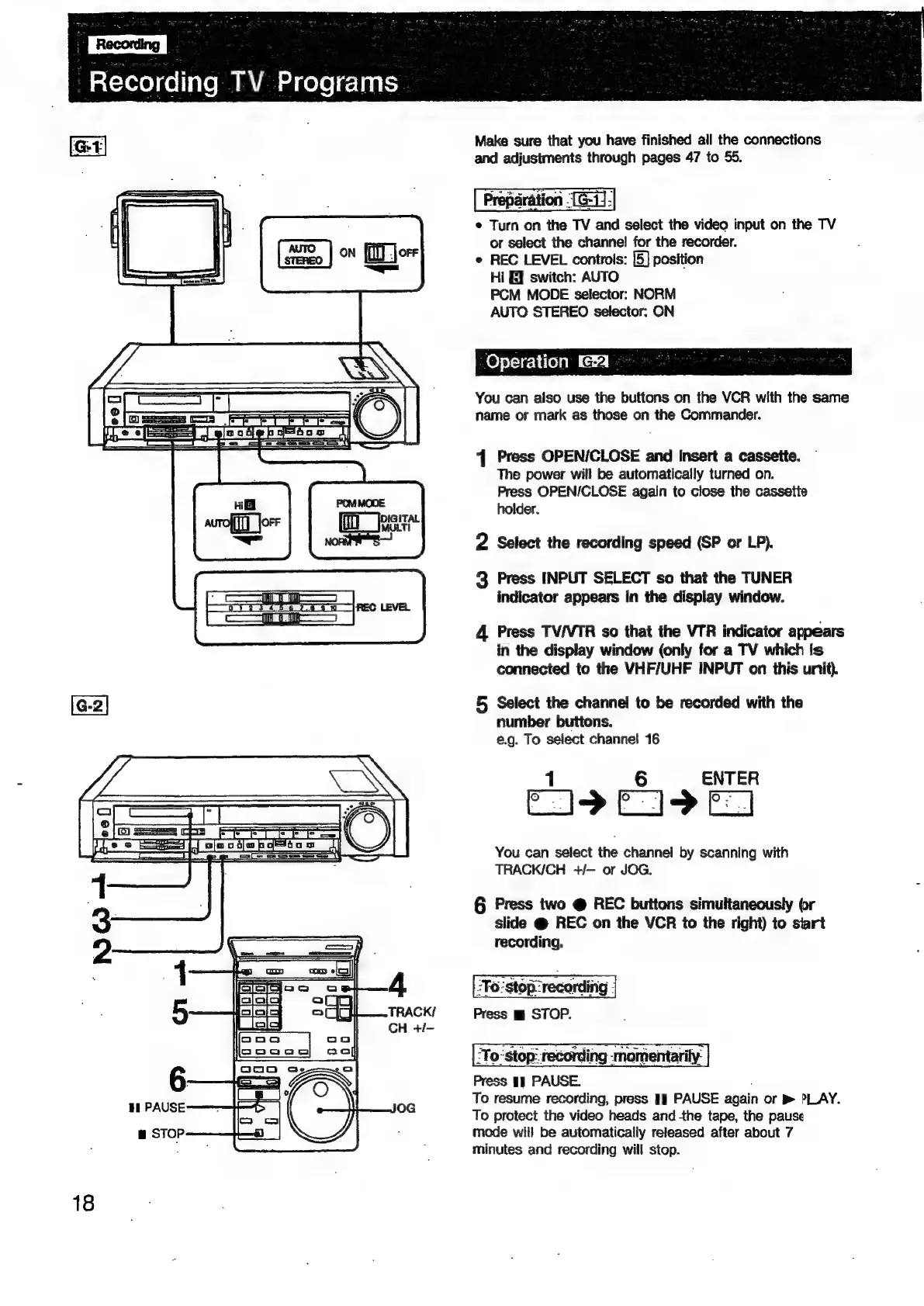
Make
sure
that
you
have
finished
all
the
connections
and
adjustments
through
pages
47
to
55.
e
Tom:
on
the
TV
and
select
the
video
input
on
the
TV
or
select
the
channel
for
the
recorder.
*
REC
LEVEL
controls:
[5]
position
Hi
GF
switch:
AUTO
PCM
MODE
selector:
NORM
AUTO
STEREO
selector:
ON
Operation
a
You
can
aiso
use
the
buttons
on
the
VCR
with
the
same
name
or
mark
as
those
on
the
Commander.
1
Press
OPEN/CLOSE
and
insert
a
cassette.
The
power
will
be
automatically
turned
on.
Press
OPEN/CLOSE
again
to
close
the
cassette
holder.
2
Select
the
recording
speed
(SP
or
LP).
3
Press
INPUT
SELECT
so
that
the
TUNER
indicator
appears
in
the
display
window.
Tj
Bl
———J
4
Press
TV/VTR
so
that
the
VTR
indicator
appears
in
the
display
window
(only
for
a
TV
which
is
connected
to
the
VHF/UHF
INPUT
on
this
unit).
[G-2|
5
Select
the
channel
to
be
recorded
with
the
number
buttons.
e.g.
To
select
channel
16
ENTER
C9
E19
FI
You
can
select
the
channel
by
scanning
with
TRACK/CH
+/—
or
JOG.
§
Press
two
@
REC
buttons
simultaneously
(r
slide
@
REC
on
the
VCR
to
the
right)
to
siart
recording.
?Fo'stop2recording
;
Press
m
STOP.
2To:stop:
recording
‘momentarily:
Press
1],
PAUSE.
To
resume
recording,
press
PAUSE
again
or
>
PLAY.
To
protect
the
video
heads
and
-the
tape,
the
pause
mode
will
be
automatically
released
after
about
7
minutes
and
recording
will
stop.
18

Related product manuals