EasyManua.ls Logo

Sony EV-S900 - Clock Set

Sony EV-S900
60 pages
Print Icon
To Next Page IconTo Next Page
To Previous Page IconTo Previous Page
Loading...
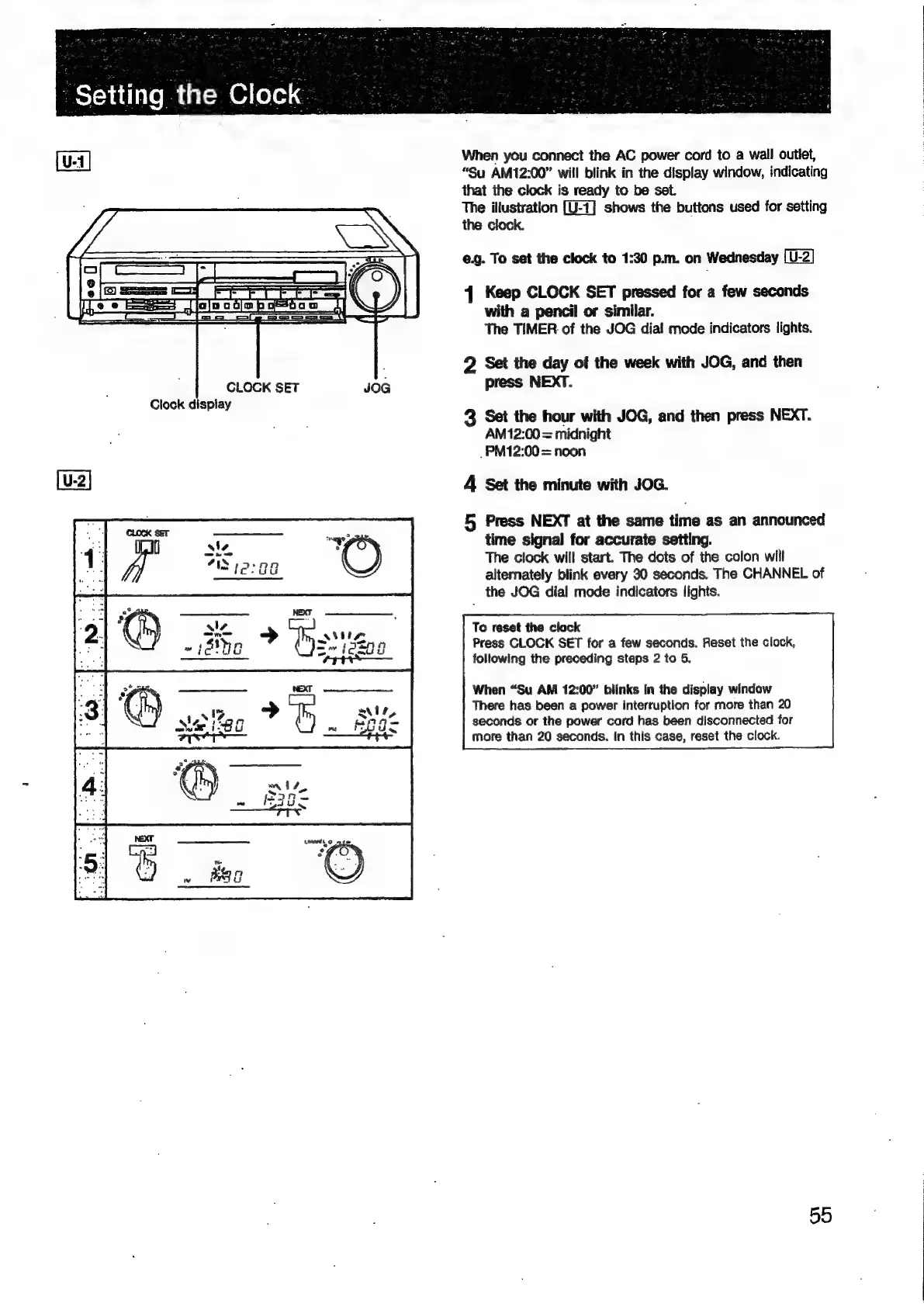
“Setting
the
Clock
CLOCK
SET
Clock
display
JOG
When
you
connect
the
AC
power
cord
to
a
wall
outlet,
“Su
AM12:00”
will
blink
in
the
display
window,
indicating
that
the
clock
is
ready
to
be
set.
The
illustration
shows
the
buttons
used
for
setting
the
clock.
e.g.
To
set
the
clock
to
1:30
p.m.
on
Wednesday
[U-2]
41
Keep
CLOCK
SET
pressed
for
a
few
seconds
with
a
pencil
or
similar.
The
TIMER.
of
the
JOG
dial
mode
indicators
lights.
2
Set
the
day
of
the
week
with
JOG,
and
then
press
NEXT.
3
Set the
hour
with
JOG,
and
then
press
NEXT.
AM12:00
=
midnight
_PM12:00
=
noon
4
Set
the
minute
with
JOG.
5
Press
NEXT
at
the
same
time
as
an
announced
time
signal
for
accurate
setting.
The
clock
will
start.
The
dots
of
the
colon
will
alternately
blink
every
30
seconds.
The
CHANNEL
of
the
JOG
dial
mode
indicators
lights.
To
reset
the
clock
Press
CLOCK
SET
for
a
few
seconds.
Reset
the
clock,
following
the
preceding
steps
2
to
5.
When
“Su
AM
12:00”
blinks
in
the
display
window
There
has
been
a
power
interruption
for
more
than
20
seconds
or
the
power
cord
has
been
disconnected
for
more
than
20
seconds.
In
this
case,
reset
the
clock.
5d

Related product manuals