EasyManua.ls Logo

Sony EV-S900 - Operation

Sony EV-S900
60 pages
Print Icon
To Next Page IconTo Next Page
To Previous Page IconTo Previous Page
Loading...
bre
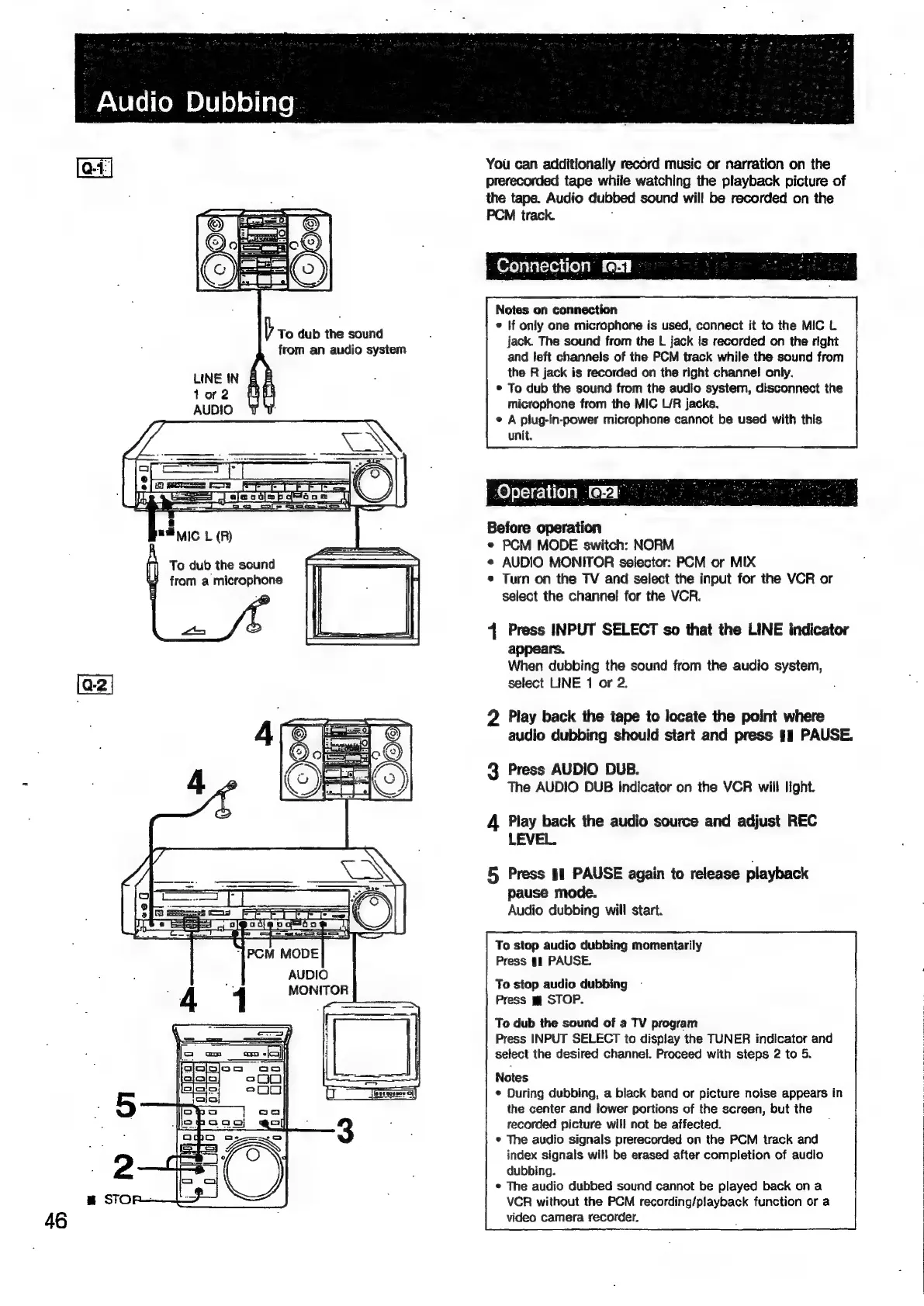
dub
the
sound
from
an
audio
system
To
dub
the
sound
from
a
microphone
“Audio
Dubbing
You
can
additionally
record
music
or
narration
on
the
prerecorded
tape
while
watching
the
playback
picture
of
the
tape.
Audio
dubbed
sound
will
be
recorded
on
the
PCM
track.
Connection
eI
Notes
on
connection
©
If
only
one
microphone
is
used,
connect
it
to
the
MIC
L
jack.
The
sound
from
the
L
jack
is
recorded
on
the
right
and
left
channels
of
the
PCM
track
while
the
sound
from
the
R
jack
is
recorded
on
the
right
channel!
only.
©
To
dub
the
sound
from
the
audio
system,
disconnect
the
microphone
from
the
MIC
L/R
jacks.
¢
A
plug-in-power
microphone
cannot
be
used
with
this
unit.
Operation
(Hi:
Before
operation
*
PCM
MODE
switch:
NORM
¢
AUDIO
MONITOR
selector:
PCM
or
MIX
*
Turn
on
the
TV
and
select
the
input
for
the
VCR
or
select
the
channel
for
the
VCR.
4
Press
INPUT
SELECT
so
that
the
LINE
indicator
appears.
When
dubbing
the
sound
from
the
audio
system,
select
LINE
1
or
2.
2
Play
back
the
tape
to
locate
the
point
where
audio
dubbing
should
start
and
press
#1
PAUSE.
3
Press
AUDIO
DUB.
The
AUDIO
DUB
indicator
on
the
VCR
will
light.
4
Play
back
the
audio
source
and
adjust
REC
LEVEL.
5
Press
s1
PAUSE
again
to
release
playback
pause
mode.
Audio
dubbing
will
start.
To
stop
audio
dubbing
momentarily
Press
§1
PAUSE.
To
stop
audio
dubbing
Press
m@
STOP.
To
dub
the
sound
of
a
TV
program
Press
INPUT
SELECT
to
display
the
TUNER
indicator
and
select
the
desired
channel.
Proceed
with
steps
2
to
5.
Notes
*
During
dubbing,
a
black
band
or
picture
noise
appears
in
the
center
and
lower
portions
of
the
screen,
but
the
recorded
picture
will
not
be
affected.
*
The
audio
signals
prerecorded
on
the
PCM
track
and
index
signals
wil!
be
erased
after
completion
of
audio
dubbing.
¢
The
audio
dubbed
sound
cannot
be
played
back
on
a
VGR
without
the
PCM
recording/playback
function
or
a
video
camera
recorder.

Related product manuals