EasyManua.ls Logo

Sony EV-S900 - Automatic Assemble Editing; Using a Video Editing Controller; Using a VCR with Auto Assemble Function

Sony EV-S900
60 pages
Print Icon
To Next Page IconTo Next Page
To Previous Page IconTo Previous Page
Loading...
LINE
OUT
1
or
2
VIDEO/AUDIO
SLAVE
|
MASTER
~—
<2:
Signai
flow
CONTROL
S
OUT
y
CONTROL
S$
VIDEO/AUDIO
OUT
)
LINE
IN
1
or
2
EV-S900
|
VIDEO/AUDIO
x
wi:
Signal
flow
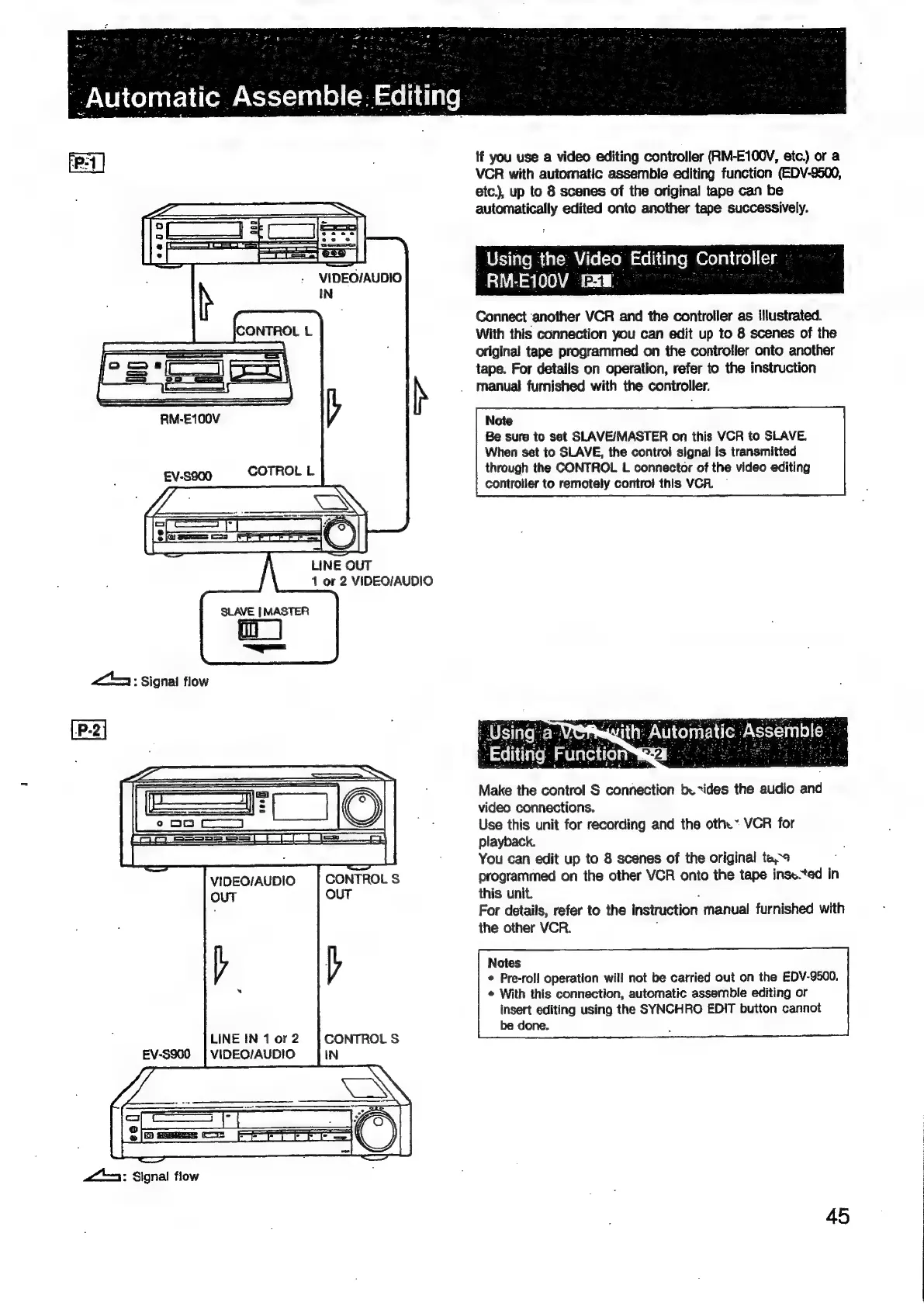
If
you
use
a
video
editing
controller
(RM-E100V,
etc.)
or
a
VCR
with
automatic
assemble
editing
function
(EDV-9500,
etc.),
up
to
8
scenes
of
the
original
tape
can
be
automatically
edited
onto
another
tape
successively.
_
Using
the
Video
Editing:
Controller.
.
RM-
E100V
-
'P.4
Connect
another
VCR
and
the
controller
as
illustrated.
With
this
connection
you
can
edit
up
to
8
scenes
of
the
original
tape
programmed
on
the
controller
onto
another
tape.
For
details
on
operation,
refer
to
the
instruction
manual
furnished
with
the
controller.
Note
Be
sure
to
set
SLAVE/MASTER
on
this
VCR
to
SLAVE.
When
set
to
SLAVE,
the
control
signal
is
transmitted
through
the
CONTROL
L
connector
of
the
video
editing
controller
to
remotely
contro!
this
VCR.
~
Make
the
control
S
connection
be
vides
the
audio
and
video
connections.
Use
this
unit
for
recording
and
the
oth.”
VCR
for
playback.
You
can
edit
up
to
8
scenes
of
the
original
ta,¢
programmed
on
the
other
VCR
onto
the
tape
inse.ted
in
this
unit.
For
details,
refer
to
the
instruction
manual
furnished
with
the
other
VCR.
Notes
©
Pre-roll
operation
will
not
be
carried
out
on
the
EDV-9500.
¢
With
this
connection,
automatic
assemble
editing
or
insert
editing
using
the
SYNCHRO
EDIT
button
cannot
be
done.
45

Related product manuals