EasyManua.ls Logo

Sony EV-S900 - Page 5

Sony EV-S900
60 pages
Print Icon
To Next Page IconTo Next Page
To Previous Page IconTo Previous Page
Loading...
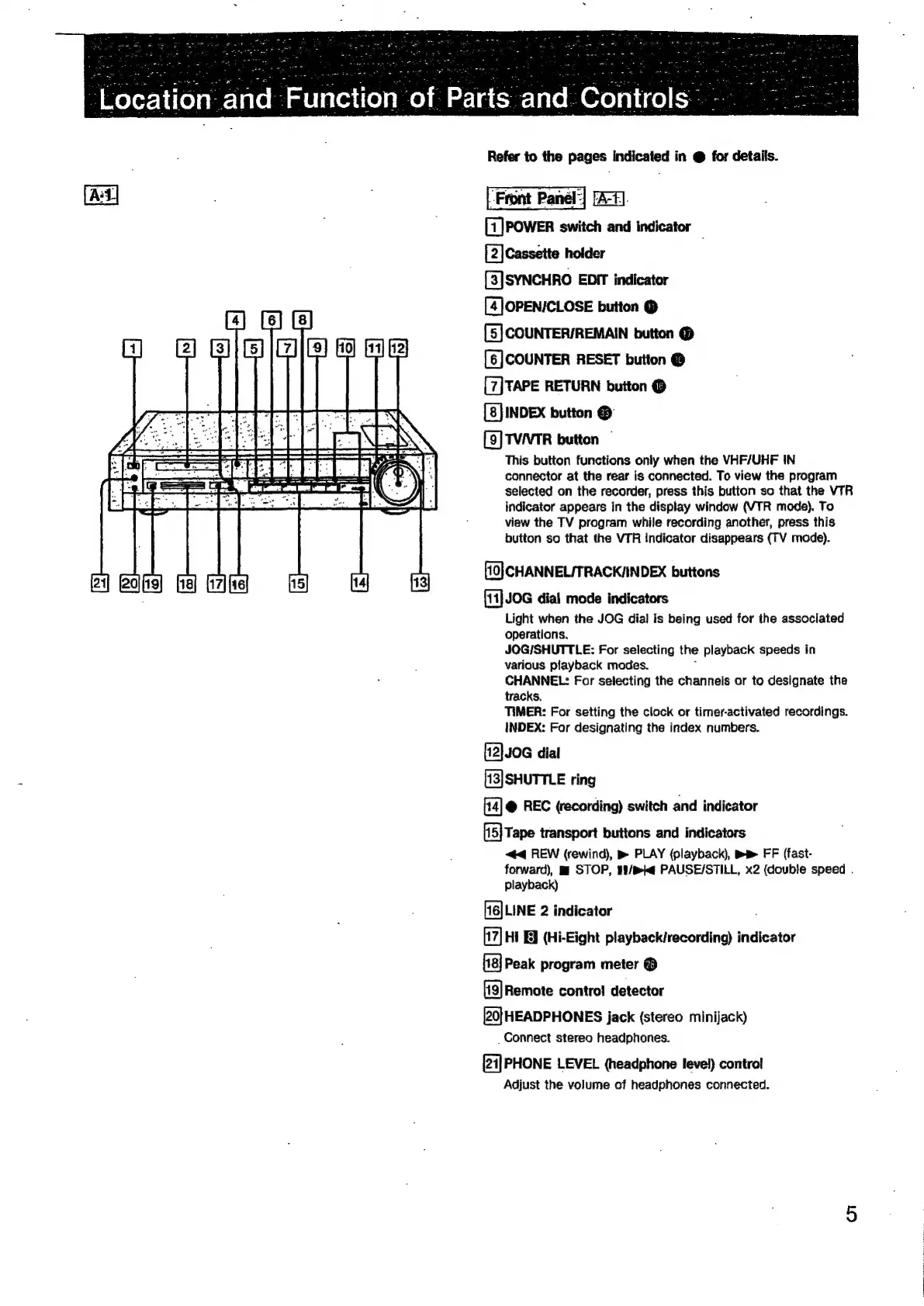
[7]POwER
switch
and
indicator
[2]Cassette
holder
[3]SYNCHRO
EDIT
indicator
[4] OPEN/CLOSE
button
@
[5]
COUNTER/REMAIN
button
@
[6]
COUNTER
RESET
button
@
[7]
TAPE
RETURN
button
@
INDEX
button
@
[9]
TVVTR
button
©
This
button
functions
only
when
the
VHF/UHF
IN
connector
at
the
rear
is
connected.
To
view
the
program
selected
on
the
recorder,
press
this
button
so
that
the
VTR
indicator
appears
in
the
display
window
(VIR
mode).
To
view
the
TV
program
while
recording
another,
press
this
button
so
that
the
VTR
indicator
disappears
(FV
mode).
[10}
CHANNEL/TRACK/INDEX
buttons
[11]
JOG
dial
mode
indicators
Light
when
the
JOG
dial
is
being
used
for
the
associated
operations.
JOGISHUTTLE:
For
selecting
the
playback
speeds
in
various
playback
modes.
CHANNEL:
For
selecting
the
channels
or
to
designate
the
tracks.
TIMER:
For
setting
the
clock
or
timer-activated
recordings.
INDEX:
For
designating
the
index
numbers.
[12]J0G
dial
[13]
SHUTTLE
ring
@
REC
(recording)
switch
and
indicator
[15]
Tape
transport
buttons
and
indicators
44
REW
(rewind),
m
PLAY
(playback),
Bm
FF
(fast-
forward),
mi
STOP,
#8/mi@
PAUSE/STILL,
x2
(double
speed
.
playback)
[16]
LINE
2
indicator
17]
Hi
BY
(Hi-Eight
playback/recording)
indicator
{18}
Peak
program
meter
®
[19]
Remote
contro!
detector
[20]
HEADPHONES
jack
(stereo
minijack)
_
Connect
stereo
headphones.
[24]
PHONE
LEVEL
(headphone
level)
control
Adjust
the
volume
of
headphones
connected.

Related product manuals