EasyManua.ls Logo

Sony EV-S900 - Connecting TV;Color Monitor with A;V Inputs

Sony EV-S900
60 pages
Print Icon
To Next Page IconTo Next Page
To Previous Page IconTo Previous Page
Loading...
Antenna/Cable
and
TV/Monitor
Connection
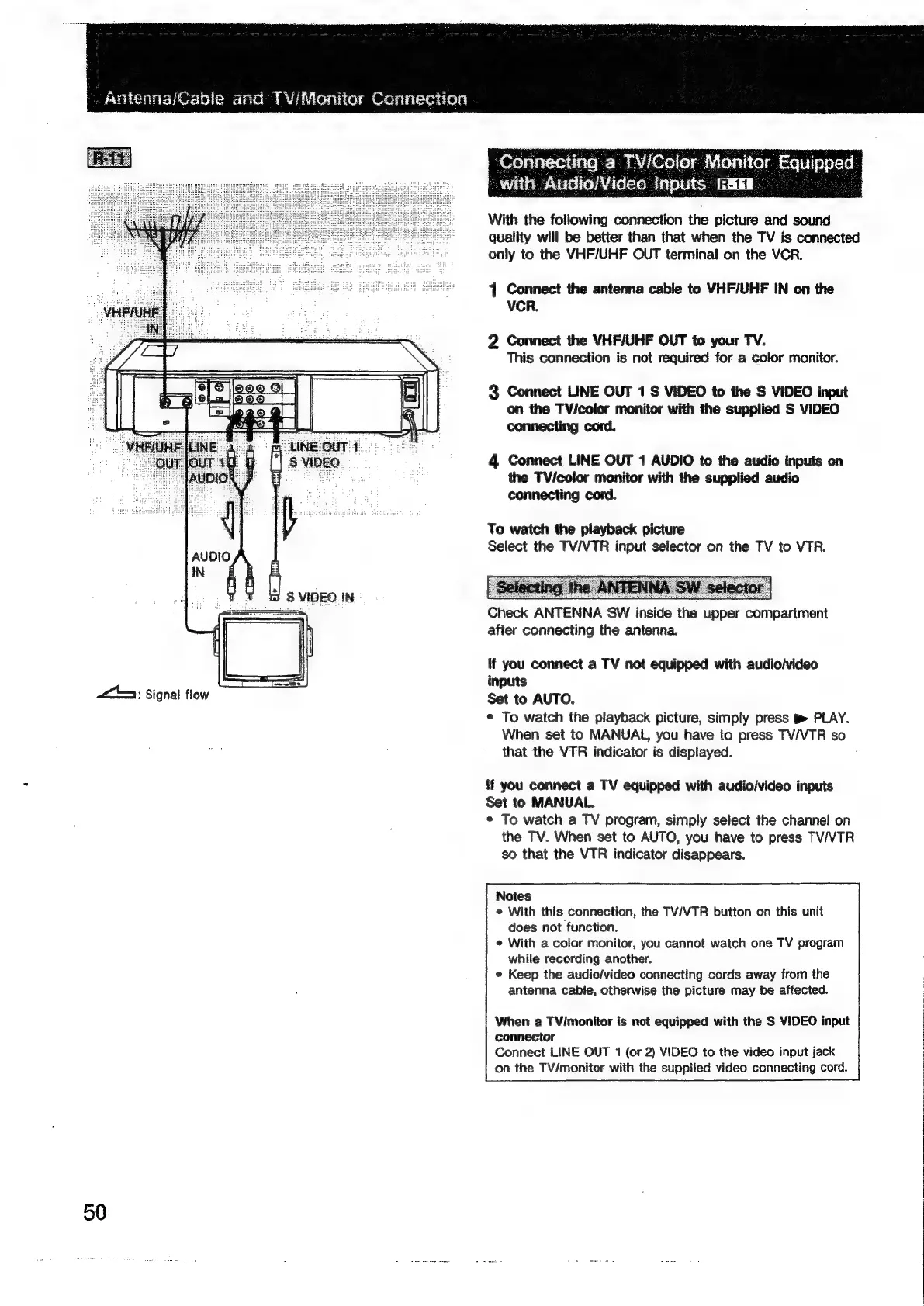
Connecting
a
TV/Coler
Monitor
Fauipped
with
Audio/Video
Inputs
&
a:
Signal
flow
50
With
the
following
connection
the
picture
and
sound
quality
will
be
better
than
that
when
the
TV
is
connected
only
to
the
VHF/UHF
OUT
terminal
on
the
VCR.
4
Connect
the
antenna
cable
to
VHF/UHF
IN
on
the
VCR.
2
Connect
the
VHF/UHF
OUT
to
your
TV.
This
connection
is
not
required
for
a
color
monitor.
3
Connect
LINE
OUT
1
S
VIDEO
to
the
S
VIDEO
input
on
the
TVi/color
monitor
with
the
supplied
S
VIDEO
connecting
cord.
4
Connect
LINE
OUT
1
AUDIO
to
the
audio
inputs
on
the
TV/color
monitor
with
the
supplied
audio
connecting
cord.
To
watch
the
playback
picture
Select
the
TV/VTR
input
selector
on
the
TV
to
VTR.
Check
ANTENNA
SW
inside
the
upper
compartment
after
connecting
the
antenna.
If
you
connect
a
TV
not
equipped
with
audio/video
inputs
Set
to
AUTO.
*
To
watch
the
playback
picture,
simply
press
B
PLAY.
When
set
to
MANUAL,
you
have
to
press
TV/VTR
so
that
the
VTR
indicator
is
displayed.
{f
you
connect
a
TV
equipped
with
audio/video
inputs
Set
to
MANUAL.
*
To
watch
a
TV
program,
simply
select
the
channel
on
the
TV.
When
set
to
AUTO,
you
have
to
press
TV/VTR
so
that
the
VTR
indicator
disappears.
Notes
e
With
this
connection,
the
TV/VTR
button
on
this
unit
does
not
function.
¢
With
a
color
monitor,
you
cannot
watch
one
TV
program
while
recording
another.
*
Keep
the
audio/video
connecting
cords
away
from
the
antenna
cable,
otherwise
the
picture
may
be
affected.
When
a
TV/monitor
is
not
equipped
with
the
S
VIDEO
input
connector
Connect
LINE
OUT
1
(or
2)
VIDEO
to
the
video
input
jack
on
the
TV/monitor
with
the
supplied
video
connecting
cord.

Related product manuals