If the terminal of the device connected is not compatible with the HDMI cable (supplied),
use an HDMI plug adaptor (sold separately). For details, refer to the instruction manual
supplied with the external media device.
[46] How to Use
Playback Playing images on a 4K TV
Viewing images on a 4K TV
You can play images recorded in the movie format [ XAVC S 4K], in high definition
image quality by connecting this product to a TV with an HDMI jack.
1. Switch the input on the TV to the connected jack.
- [Setup] - [ Connection] - [HDMI Resolution] - desired setting.
The playback image quality differs, depending on the [HDMI Resolution] setting value.
When [HDMI Resolution] is set to [Auto] or [2160p/1080p]
Playback image quality: 4K
When [HDMI Resolution] is set to [1080p], [1080i] or [720p]
Playback image quality: High definition image quality
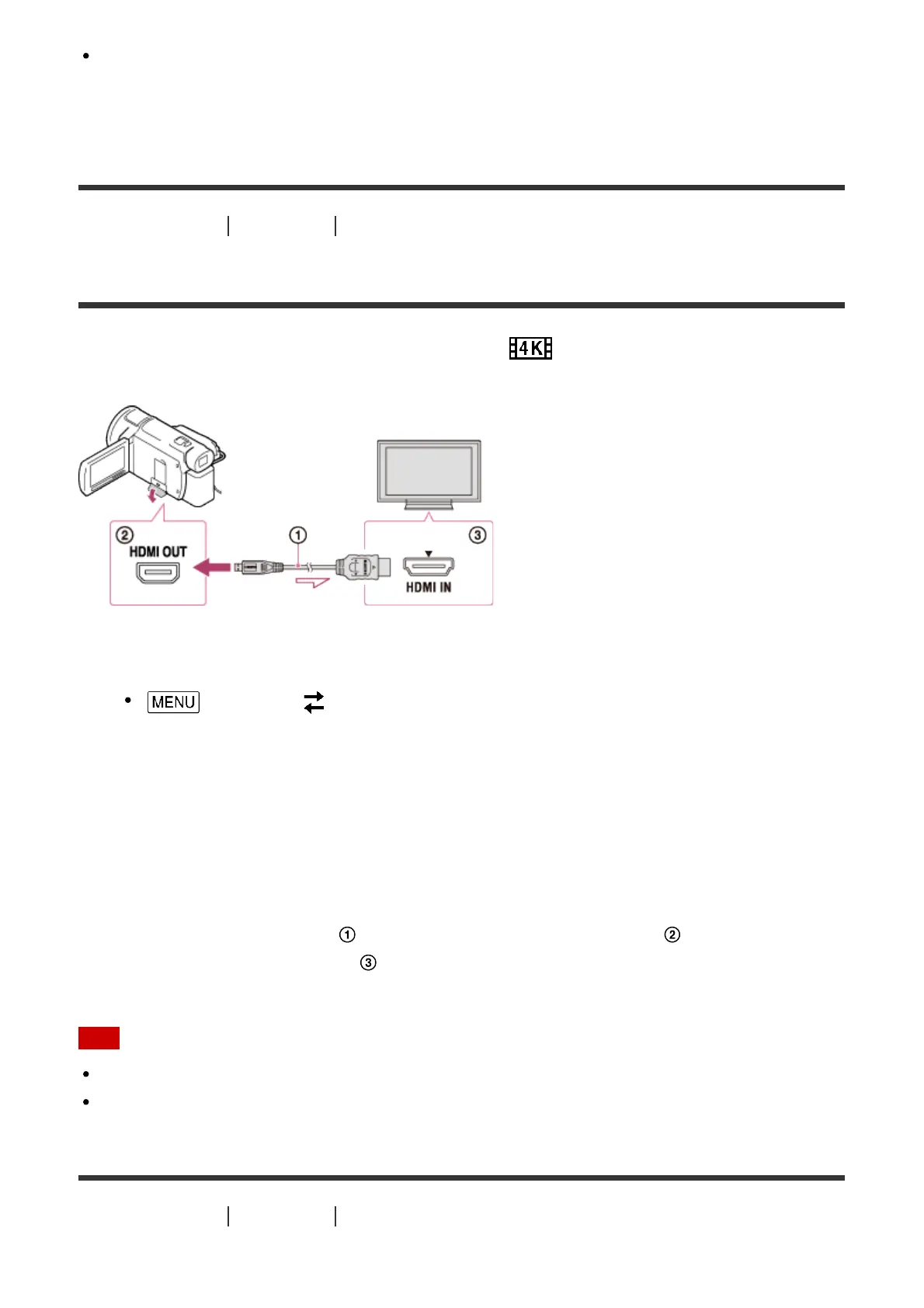
2. Connect the HDMI cable ( ) (supplied) to the HDMI OUT jack ( ) on this product
and to the HDMI input jack ( ) on the TV.
Note
Refer to the instruction manuals of the TV as well.
Use the supplied AC Adaptor as the power source.
[47] How to Use
Playback Playing images on a 4K TV



 To Next Page