106
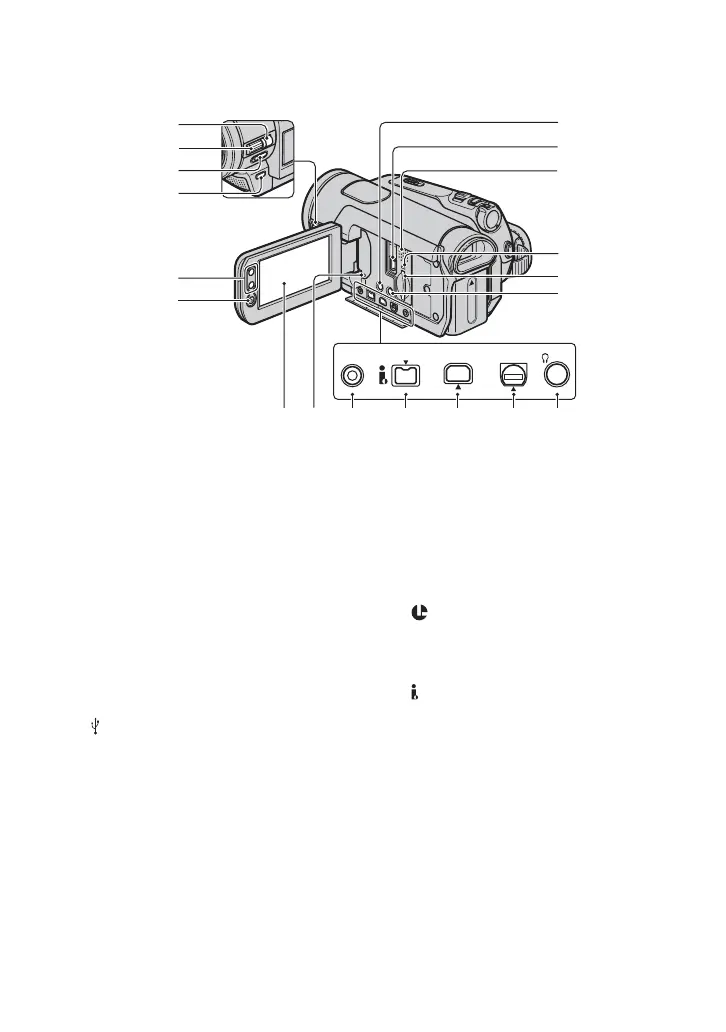
A HDR-HC7:
MANUAL button (27)
B HDR-HC7:
CAM CTRL dial (27)
C NIGHTSHOT switch (28)
D BACK LIGHT button (28)
E Zoom buttons (26)
F START/STOP button (24)
G DISPLAY/BATT INFO button (15)
H (USB) jack (72)
I Speaker
Playback sounds come out from the
speaker. For how to adjust the volume,
see page 29.
J Access lamp (20, 93)
K “Memory Stick Duo” slot (20)
L EASY button (22)
M LCD screen/touch panel (7, 19)
N RESET button
Initializes all the settings, including the
setting of the date and time (Menu items
customized on Personal Menu are not
initialized).
O LANC jack (blue)
The LANC control jack is used for
controlling the tape transport of video
devices and peripherals connected to it.
P HDV/DV Interface (i.LINK) (35, 66,
68, 76)
Q COMPONENT OUT jack (35)
R A/V (audio/video) OUT jack (35, 66)
S HDR-HC7:
i (Headphone) jack
qs
qa
0
9
8
6
5
4
3
2
1
qd
COMPONENT OUTHDV/DVLANC A/V OUT
qgqf qh qj qk ql
Identifying parts and controls (Continued)


 To Next Page