12
This section is extracted from
instruction manual.
Step 2: Setting the time
You must set the time beforehand to use the timer
functions.
The clock is on a 24-hour system for the European
model, and a 12-hour system for other models.
The 24-hour system is used for illustration
purposes.
x
.
>
N
`/1
X
M
m
4,6
3,5
3,5
2
1
4
DISPLAY
CURSORT
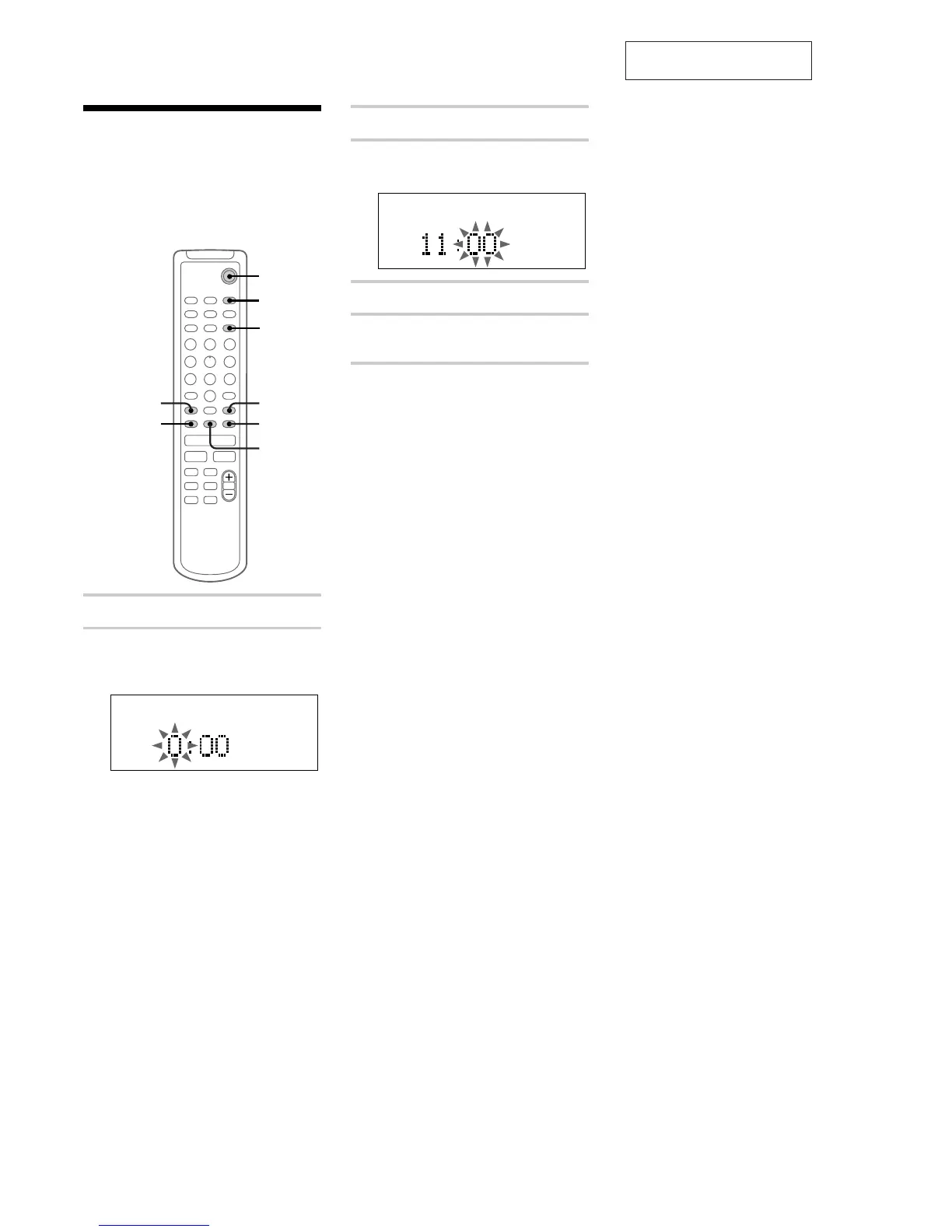
1 Turn on the system.
2 Press CLOCK/TIMER SET.
The clock appears and the hour indication
flashes.
3 Press . or > to set the hour.
4 Press ENTER/YES or CURSORt.
The minute indication flashes.
5 Press . or > to set the minute.
6 Press ENTER/YES.
The clock starts.
If you made a mistake
Press CURSORT or t repeatedly until the
incorrect item flashes, then set it again.
To change the preset time
You can change the preset time while the system
is off.
1 Press DISPLAY to display the clock.
2 Press CLOCK/TIMER SET.
3 Repeat steps 3 to 6 of “Setting the time.”
Tip
The upper dot of the colon flashes for the first
30 seconds, and the lower dot flashes for the last
30 seconds of each minute.


 To Next Page