HCD-EC709iP/EC909iP
7
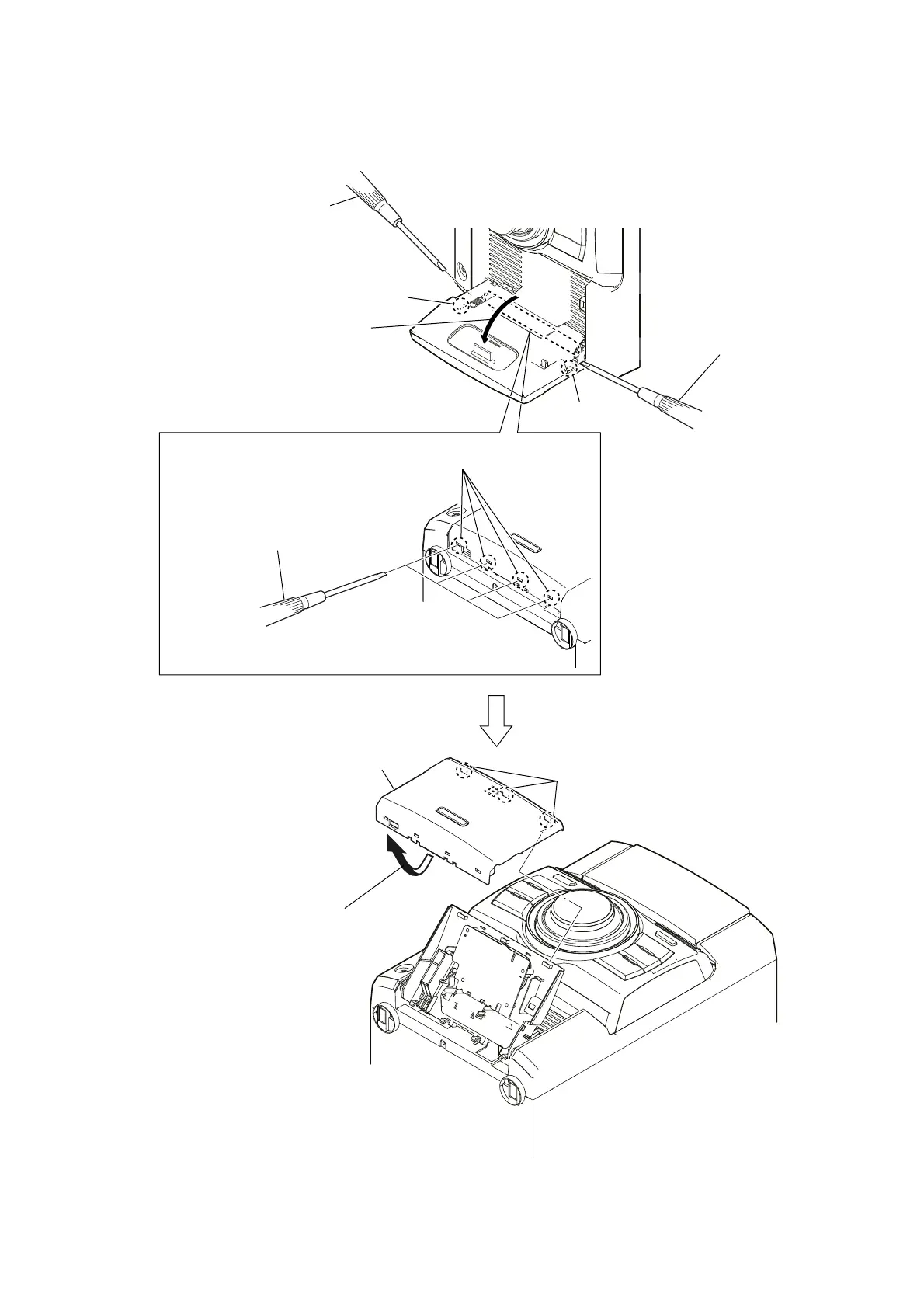
2-3. ORNAMENT PLATE (DOCK) OR iPod ASSY
1
Open the iPod dock.
4
Confirm four claws has come off
after shutting the iPod dock.
3
claw
3
claw
6
three claws
7
ornament plate (dock) or iPod assy
5
Turn up a ornament plate (dock) or
iPod assy low
part and remove it without
using by the flat-head screwdriver.
2
Push in flat-head screwdriver.
Note 1: Avoid a claw and put a
flat-head screwdriver in.
2
Push in flat-head screwdriver.
Note 1: Avoid a claw and put a
flat-head screwdriver in.
Note 2: Push the gap by the flat-head screwdriver
when not coming off.
– Bottom view –
– Bottom view –



 To Next Page