HCD-HDX285/HDX287WC/HDX585/HDX587WC/HDX589W/HDX685/HDX686W
8
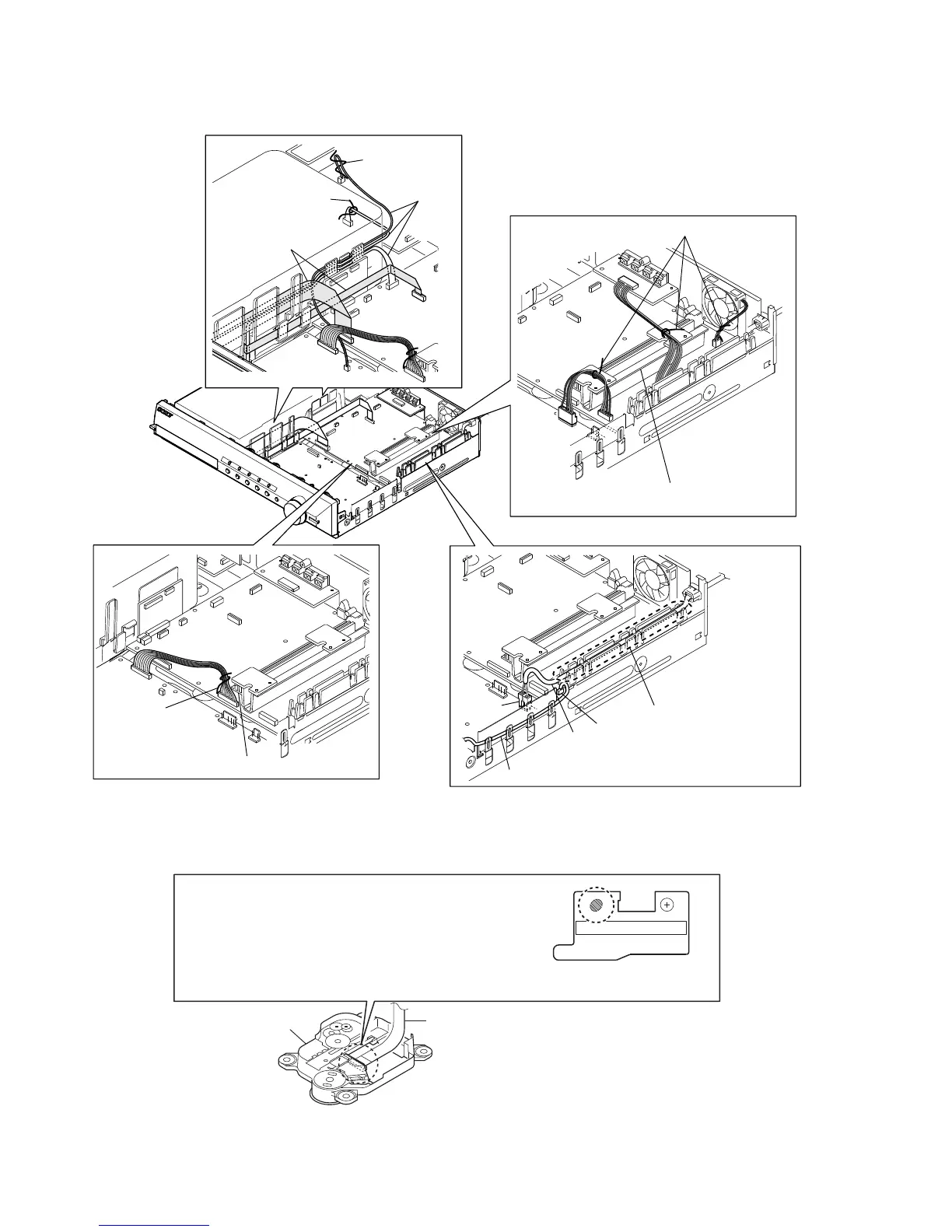
HARNESS SETTING
PRECAUTION WHEN REMOVE GOOD OPTICAL PICK-UP BLOCK
wires (flat type)
lead wires
lead pin
lead pin
lead pin
lead pin
Note 1: Check not touch the heatsink.
Note 2: Check not touch the heatsink.
Note 3: Insert fully until
click the power cord.
power cord
lead wire
CN901
CN3001
wire (flat type) (24 core)
optical pick-up block
CAUTION
Be sure to bridge here, and then disconnect the
wire (flat type) (24 core).
(optical pick-up block will be destroyed without bridging)
On the contrary at the installation, connect the
wire (flat type) (24 core) first, and then remove the bridge.
Note: For a soldering iron, use the one with a ground wire.
(Refer to DISASSEMBLY 3-12. OPTICAL PICK-UP BLOCK (KHM-310CAB or KHM-313CAB))


 To Next Page