– 15 –
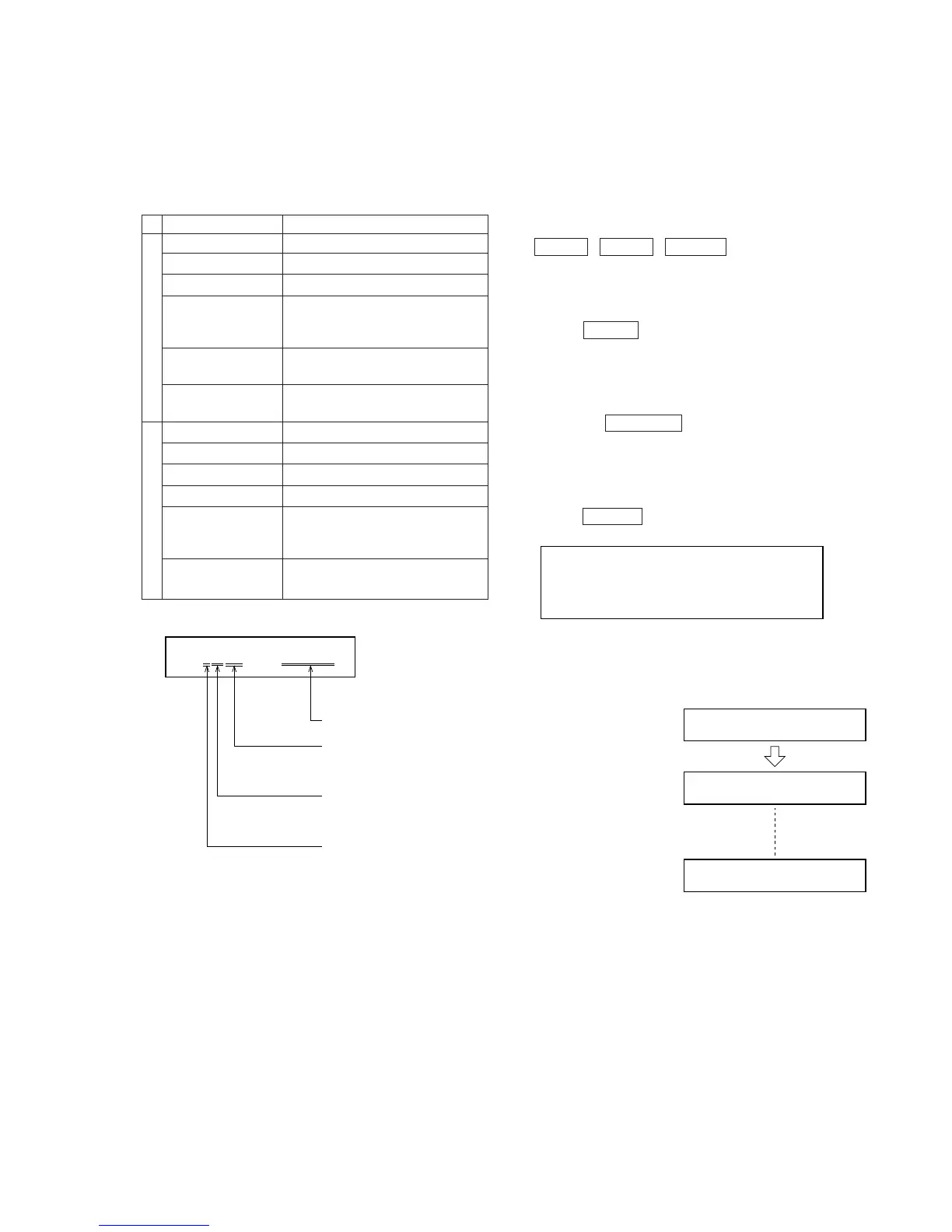
3. If errors occur during or after aging, the error messages in the
following table will be displayed.
Table 4-2.
4-4. FLUORESCENT INDICATOR TUBE AND
CHECK MODE FOR KEYS
4-4-1. Setting the Check Mode
• Turn OFF the power of the unit, and set the check mode by press-
ing the following keys together.
§ (MD) + π (MD) + GROOVE
When set, the fluorescent indicator tube and all LEDs will light
up.
4-4-2. Releasing the Check Mode
• Press the POWER key during the check mode for the fluores-
cent indicator tube, or press any key during the check mode for
each key when the display shows “KEY = OK”. The unit sets into
the mode for normal operations.
4-4-3. Operating the Check Mode
• Each time the ENTER/YES key is pressed in the check mode for
the fluorescent indicator tube, the display changes in three ways.
The LED lighting pattern can be changed by rotating the MULTI
JOG dial.
• Check Mode of Keys
Press the EDIT/NO key to set this mode.
When set, the following will be displayed.
MD Section
CD Section
Note 1:
The display counts up each time a key is pressed.
(It will not count up when a key already pressed once is pressed
again.) The order of pressing the key and the count up are not
related.)
When a key is pressed.
When all the keys are pressed,
this will be displayed.
(There are altogether 33 keys.)
When a key is pressed during
this display, this check mode
will end.)
CD1
*
99 1m23s
track number
disc number
Point at which sound
jumps occurred.
*
is displayed at the point the
sound jump occurred.
- is displayed normally.
KEY
=
0JOG
=
0
K
KEY
=
0JOG
=
0
KEY
=
1
JOG
=
0
KEY
=
JOG
=
0
O
Error Message Contents
MD A-Erase NG Cannot all-erase MD.
MD R-Pause NG Cannot record-pause MD.
MD D-Input NG Cannot lock MD digital in.
Cannot playback last MD song.
MD Play NG (The played back track is not the last
track (access error)).
MD TOC NG
MD TOC are abnormal.
(The total track is abnormal.)
MD No Disc NG
Cannot read MD TOC.
(Disc error)
CD Focus NG CD focus NG
CD GFS NG CD GFS (Garde frame sync) NG.
CD TOC NG 16 seconds after reading CD TOC.
CD SEARCH NG 16 seconds after CD search.
Not an error message indicating
CD SERVO OK servo system error. May be displayed
during STOP.
Refer to NOTE 1.
Sound jumps lasting more than 1
second during play back.



 To Next Page