31
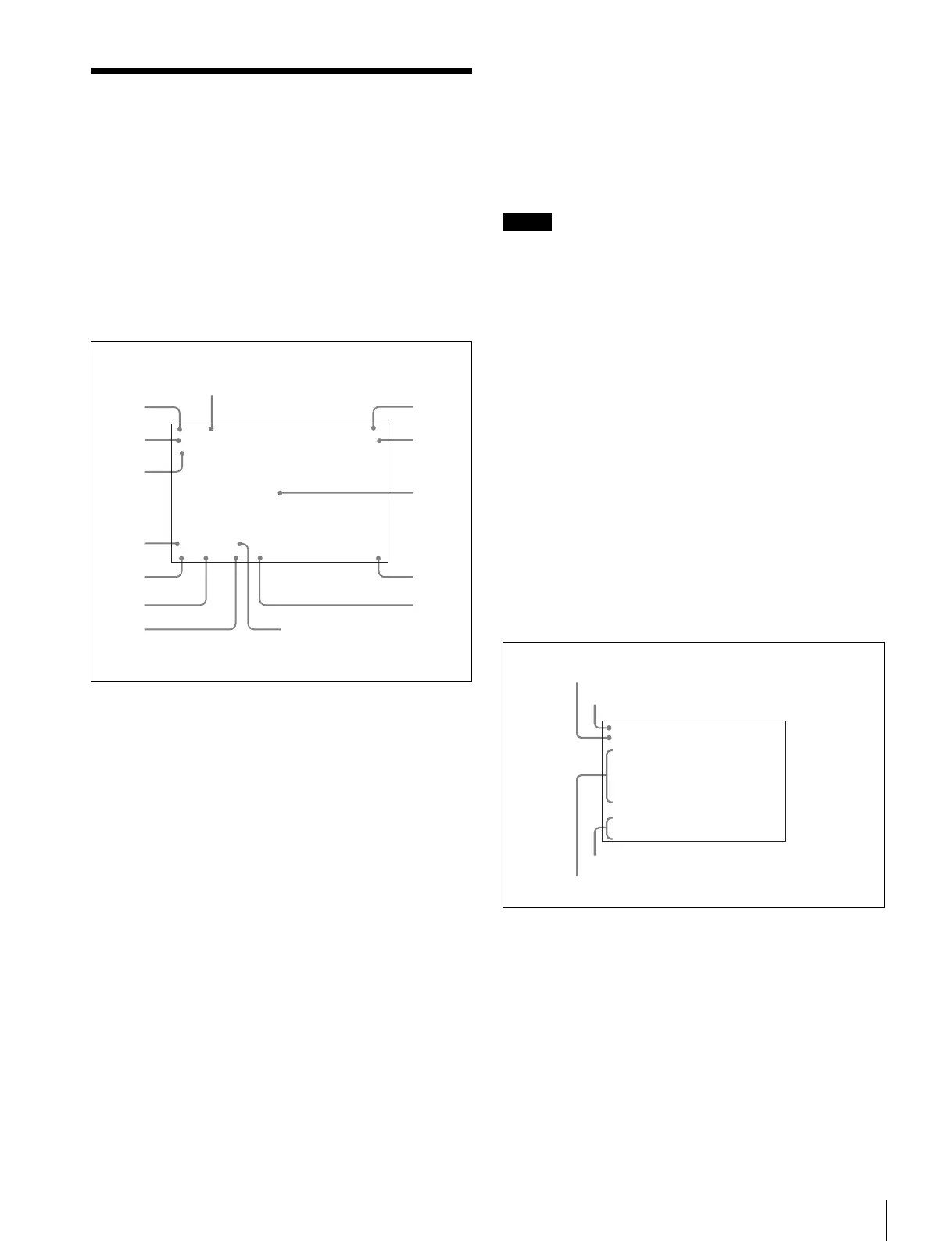
Viewfinder Screen Status Display
Viewfinder Screen Status
Display
Besides the video image, the viewfinder can display text and
messages showing the camera settings and operation status,
as well as items such as a center marker or safety zone
marker.
When the DISPLAY switch is set to ON
Items set to ON using the menu or related switches will be
displayed on the upper and lower edges of the screen.
a Zoom position
Indicates the approximate position of the zoom lens variator
between wide angle (0) and telephoto (99). Shows how close
it is to the telephoto side.
b Lens extender
“EX” is displayed when a lens extender is in use.
c Digital extender
“D.EXT” is displayed when a digital extender is in use.
d TALK indication
Displayed when the intercom microphone is set to ON.
e 5600K mode
Displayed when 5600K is set to ON.
f Filter
Displays the type of filter currently selected. The number (1, 2,
3, 4, or 5) indicates the ND filter, and the letter (A, B, C, D or
E) is for the CC filter (HDC2500/2550 only).
g White balance memory
Displays the currently selected white balance automatic
adjustment memory.
W:A: The WHITE BAL switch is set to “A”
W:B: The WHITE BAL switch is set to “B”
W:P: The WHITE BAL switch is set to “PRST”
h Gain value
Displays the video gain value (dB) set with the GAIN switch.
i Focus position
Shows the focus position of a zoom lens as a numeric value (0
to 255 (infinity)).
Note
Displayed only when a serial communication lens is
connected.
j Battery voltage
Displays the input voltage.
k Setting change / adjustment process message area
This area is only used when the MESSAGE item of the menu
is set to other than OFF.
l F value
Indicates the lens F (iris opening) value.
m Shutter/ECS
Displays the shutter/ECS status. Nothing is displayed if the
electronic shutter is set to OFF.
n Optical axis compensation (OPAC) mode
Displays when optical axis compensation is set to ON.
When you press the CANCEL/STATUS switch
toward STATUS
The status display is changed to show the following items:
a Assignable switch indication
The function assigned to the assignable switch (page 13) is
indicated.
For the functions that can be assigned, see OPERATION
menu <SWITCH ASSIGN1> (page 46).
b Format indication
The current video format is displayed.
c ‘!’ indication area
This area is used to display abnormal statuses, using the <‘!’
IND> function. Display options can be set, using the menu.
(!CC is displayed for HDC2500/2550 only.)
F255
12.5V
EX Z55
1A A
F5.6
0dB 1/125
OPAC
W:
5600
D.EXT
TALK
1
2
3
4
5
6
7
8
9
0
qs
qd
qa
qf
1080-59.94i
ASSIGNABLE :OFF
!ND :2
!CC :C
!FAN :MAX
!EXT :ON
!FORMAT :1080-59.94i
OPT LV CAM:ssxxxxxxb
CCU:ssxxxxxxb
a
c
d
b



 To Next Page