24
GB
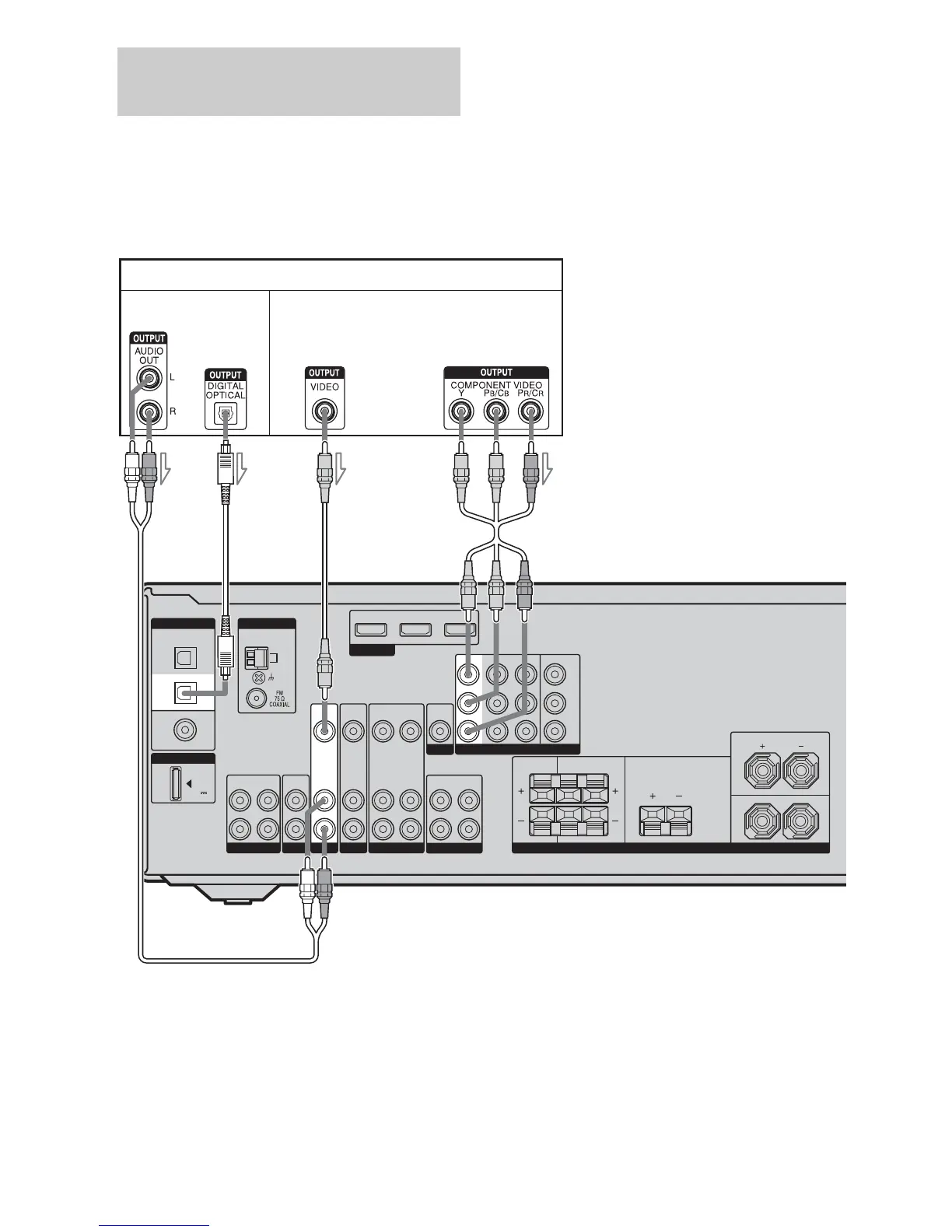
The following illustration shows how to
connect a satellite tuner or set-top box.
It is not necessary to connect all the cords.
Connect audio and video cords according to
the jacks of your components.
Notes
• When connecting optical digital cords, insert the
plugs straight in until they click into place.
• Do not bend or tie optical digital cords.
Tip
All the digital audio jacks are compatible with
32 kHz, 44.1 kHz, 48 kHz, and 96 kHz sampling
frequencies.
Connecting a satellite tuner/
set-top box
DVD IN BD IN OUT
HDMI
VIDEO
OUT
VIDEO
IN
AUDIO
OUT
AUDIO
IN
VIDEO
IN
AUDIO
IN
AUDIO
OUT
SUBWOOFER
SURROUND
FRONT: ONLY FOR SS-MSP5000
CENTER: ONLY FOR SS-CNP5000
SURROUND: ONLY FOR SS-SRP5000
SURROUND
BACK
CENTER
LR
FRONT
L
R
SPEAKERS
DMPORT
AM
ANTENNA
L
R
L
R
SA-CD
/
CD
/
CD-R
ININOUT
TV DVD VIDEO 1
VIDEO
OUT
MONITOR
DC5V
0.7A MAX
AUDIO
IN
MONITOR OUT
Y
P
B
/
C
B
P
R
/
C
R
COMPONENT VIDEO
OPTICAL
COAXIAL
BD
IN
SAT
IN
DVD
IN
DIGITAL
SAT
VIDEO
IN
SAT IN DVD IN BD IN
BA
Audio signals Video signals
C
Satellite tuner/Set-top box
D
A Audio cord (not supplied)
B Optical digital cord (not supplied)
C Video cord (not supplied)
D Component video cord (not supplied)



 To Next Page