16
GB
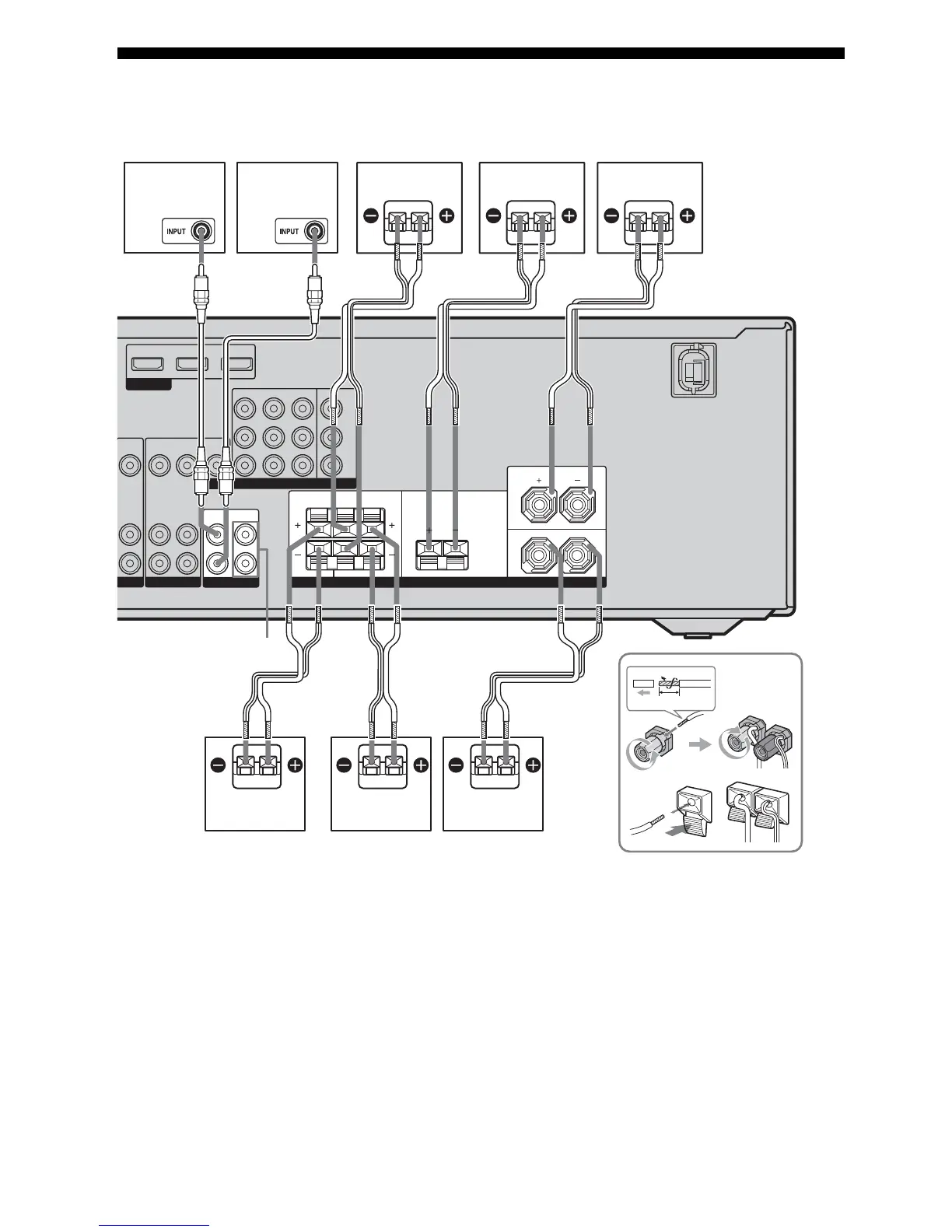
2: Connecting the speakers
Before connecting the cords, be sure to disconnect the AC power cord.
AFront speaker (left)
BFront speaker (right)
CCenter speaker
DSurround speaker (left)
ESurround speaker (right)
FSurround back speaker
GSubwoofer (left)
HSubwoofer (right)
a)
Before connecting the cords, be sure to attach the
supplied monaural audio cord labels to both ends
of the cord.
For details, see “To connect the subwoofers
correctly” (page 17).
b)
If you have additional subwoofers, connect them
to the SUBWOOFER jacks.
c)
Use the long speaker cords to connect the surround
and surround back speakers and the short speaker
cords to connect the front and center speakers.
DVD IN BD IN OUT
HDMI
VIDEO
OUT
SAT IN
DVD IN BD IN MONITOR OUT
VIDEO
IN
AUDIO
OUT
AUDIO
IN
VIDEO
IN
AUDIO
IN
Y
P
B
/
C
B
P
R
/
C
R
DVD VIDEO 1
VIDEO
OUT
MONITOR
COMPONENT VIDEO
SUBWOOFER
LR
L
R
SPEAKERS
10 mm
AUDIO
OUT
L
R
SURROUNDSURROUND
BACK
CENTER
FRONT
FRONT: ONLY FOR SS-MSP5000
CENTER: ONLY FOR SS-CNP5000
SURROUND: ONLY FOR SS-SRP5000
HG
A
ACE
AB
BDF
A Monaural audio cord (supplied)
a)
B Speaker cord (supplied)
c)
SUBWOOFER
jacks
b)
B



 To Next Page