SECTION 4
SERVICE ADJUSTMENT
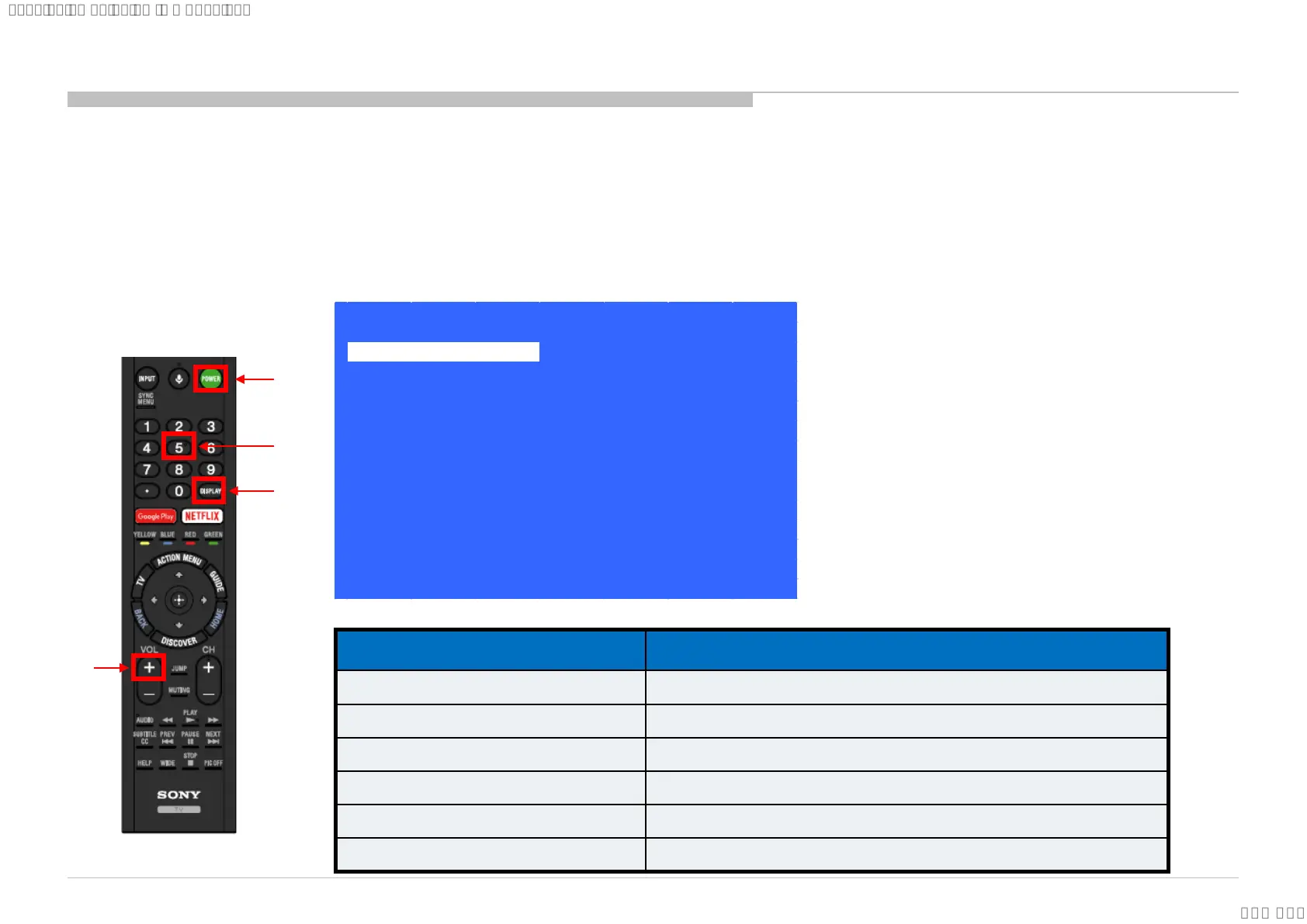
When finished the operation of service mode , please AC Plug OFF/ON the TV set
*If you don’t do AC plug OFF/ON, remain the Service Mode App and user can see the Service Mode after RC ON.
From Standby Mode
1. Go to TV standby condition by remote commander.
2. Press “Display or i+ (info)”, “5”, “Volume+” then “TV power” on remote.
3. You can see Service menu on display.
>>
>>
>>
>>
>>
>>
>>
[Home]Exit
General Setting
Tuner
Wi-Fi / BT
Service Mode
Model Information
Self diagnosis History
Video / Audio
Panel / PQ
>> SDB Service Menu
1
2
3
4
Function The flow of control
Service mode on <Display or i+(info)> <5> <Vol. Up> <Power>
Close Service menu <Home>
Service mode off AC plug OFF
Item up / down
<↑> / <↓>
Item select left/right
<←> / <→>
Execute <Enter>
4.1 How to Enter Service Mode
Summary of Service Control
69
SYSSET
2018/03/1622:32:44(GMT+09:00)





 To Next Page