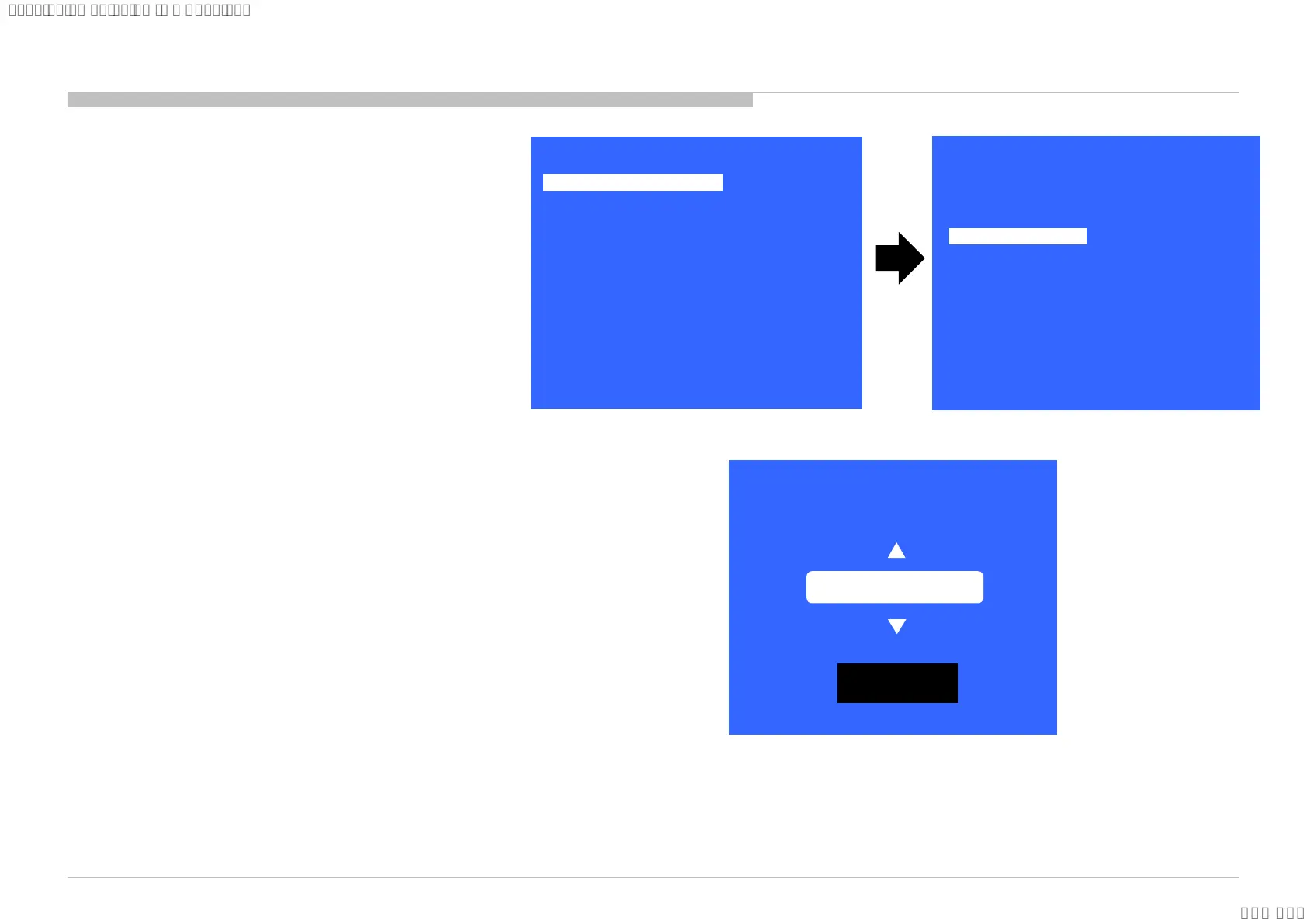
1) In “Service Mode”, select “Model Information” by
pressing “↑” or “↓” then pressing “Enter” or “→”
button to enter inside.
2) Select “Model Number Setting” by pressing “↑” or
“↓” button then pressing “Enter” or “→” button
3) Press “↑” or “↓” arrow key to scroll Product Name
Candidate. (e.g. KD-65XF9005 CEI)
4) Select one Product Name from the list. After that
select “[OK]” and press “Enter” button.
>>
>>
>>
>>
>>
>>
>>
[</>] Set [Home]Exit
General Setting
Tuner
Wi-Fi / BT
Service Mode
Model Information
Self diagnosis History
Video / Audio
Panel / PQ
>> SDB Service Menu
>>
Model Information
>>
Model Number Setting
>>
SERIAL NUMBER EDIT
[</>] Set [Home]Exit
Model
Status Information
OK
[MODEL_NUMBER_SETTING]
_ _ _ _ _ _ _ _ _ _ _ _
73
4.4 Model Number Setting
SYSSET
2018/03/1622:32:44(GMT+09:00)






 To Next Page