Getting Started
13
GB
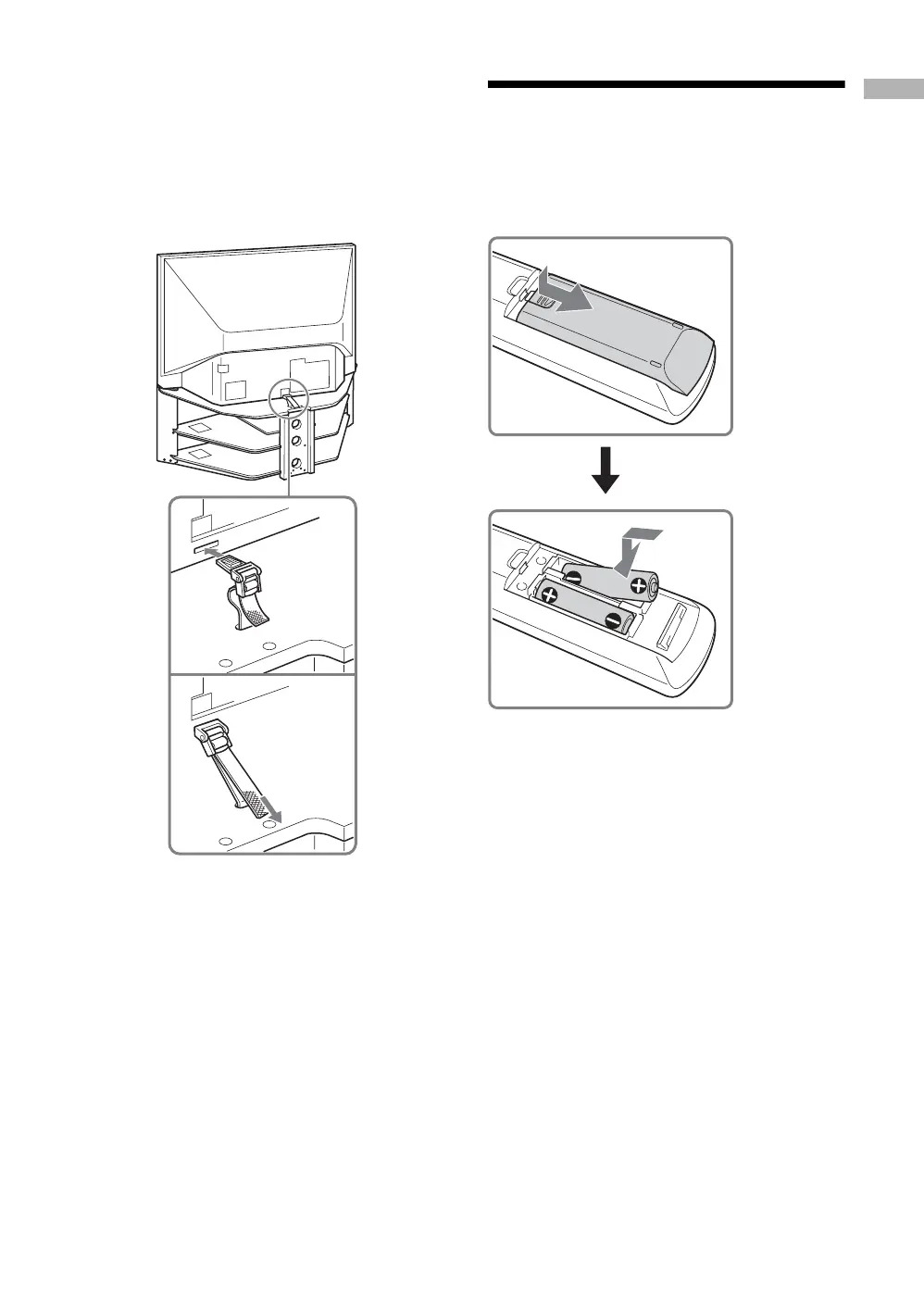
Preventing the TV from Toppling Over
As a protective measure, secure the TV as follows.
Using the TV stand with support belts
Sony strongly recommends using the TV stand SU-
RG11S (for KF-E42A10)/SU-RG11M (for KF-
E50A10) with a support belt designed for your TV.
Note
When using the SU-RG11S for KF-E42A10 (not supplied)/
SU-RG11M for KF-E50A10 (not supplied) stand for your
TV, you must use the support belt.
2: Inserting batteries
into the remote
Notes
• Observe the correct polarity when inserting batteries.
• Dispose of batteries in an environmentally friendly way.
Certain regions may regulate disposal of the battery.
Please consult your local authority.
• Do not use different types of batteries together or mix old
and new batteries.
• Handle the remote with care. Do not drop or step on it, or
spill liquid of any kind onto it.
• Do not place the remote in a location near a heat source, or
in a place subject to direct sunlight, or in a damp room.


 To Next Page