8
GB
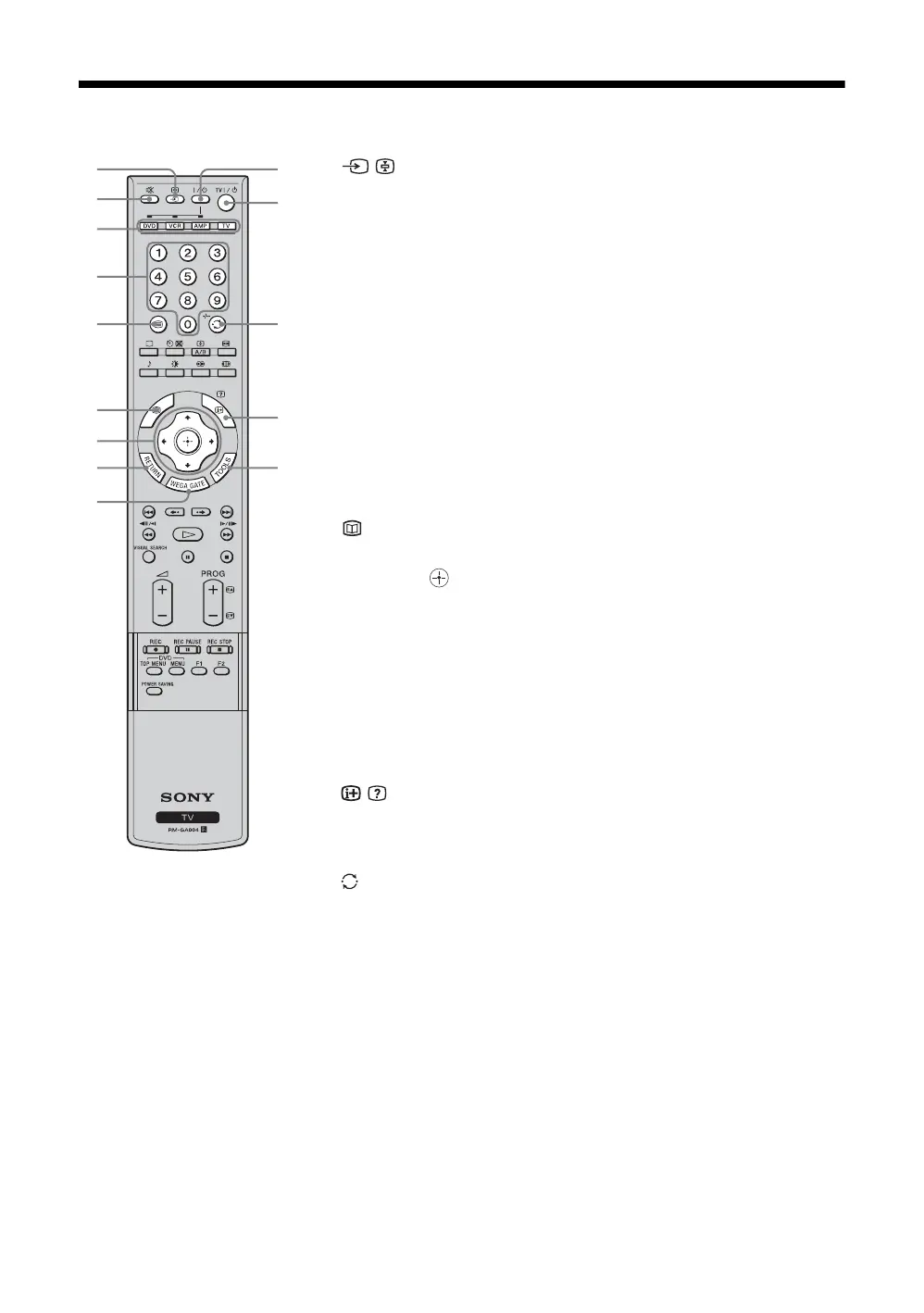
Overview of the remote
1 / – Input select / Text hold
In TV mode (page 21): Selects the input source from equipment connected to the
TV jacks.
In Text mode (page 19): Holds the current page.
2 % – Muting (page 18)
Mutes the sound.
3 Function buttons (page 45)
• Selects the connected equipment you want to operate with this remote. The
button of the equipment which the remote can operate lights up when
operation buttons are pressed.
• Used to program the remote to operate Sony video/audio equipment.
4 Number buttons
In TV mode (page 18): Selects channels.
In Text mode (page 19): Enters the three-digit page number to select the page.
5 / – Text (page 19)
Displays Text.
6
This button does not work with this model.
7 M/m/</,/ (page24)
Selects the item and setting when operating WEGA GATE.
8 RETURN
Returns to the previous page when operating WEGA GATE.
9 WEGA GATE (page 24)
Displays WEGA GATE which includes TV List, External Inputs, and Settings.
0 TOOLS (page 20)
Enables you to access various viewing options and change/make adjustments
according to the source and screen mode.
qa / – Info / Text reveal
In TV mode (page 18): Displays information such as current channel number and
screen mode.
In Text mode (page 19): Reveals hidden information (e.g., answers to quizzes).
qs /-/-- – Previous channel (page 18)
Returns to the previous channel watched (for more than five seconds).
When operating DVD, it works as the “Execute” button (page 46).
qd TV "/1 – TV standby (page 18)
Switches off the TV temporarily. The 1 (standby) indicator on the front of the
TV lights up. Press again to switch on the TV from the standby mode.
qf "/1 – Power (page 46)
Switches the VCR, DVD, or audio equipment connected to the TV on or off.
1
2
3
4
5
6
7
8
9
a
;
d
f
s


 To Next Page