42
GB
Connecting optional equipment
Note
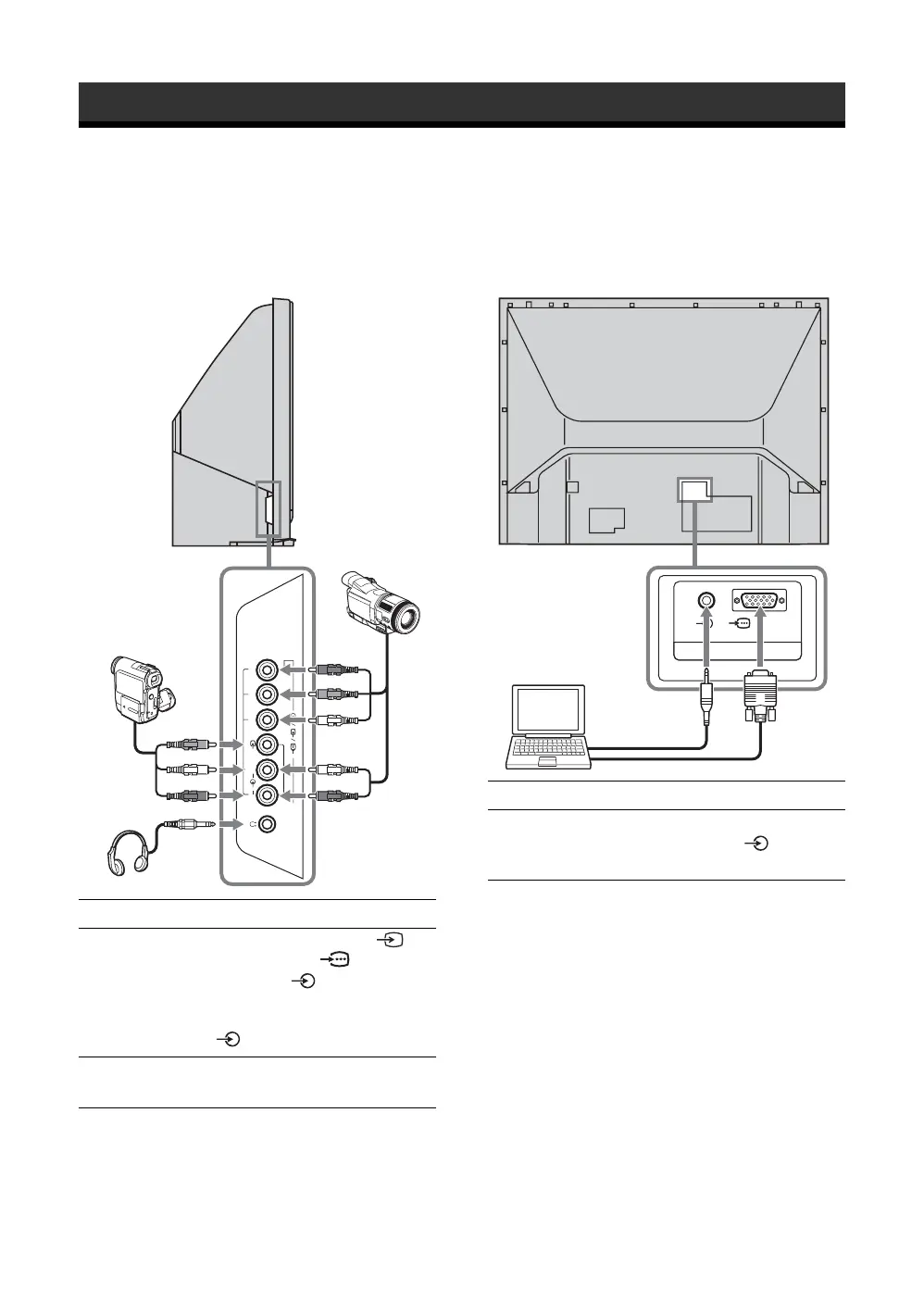
To see the image from Component input on the side panel,
select “Auto” in “Video2(Component)” in “Setup” menu
(page 40).
Using Optional Equipment
You can connect a wide range of optional equipment to your TV.
Connect the cables, matching the colors of the plugs with those of the jack.
Connecting to the side/rear of the TV
To connect Do this
Camcorder or video
game equipment
A
Connect to the video jack 2, or
component jack 2, and the
audio jacks 2.
If you connect mono equipment,
connect it to the L(MONO) jack
2 (page 43).
Headphones B Connect to the i jack to listen to
sound from the TV on headphones.
(
MONO
)
RL
P
R
/C
R
P
B
/C
B
Y
2
Headphones
Camcorder
without
component
video out
Camcorder with
component
video out
A
B
To connect Do this
Personal computer
C
Connect to the PC Input jack RGB
and the audio jack on the rear
of the TV.
PC IN
(
RGB
)
C
Personal computer


 To Next Page