EasyManua.ls Logo

Sony LBT-A57CD - Page 56

Sony LBT-A57CD
92 pages
Print Icon
To Next Page IconTo Next Page
To Previous Page IconTo Previous Page
Loading...
@
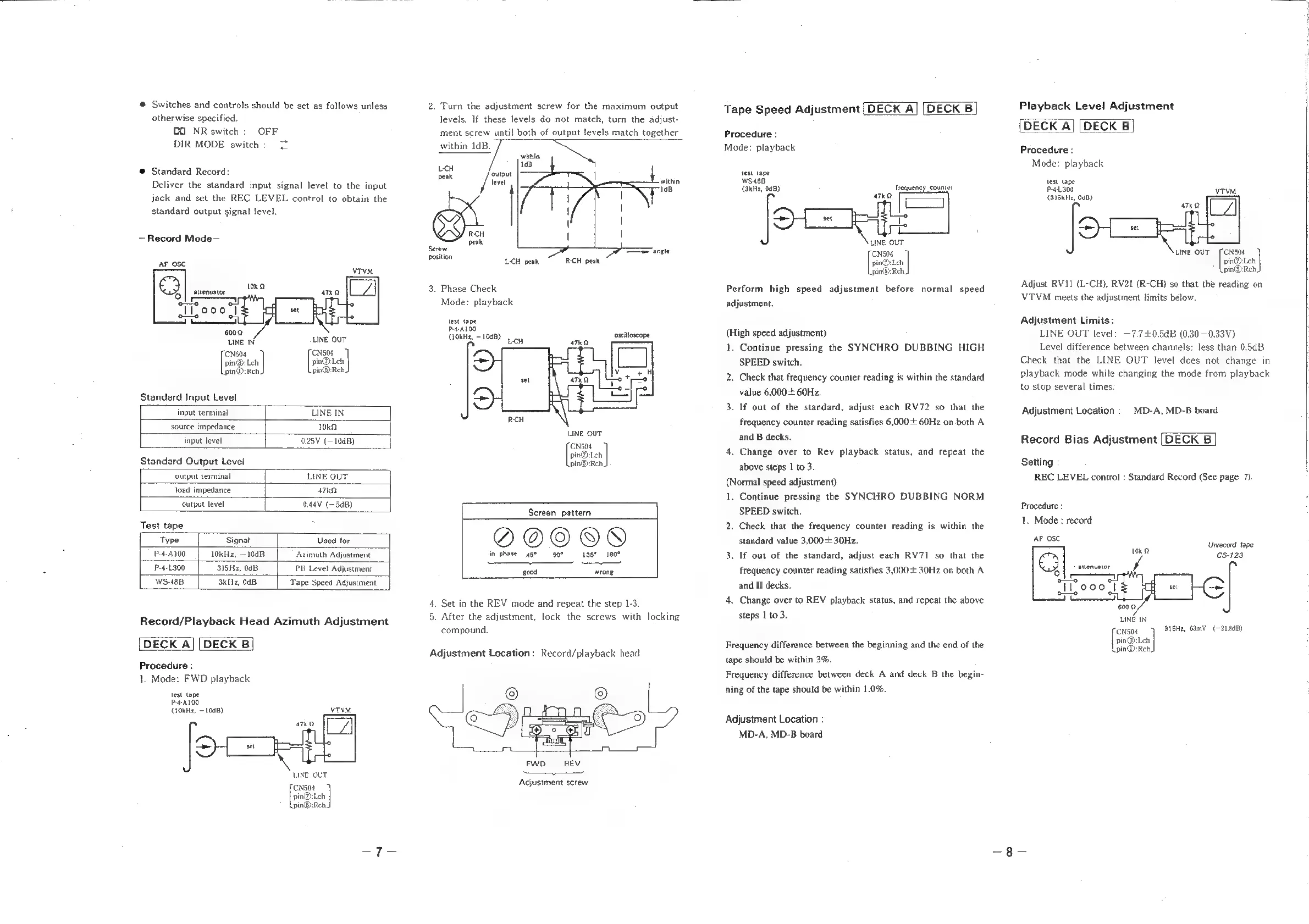
Switches
and
controls
should
be
set
as
follows
unless
otherwise
specified.
OO
NR
switch:
OFF
DIR
MODE
switch:
2
©
Standard
Record:
Deliver
the
standard
input
signal
level
to
the
input
jack
and
set
the
REC
LEVEL
control
to
obtain
the
standard
output
signal
level.
Record
Mode—
AF_OSC
Cyl
|
ame
ILooo
|
a
Leees
vTVM
6002
LINE
IN
LINE
OUT
‘CN504
‘CN504
pin@:
|
pin@:Leh
pin@:Reh,
pin@:Reh,
Standard
Input
Level
input
terminal
LINE
IN
source
impedance
10k
input
level
0.25V
(=10dB)
Standard
Output
Level
output
terminal
LINE
OUT,
load
impedance
47k
output
level
0.44V
(=3dB)
Test
tape
Type
Signal
Used
for
P-4-A100
10kHz,
—10dB
Azimuth
Adjustment
P-4-L300
315Hz,
0dB
PB
Level
Adjustment
WS-48B
3k11z,
0dB.
Tape
Speed
Adjustment
Record/Playback
Head
Azimuth
Adjustment
DECK
A]
[DECK
B
Procedure:
1.
Mode:
FWD
playback
test
tape
P4100
(lOkH2,
~
1008)
VTVM
OT
©
OUT
‘CN504
pin@:Leh
pin@:Reh
2.
Turn
the
adjustment
screw
for
the
maximum
output
levels.
If
these
levels
do
not
match,
turn
the
adjust-
ment
screw
until
both
of
output
levels
match
together
within
1dB
within
ee
1dB
LCH
Si
‘output
oi
level
within
103
RCH
peak
Serew
=
angle
sition
LCH
peak
RCH
peak
3.
Phase
Check
Mode:
playback
test
tape
4.4100
10kHz,
-10dB)
oscilloscope
§
LCH
ATKD
LINE
OUT
[ons
pin@:Lch
pin@):Rch.
Screen
pattern
O@OO®
in
phase
45° 90°
15°
180°
good
wrong
4.
Set
in
the
REV
mode
and
repeat
the
step
1-3.
5.
After
the
adjustment,
lock
the
screws
with
locking
compound.
Adjustment
Location:
Record/playback
head
FWD
REV
%
Adjustment
screw
Tape
Speed
Adjustment
[DECK
A]
[DECK
B]
Procedure
:
Mode:
playback
test
tape
WS-48B
(kHz,
0dB)
frequency
counter
ATKQ
og
‘CN504
pin@:Leh
pin®:Rch,
ee
Perform
high
speed
adjustment
before
normal
speed
adjustment.
(High speed
adjustment)
1.
Continue
pressing
the
SYNCHRO
DUBBING
HIGH
SPEED
switch.
2.
Check
that
frequency
counter
reading
is
within
the
standard
value
6,000+
60Hz.
3. If
out
of
the
standard,
adjust
each
RV72
so
that
the
frequency
counter
reading
satisfies
6,000+
60Hz
on
both
A
and
B
decks.
4.
Change
over
to
Rev
playback
status,
and
repeat
the
above
steps
1
to
3.
(Normal
speed
adjustment)
1.
Continue
pressing
the
SYNCHRO
DUBBING
NORM
SPEED
switch.
2.
Check
that
the
frequency
counter
reading
is
within
the
standard
value
3,000
+
30Hz.
3.
If
out
of
the
standard,
adjust
each
RV71
so
that
the
frequency
counter
reading
satisfies
3,000
30Hz
on
both
A
and
B
decks.
4.
Change
over
to
REV
playback
status,
and
repeat
the
above
steps
1
to
3.
Frequency
difference
between
the
beginning
and
the
end
of
the
tape
should
be
within
3%.
Frequency
difference
between
deck
A
and
deck
B
the
begin-
ning
of
the
tape
should
be
within
1.0%.
Adjustment
Location
:
MD-A,
MD-B
board
Playback
Level
Adjustment
DECK
A]
[DECK
B
Procedure
:
Mode:
playback
test
tape
P4300
yTvM
(315kH12,
0dB)
4TkQ
oY}
‘CNS04
[ome
ie
pin@):Rch,
Adjust
RV11
(L-CH),
RV21
(R-CH)
so
that
the
reading
on
VTVM
meets
the
adjustment
limits
below.
Adjustment
Limits
:
LINE
OUT
level:
—7.7+0.5dB
(0.30
—0.33V)
Level
difference
between
channels:
less
than
0.5dB
Check
that
the
LINE
OUT
level
does
not
change
in
playback
mode
while
changing
the
mode
from
playback
to
stop
several
times.
Adjustment
Location:
MD-A,
MD-B
board
Record
Bias
Adjustment
|DECK
B
Setting
:
REC
LEVEL
control
:
Standard
Record
(See
page
7).
Procedure
:
1.
Mode
:
record
AF
OSC
i
dt
inrecord
tape
uae
5-123
oto
Tl
000
set
one
tiene
600
LNé
IN
ese
315He,
63mV_
(—21.84B)
amy
L
pin@:Reh.

Related product manuals