EasyManua.ls Logo

Sony LBT-A57CD - Page 74

Sony LBT-A57CD
92 pages
Print Icon
To Next Page IconTo Next Page
To Previous Page IconTo Previous Page
Loading...
SECTION
1
GENERAL
This
section
is
extracted
from
instruction
manual.
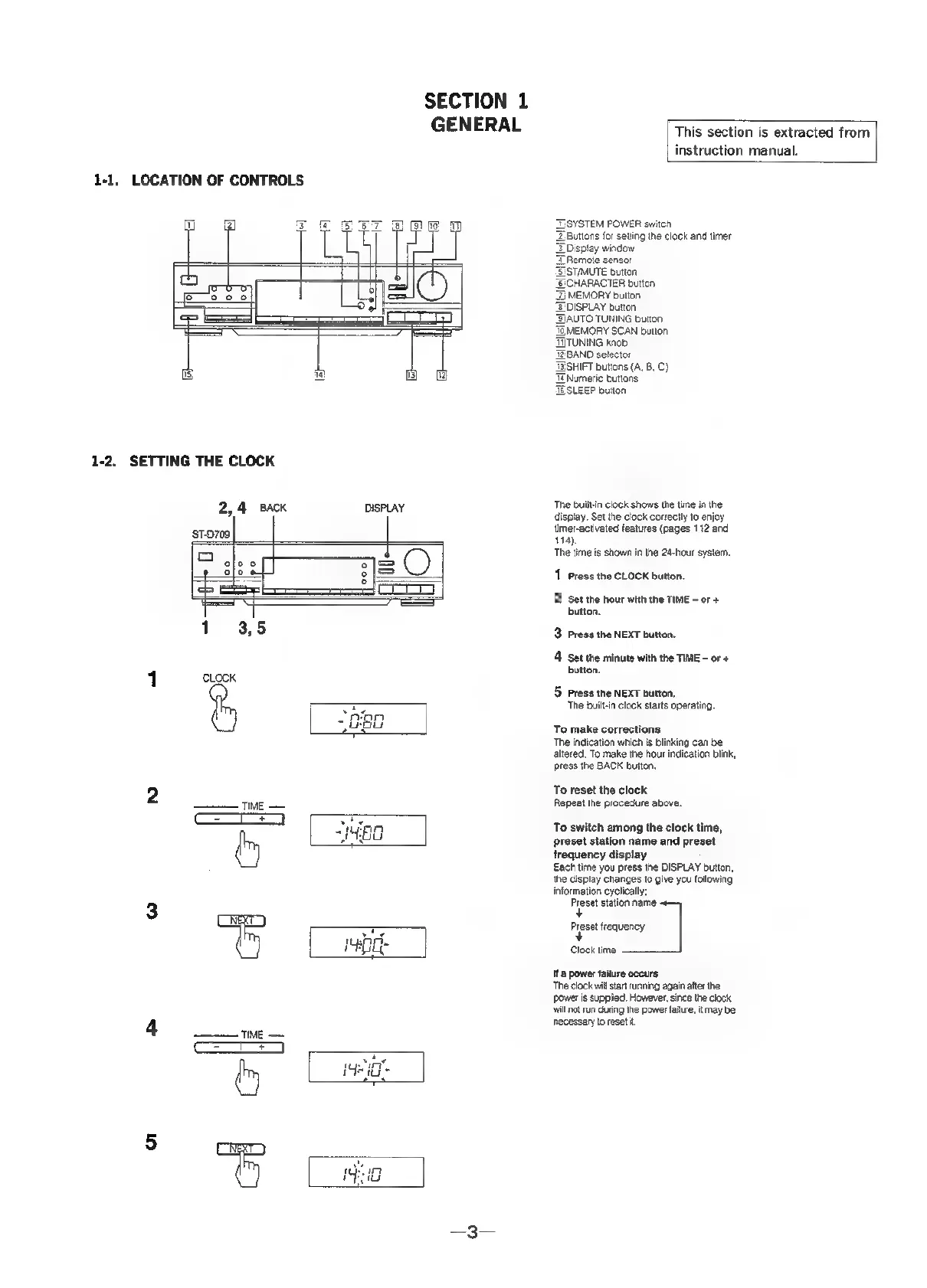
1-1,
LOCATION
OF
CONTROLS
a
‘SYSTEM
POWER
switch
Buttons
for
setting
the
clock
and
timer
isplay
window
emote
sensor
SISTMUTE
button
HARACTER
button
=F
MEMORY
button
‘EDISPLAY
button
\UTO
TUNING
button
EMORY
SCAN
button
TITUNING
knob
ZEBAND
selector
HIFT
buttons
(A,
8,
C)
lumeri¢
buttons
TBSLEEP
button
1-2.
SETTING
THE
CLOCK
2,4
Back
DISPLAY
‘The
built-in
clock
shows
the
time
in
the
7
display.
Set
the
clock
correctly
to
enjoy
timer-activated
features
(pages
112
and
114).
The
time
is
shown
in
the
24-hour
system.
ST-D709
1
Press
the
CLOCK
button.
2
Set
the
hour
with
the
TIME
-
or
+
button.
3
Press
the
NEXT
button.
4
Set
the
minute
with
the
TIME
-
or
+
button.
1
cLock
5
Press
the
NEXT
button,
‘The
builtin
clock
starts
operating
Finks
To
make
corrections
‘The
indication
which
is
blinking
can
be
altered.
To
make
the
hour
indication
blink,
press
the
BACK
button.
2
To
reset
the
clock
TIME
Repeat
the
procedure
above.
To
switch
among
the
clock
time,
preset
station
name
and
preset
frequency
display
Each
time
you
press
the
DISPLAY
button,
the
display
changes
to
give
you
following
information
cyclically;
Preset
station
name
<—
jc
+
7
Preset
eauency
un
|
fag
ee
Clock
time
——___]
Ita
power
failure
occurs
‘The
clock
will
start
running
again
after
the
ower
is
supplied.
However,
since
the
clock
will
not
run
during
the
power
failure,
it
may
be
4
necessary
to
reset
it
TIME
orf

Related product manuals