EasyManua.ls Logo

Sony LBT-A57CD - Page 76

Sony LBT-A57CD
92 pages
Print Icon
To Next Page IconTo Next Page
To Previous Page IconTo Previous Page
Loading...
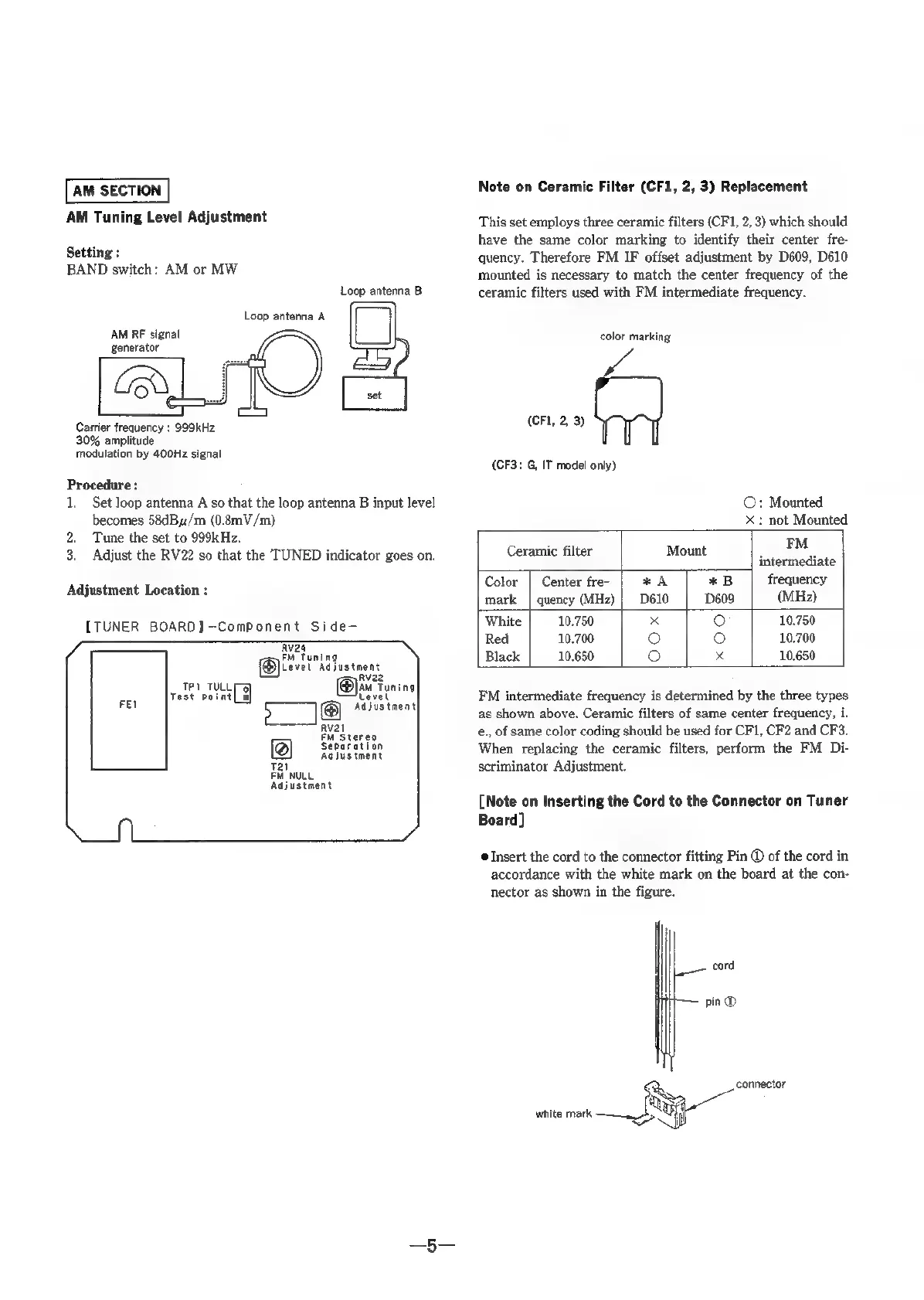
AM
SECTION
AM
Tuning
Level
Adjustment
Setting
:
BAND
switch:
AM
or
MW
Loop
antenna
B
Loop
antenna
A
LI
~
}
‘AM
RF
signal
generator
set
Carrier
frequency
:
999kHz
30%
amplitude
modulation
by
400Hz
signal
Procedure
:
1,
Set
loop
antenna
A
so
that
the
loop
antenna
B
input
level
becomes
58dBy/m
(0.8mV/m)
2.
Tune
the
set
to
999kHz.
3.
Adjust
the
RV22
so
that
the
TUNED
indicator
goes
on.
Adjustment
Location
:
[TUNER BOARD]
—Component
Side-
Rv24
FM
Tuning
Level
Adjustment
Rv22
TP1
TULLE
9]
M
Tuning
Test
point
oj
Level
FEI
Adjustment
Rval
EM
Stereo
a)
Separation
Adjustment
Tai
FM
NULL
Adjustment
Note
on
Ceramic
Filter
(CF1,
2,
3)
Replacement
This
set
employs
three
ceramic
filters
(CF1,
2,
3)
which
should
have
the
same
color
marking
to
identify
their
center
fre-
quency.
Therefore
FM
IF
offset
adjustment
by
D609,
D610
mounted
is
necessary
to
match
the
center
frequency
of
the
ceramic
filters
used
with
FM
intermediate
frequency.
color
marking
(CF1,
2,
3)
(CF3:
G,
IT
model
only)
©:
Mounted
x
:
not
Mounted
Ceramic
filter
Mount
_
FM
intermediate
Color
|
Center
fre-
*A
*B
frequency
mark
|
quency
(MHz)
|}
D610 D609
(MHz)
White
10.750
x
e)
10.750
Red
10.700
(}
°
10.700
Black
10.650
{e)
x
10.650
FM
intermediate
frequency
is
determined
by
the
three
types
as
shown
above.
Ceramic
filters
of
same
center
frequency,
i.
e.,
of
same
color
coding
should
be
used
for
CF1,
CF2
and
CF3.
When
replacing
the
ceramic
filters,
perform
the
FM
Di-
scriminator
Adjustment.
[Note
on
Inserting
the
Cord
to
the
Connector
on
Tuner
Board]
©
Insert
the
cord
to
the
connector
fitting
Pin
®
of
the
cord
in
accordance
with
the
white
mark
on
the
board
at
the
con-
nector
as
shown
in
the
figure.
|
cord
pin
®

Related product manuals