EasyManua.ls Logo

Sony LBT-D117CD - CD Playback Modes; Continuous Playback; Playback Controls

Sony LBT-D117CD
31 pages
Print Icon
To Next Page IconTo Next Page
To Previous Page IconTo Previous Page
Loading...
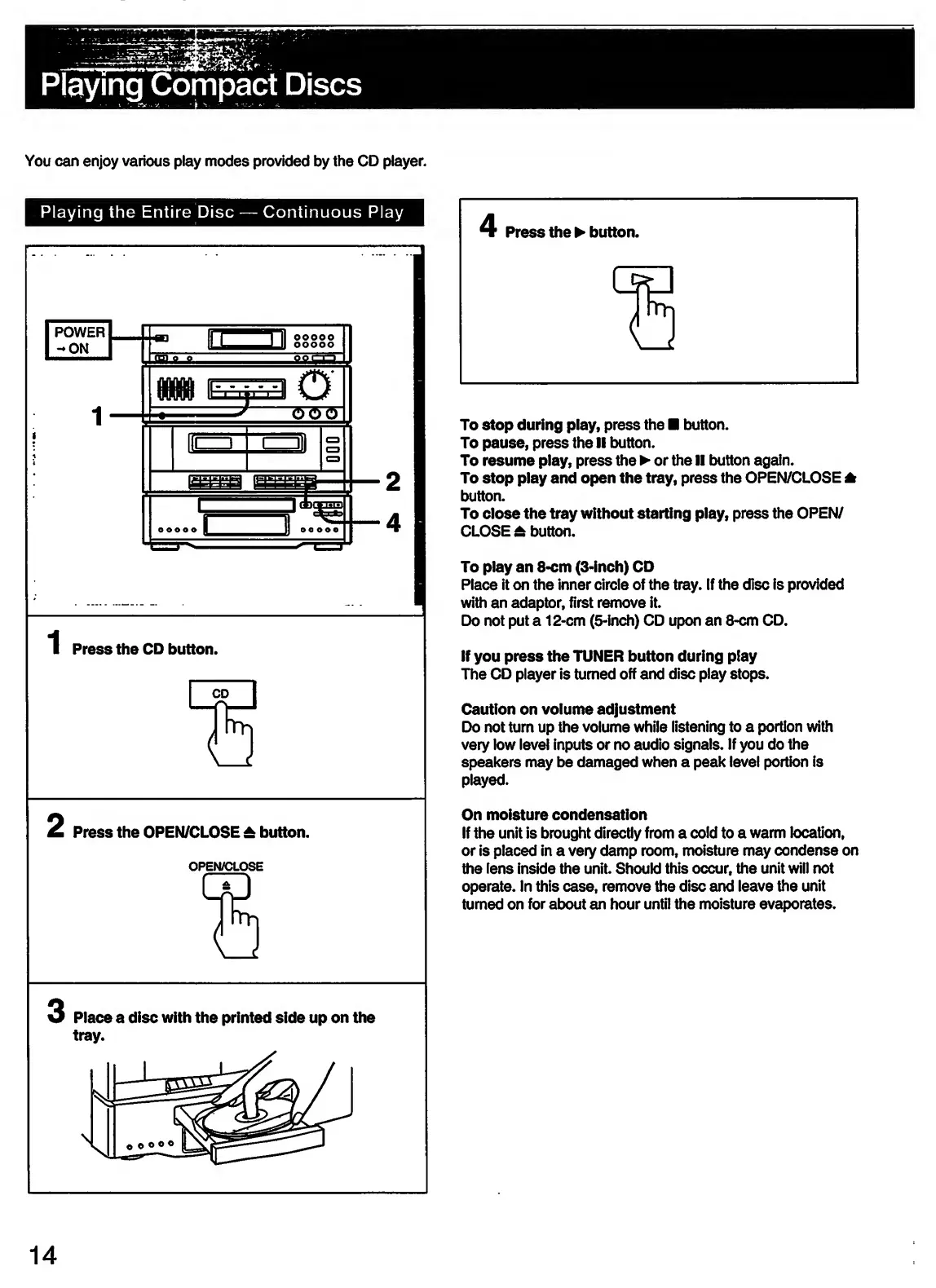
You
can
enjoy
various
play
modes
provided
by
the
CD
player.
Press
the
CD
button.
Press
the
OPEN/CLOSE
±
button.
OPEN/CLOSE
'
Press
the
button.
1
1
To
stop
during
play,
press
the
button.
To
pause,
press
the
II
button.
To
resume
play,
press
the
or
the
II
button
again.
To
stop
play
and
open
the
tray,
press
the
OPEN/CLOSE
*
button.
To
close
the
tray
without
starting
play,
press
the
OPEN/
CLOSE
£
button.
To
play
an
8-cm
(3-inch)
CD
Place
it
on
the
inner
circle
of
the
tray.
If
the
disc
is
provided
with
an
adaptor,
first
remove
it.
Do
not
put
a
12-cm
(5-inch)
CD
upon
an
8-cm
CD.
If
you
press
the
TUNER
button
during
play
The
CD
player
is
turned
off
and
disc
play
stops.
Caution
on
volume
adjustment
Do
not
turn
up
the
volume
while
listening
to
a
portion
with
very
low
level
inputs
or
no
audio
signals.
If
you
do
the
speakers
may
be
damaged
when
a
peak
level
portion
is
played.
On
moisture
condensation
If
the
unit
is
brought
directly
from
a
cold
to
a
warm
location,
or
is
placed
in
a
very
damp
room,
moisture
may
condense
on
the
lens
inside
the
unit.
Should
this
occur,
the
unit
will
not
operate.
In
this
case,
remove
the
disc
and
leave
the
unit
turned
on
for
about
an
hour
until
the
moisture
evaporates.
3
Place
a
disc
with
the
printed
side
up
on
the
tray.
14

Related product manuals