EasyManua.ls Logo

Sony LBT-D117CD - Page 15

Sony LBT-D117CD
31 pages
Print Icon
To Next Page IconTo Next Page
To Previous Page IconTo Previous Page
Loading...
Information
in
the
Display
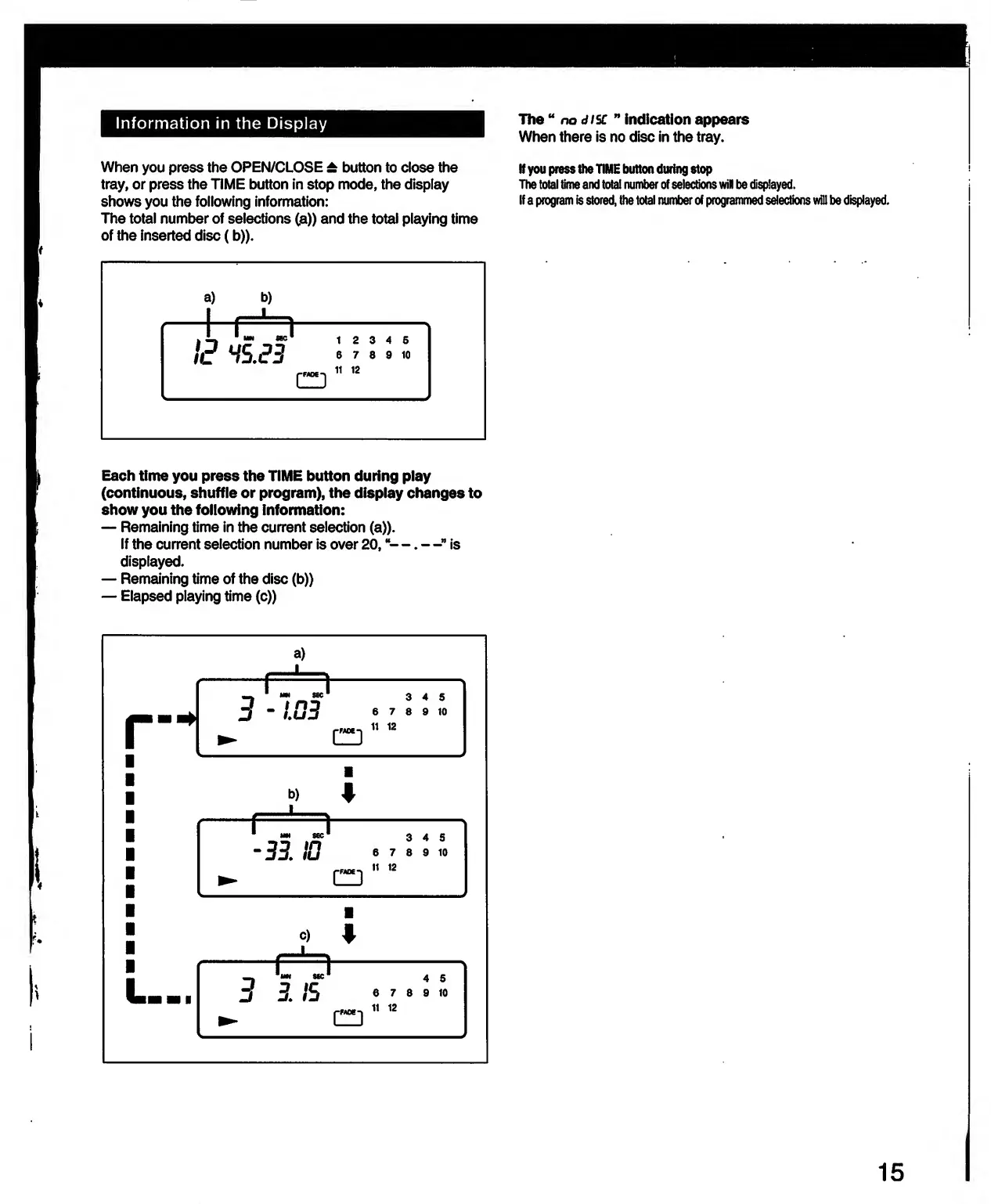
When
you
press
the
OPEN/CLOSE
±
button
to
close
the
tray,
or
press
the
TIME
button
in
stop
mode,
the
display
shows
you
the
following
information:
The
total
number
of
selections
(a))
and
the
total
playing
time
of
the
inserted
disc
(b)).
The
no
disc
indication
appears
When
there
is
no
disc
in
the
tray.
If
you
press
the
TIME
button
during
stop
The
total
time
and
total
number
of
selections
will
be
displayed.
If
a
program
is
stored,
the
total
number
of
programmed
selections
will
be
displayed.
Each
time
you
press
the
TIME
button
during
play
(continuous,
shuffle
or
program),
the
display
changes
to
show
you
the
following
information:
Remaining
time
in
the
current
selection
(a)).
If
the
current
selection
number
is
over
20,
“—.
—”
is
displayed.
Remaining
time
of
the
disc
(b)>
Elapsed
playing
time
(c))
15

Related product manuals