12
Recording a CD on an
MD
— CD-MD Synchro Recording
You can make a digital recording of a CD on an
MD, marking track numbers in the same sequence
as the original CD.
You can also record a programme of favourite
tracks (see page 15).
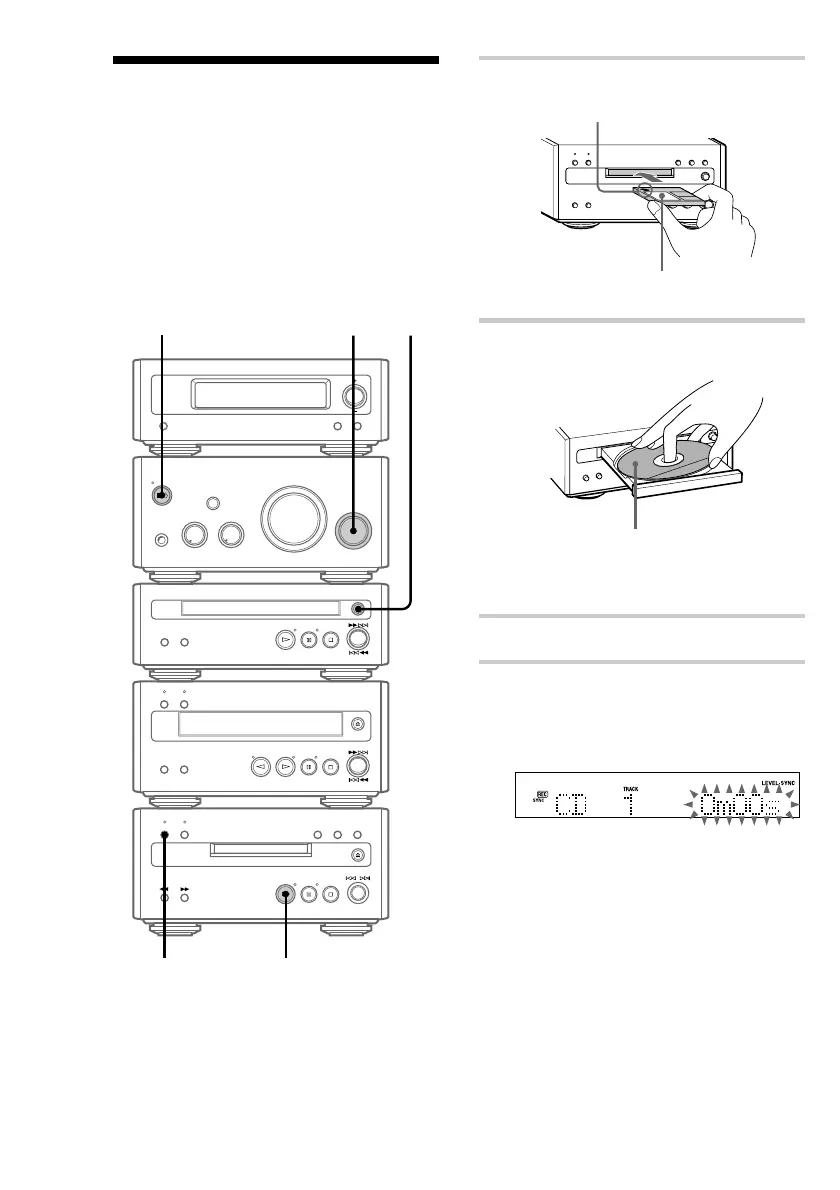
To turn on the system, press ?/1 (power). The
MD deck turns on automatically.
?/1 (power)
1 Insert a recordable MD.
With the arrow pointing toward the deck.
With the label side up, and the shutter on
the righthand side.
2 Press A on the CD player and place a
CD on the disc tray.
With the label side up.
When you play a CD single (8 cm CD),
place it on the inner circle of the tray.
Press A again to close the disc tray.
3 Turn FUNCTION until “CD” appears.
4 Press CD SYNC REC on the MD deck.
The CD SYNC REC indicator lights up. The
MD deck stands by for recording and the CD
player pauses for play.
5
3
2
4


 To Next Page