Editing
37
1 Press MD to switch the function to MD.
2 Press MENU/NO to display “MD Edit
Menu”.
3 Press . or > repeatedly until
“MD Combine ?” appears, then press
ENTER/YES.
4 Press . or > repeatedly until the
first track number of the two to be
combined appears, then press ENTER/
YES.
For example, to combine tracks 4 and 1,
select 4.
First track number
5 Press . or > repeatedly until the
second track number of the two to be
combined appears.
Second track
number to be
combined
New track
number
6 Press ENTER/YES.
“MD Complete!!” appears for a few seconds
and the tracks are combined.
Play starts.
Combining recorded
tracks
— Combine Function
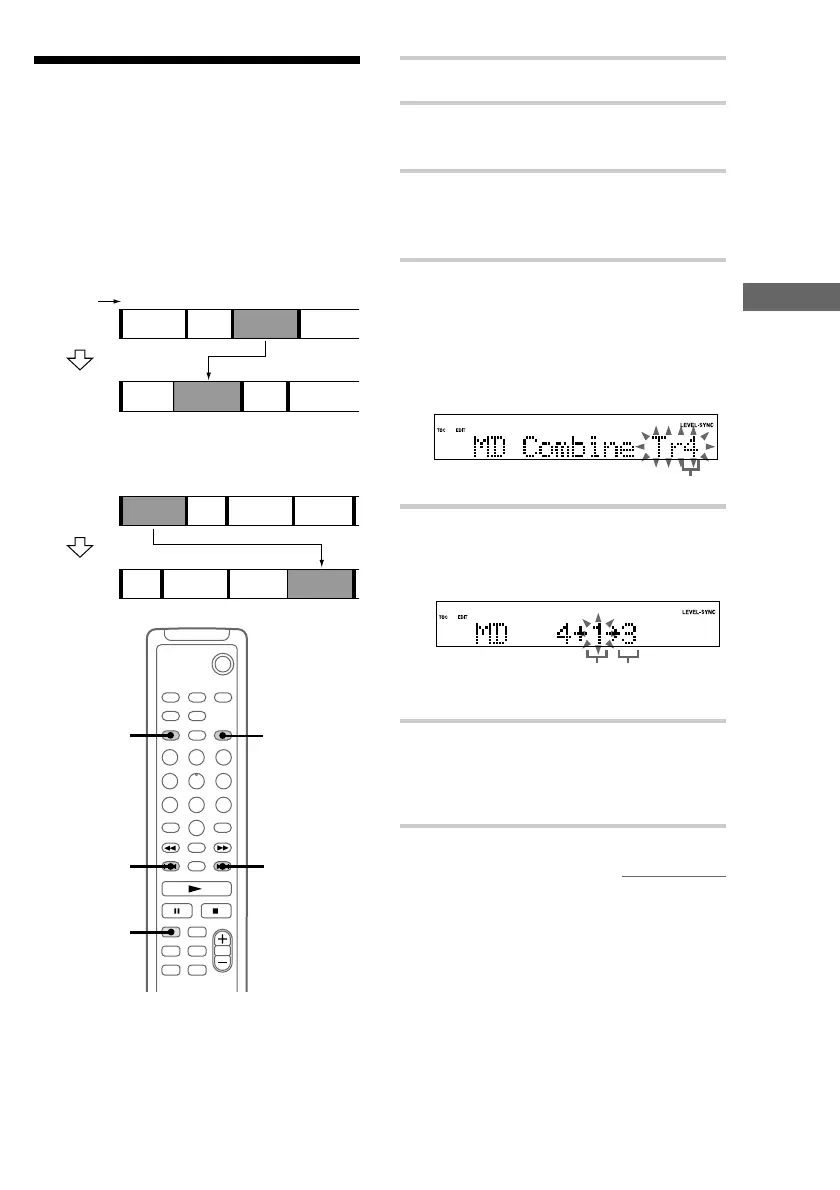
You can use this function to combine 2 tracks into
a single track. The total number of tracks
decreases by one and all tracks following the
combined ones are renumbered.
Example: Combining track 3 to track 1.
12
12
43
3
ABC D
ACBD
Example: Combining track 1 to track 4.
12
12
43
3
4
5
ABC D
BC D A
`/1
2
1
3,4,5
3,4,5
3,4,6
Original
tracks
After
COMBINE
Track
number
Original
tracks
After
COMBINE
continued



 To Next Page