Editing
29
Labelling an MD
— Name Function
You can create titles for your recorded MDs and
tracks as follows.
During recording
If “CD-TEXT” flashes in the display during
recording a CD, you can record the CD disc title
on the MD (see page 16).
After recording
Use the Name function on this page. You can
input a total of approximately 1700 characters for
the disc title and track titles on a single MD.
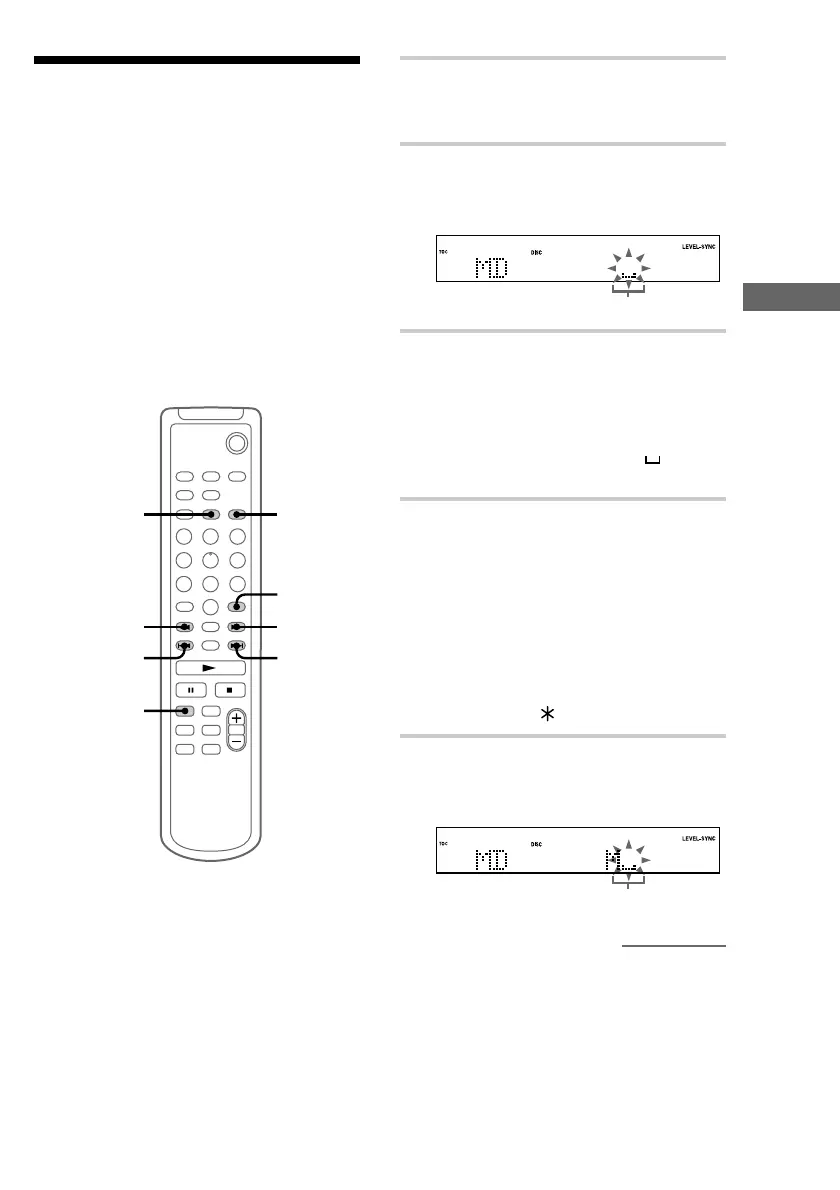
`/1
1
1,4
2,3
1,4
5
7
CLEAR
CURSORT
1 Press MD to switch the function to MD.
To label a track, press . or > until the
desired track number appears.
2 Press NAME EDIT.
The text input screen appears, and the cursor
flashes.
Cursor
3 Press CHARACTER to select the
desired type of character.
Each time you press the button, the display
changes as follows:
A (Upper cases) t a (Lower cases) t
0 (Numbers) t ! (Symbols) t (Blank
space) t A (Upper cases) t
…
4 Press . or > repeatedly to select
the desired character.
To enter a blank space
Go to step 5 without pressing . or >.
You cannot enter a space as the first
character.
To enter a symbol
You can use the following 24 symbols.
! ” # $ % & ’ ( ) + , – . / : ; < = > ? @ _ `
5 Press CURSORt.
The character you selected in step 4 stops
flashing and the cursor shifts to the right.
Cursor
continued


 To Next Page