Recording
19
3 Press the track number of the track you
want to record.
To select track number 11
and higher
Press >10 once and then the number buttons
of the track number.
For example, to select track 32, press >10, 3,
and 2.
To select track number 100
and higher
Press >10 twice and then the number buttons
of the track number.
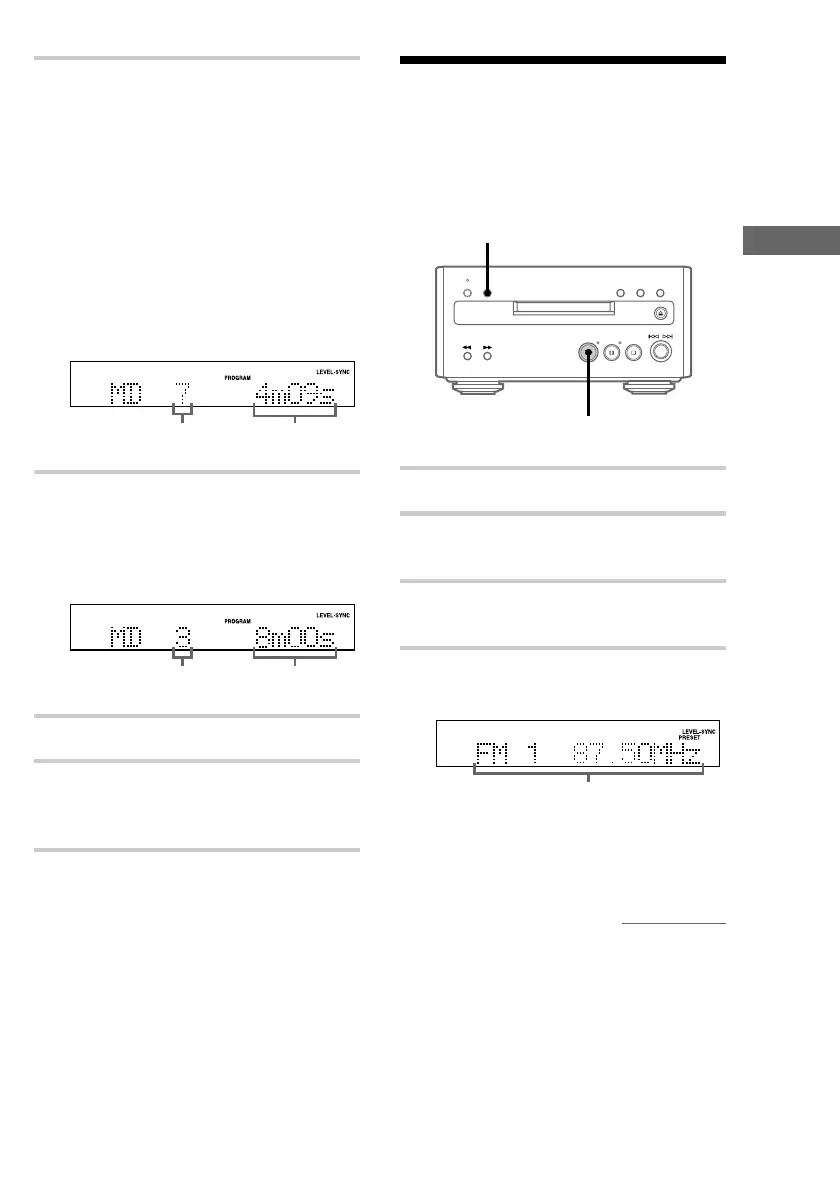
Selected track
number
Total playing
time
4 To programme additional tracks, repeat
step 3.
Each time you programme, the total time of
the programme is displayed. You can make a
programme of up to 25 tracks.
Last programmed
track number
Total playing
time
5 Insert a blank tape.
6 Do steps 3 to 7 of “Recording tracks in
the same sequence as the original MD”
(see page 17).
Recording from the
radio
— Manual Recording
You can make an analogue recording a radio
programme on an MD.
6
5
1 Insert a recordable MD.
2 Press TUNER/BAND on the tuner
repeatedly to select “AM” or “FM”.
3 Press TUNING MODE on the tuner
repeatedly until “PRESET” appears.
4 Press TUNING + or – on the tuner to
select the desired preset station.
Preset number and frequency (or station
name* or RDS station name)
*
The station name appears only if you have
labelled the station (refer to the CMT-
SP55TC Operating Instructions).
continued


 To Next Page