Editing
33
2 While playing an MD, press X at the
starting point of the portion to be erased
(point A).
The MD deck pauses for play.
3 Press MENU/NO to display “MD
Edit Menu”.
4 Press . or > repeatedly until
“MD A-B Erase ?” appears, then press
ENTER/YES.
5 Press ENTER/YES again.
“MD - Rehearsal -” and “MD Point A ok?”
appear alternately while the deck plays the
selected track from the beginning to point A.
6 While monitoring the sound, press .
or > repeatedly to find the starting
point of the portion to be erased (point
A).
You can shift the starting point by 1/86
second (1 frame) intervals.
To shift the point by second or minute
intervals, press m or M so that “s” or
“m” flashes, then press . or >.
7 Repeat step 6 until point A is played
correctly.
8 Press ENTER/YES if point A is correct.
“MD Point B Set” appears and playback for
setting the ending point of the portion to be
erased (point B) starts.
9 Continue playback until the deck
reaches point B, then press ENTER/
YES.
“MD A-B Ers” and “MD Point B ok?”
appear alternately and the deck repeats a
portion of the few seconds before point A
and after point B successively.
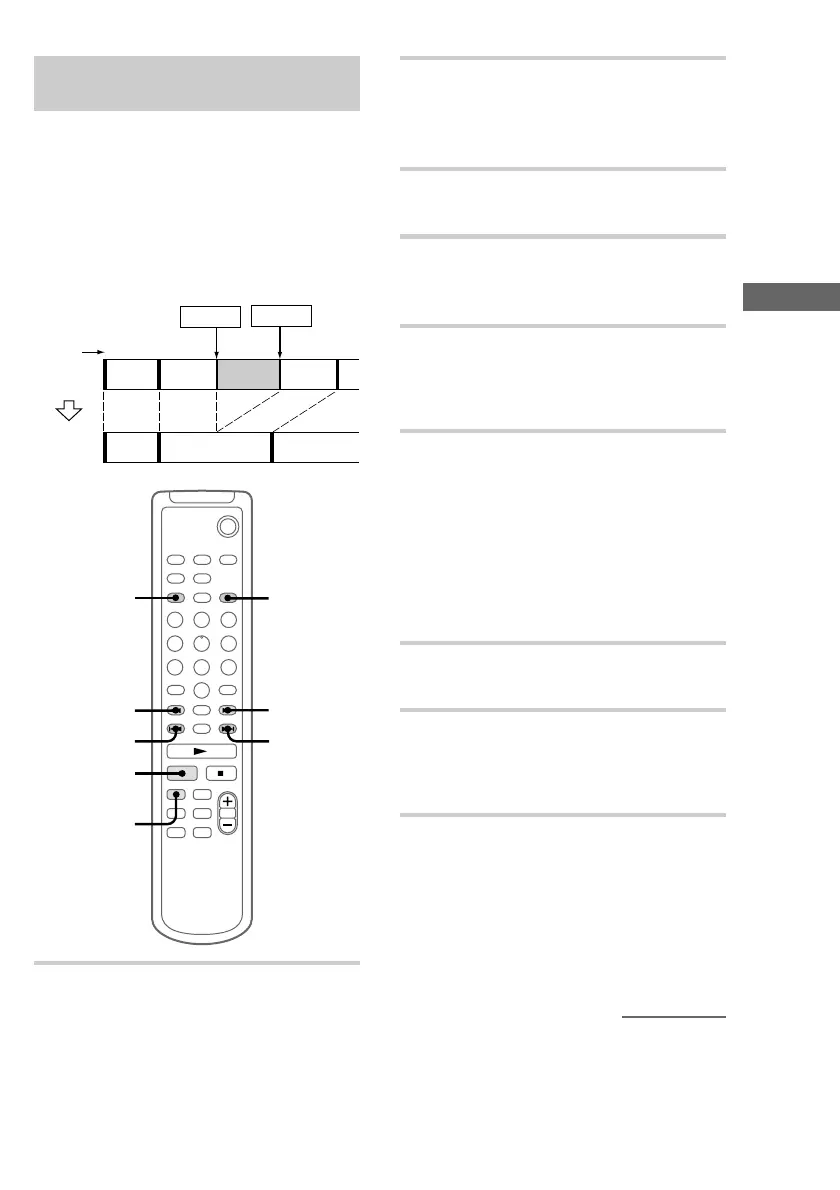
Erasing a portion of a track
— A-B Erase function
You can specify a portion within a track and erase
the portion with ease. You can shift the desired
portion by frame*, minute or second intervals.
This function is convenient when erasing
unnecessary sections after recording a satellite
broadcast or FM broadcast.
* 1 frame is 1/86 second.
Example: Erasing a portion of track 2.
12
12
3
3
A
AC
B-A
B-(A+C)
B-B B-C
`/1
3
1
2
4,6,10
4,6,10
4,5,8
9,11
m
M
1 Press MD to switch the function to MD.
Point BPoint A
Original
tracks
Track
number
After
A-B
ERASE
continued


 To Next Page