40
Connecting digital components
(continued)
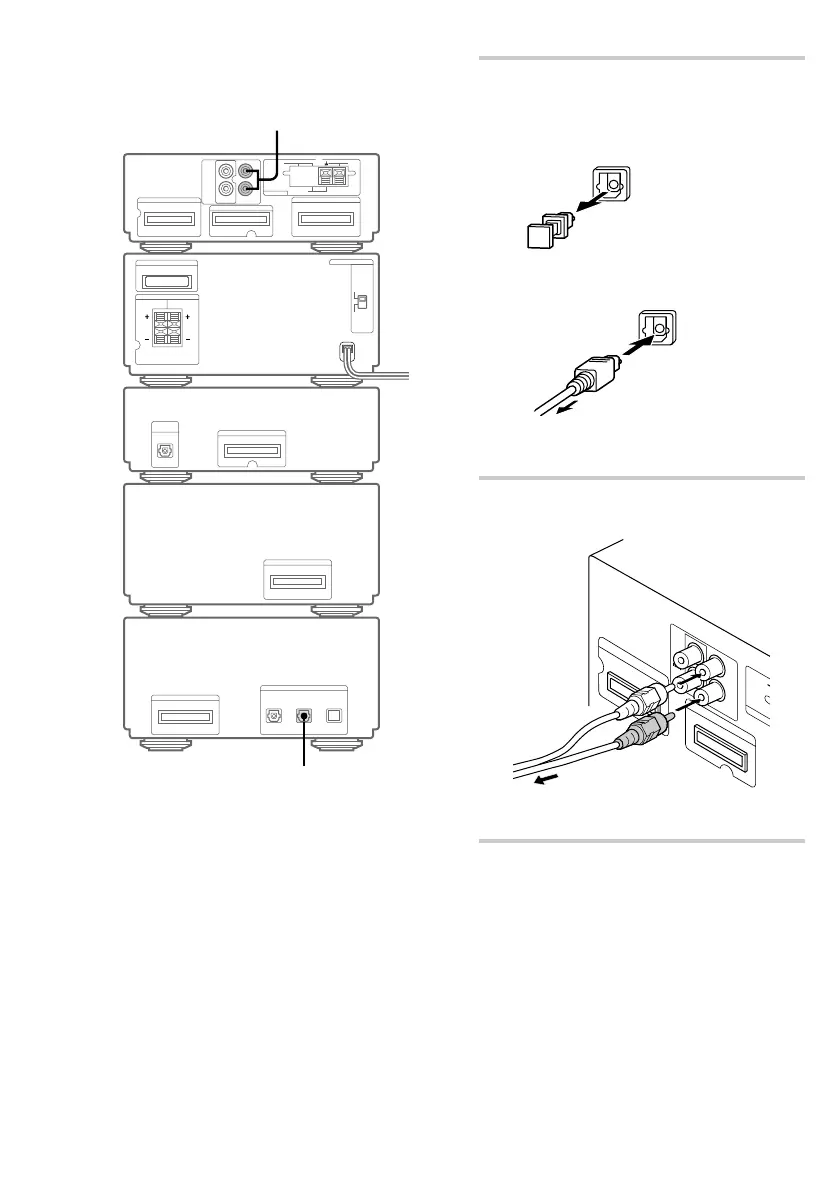
1 Connect an optical cable (square optical
connector, not supplied).
AUX
IN 2
AUX
IN 2
To the audio output of a digital component
To the digital optical output of a digital
component
1 Take the cap off the
DIGITAL OPTICAL
AUX IN.
2 Connect an
optical cable.
3 Connect the cable to the
digital optical output of a
digital component.
2 Connect audio cords (not supplied).
SYSTEM CONTROL 2
S
Y
S
TE
M
C
O
N
T
R
O
L 1
IN
OUT
R
L
Connect the cords to the audio
output of a digital component.
Tip
Switch the function to “AUX” when listening to or
recording the sound of connected components.
Tuner
MD deck


 To Next Page