Portable Headphone Amplifier
PHA-3
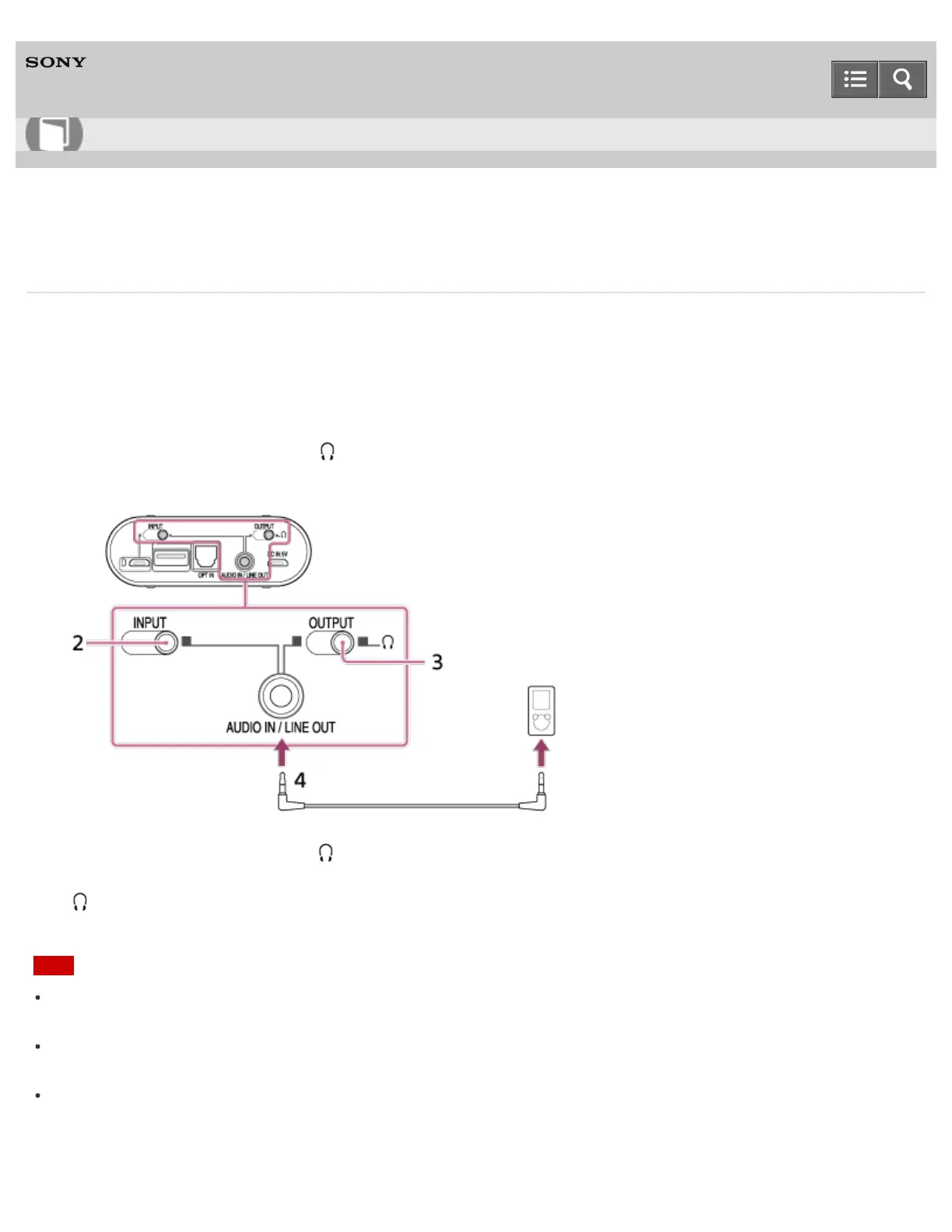
Connecting to WALKMAN models unsupported by digital-out
Before connecting, turn the volume of your WALKMAN down, and turn the headphone amplifier off.
1. Turn on the WALKMAN.
2. Set the INPUT select switch to the position of the AUDIO IN/LINE OUT jack (right edge position).
3. Set the OUTPUT select switch to (right edge position).
4. Connect the WALKMAN to the AUDIO IN/LINE OUT jack using the stereo mini cable (supplied).
5. Connect your headphones to the (headphones) NORMAL jack on the front side of the headphone amplifier.
When the WALKMAN is connected to the AUDIO IN/LINE OUT jack, your headphones cannot be connected to the
(headphones) BALANCED L/R jack.
Note
If you connect the headphone amplifier to a WALKMAN with a built-in radio or tuner, broadcasts may not be received,
or sensitivity may be reduced significantly.
If there is noise in broadcasts, place the headphone amplifier farther away from the connected WALKMAN and check
whether reception improves.
If you are listening to music too loudly, the battery may drain even if the DC IN 5V port of the headphone amplifier is
connected to a computer or an AC outlet.
Help Guide
How to Use










 To Next Page