EasyManua.ls Logo

Sony PS-6750 - Turntable Assembly Steps; Dust Cover Removal; Resilient Feet Adjustment

Sony PS-6750
24 pages
Print Icon
To Next Page IconTo Next Page
To Previous Page IconTo Previous Page
Loading...
©
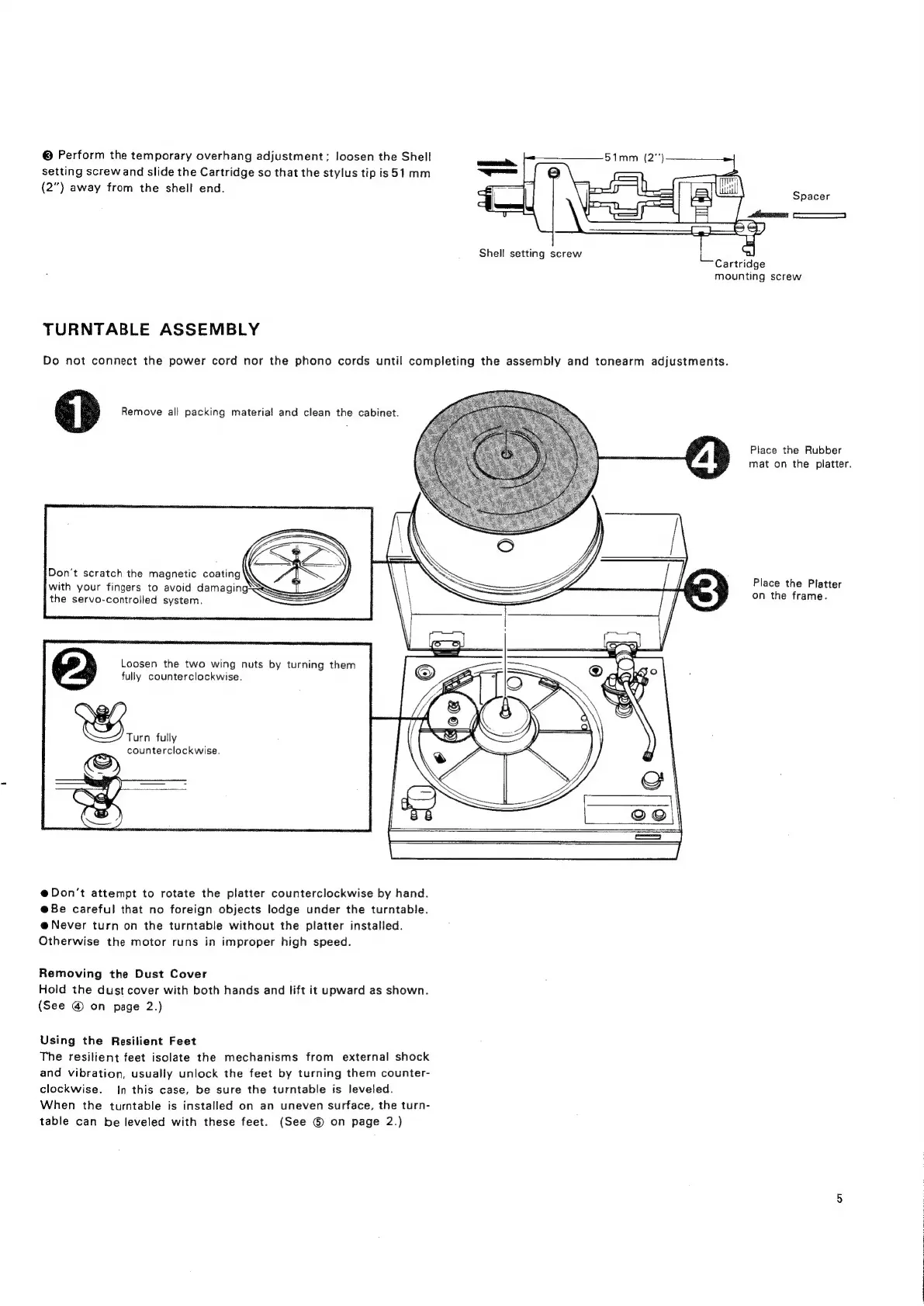
Perform
the
temporary
overhang
adjustment;
loosen
the
Shell
setting
screw
and
slide
the
Cartridge
so
that
the
stylus
tip
is51
mm
(2”)
away
from
the
shell
end.
Shell
setting
screw
mounting
screw
TURNTABLE
ASSEMBLY
Do
not
connect
the
power
cord
nor
the
phono
cords
until
completing
the
assembly
and
tonearm
adjustments.
Remove
all
packing
material
and
clean
the
cabinet.
Place
the
Rubber
mat
on
the
platter.
Don't
scratch
the
magnetic
coating
\
Place
the
Platt
er
on
the
frame.
YY
with
your
fingers
to
avoid
damaging
SF
the
servo-controlled
system.
sl
Loosen
the
two
wing
nuts
by
turning
them
fully
counterclockwise.
RS.
fully
counterclockwise.
e@Don't
attempt
to
rotate
the
platter
counterclockwise
by
hand.
@Be
careful
that
no
foreign
objects
lodge
under
the
turntable.
e@
Never
turn
on
the
turntable
without
the
platter
installed.
Otherwise
the
motor
runs
in
improper
high
speed.
Removing
the
Dust
Cover
Hold
the
dust
cover
with
both
hands
and
lift
it
upward
as
shown.
(See
@
on
page
2.)
Using
the
Resilient
Feet
The
resilient
feet
isolate
the
mechanisms
from
external
shock
and
vibration, usually
unlock
the
feet
by
turning
them
counter-
clockwise.
In
this
case,
be
sure
the
turntable
is
leveled.
When
the
turntable
is
installed
on
an
uneven
surface,
the
turn-
table
can
be
leveled
with
these
feet.
(See
©
on
page
2.)

Related product manuals