EasyManua.ls Logo

Sony PS-6750 - Stylus Overhang Check; Anti-Skating Compensation; System Connections; Record Handling Tips

Sony PS-6750
24 pages
Print Icon
To Next Page IconTo Next Page
To Previous Page IconTo Previous Page
Loading...
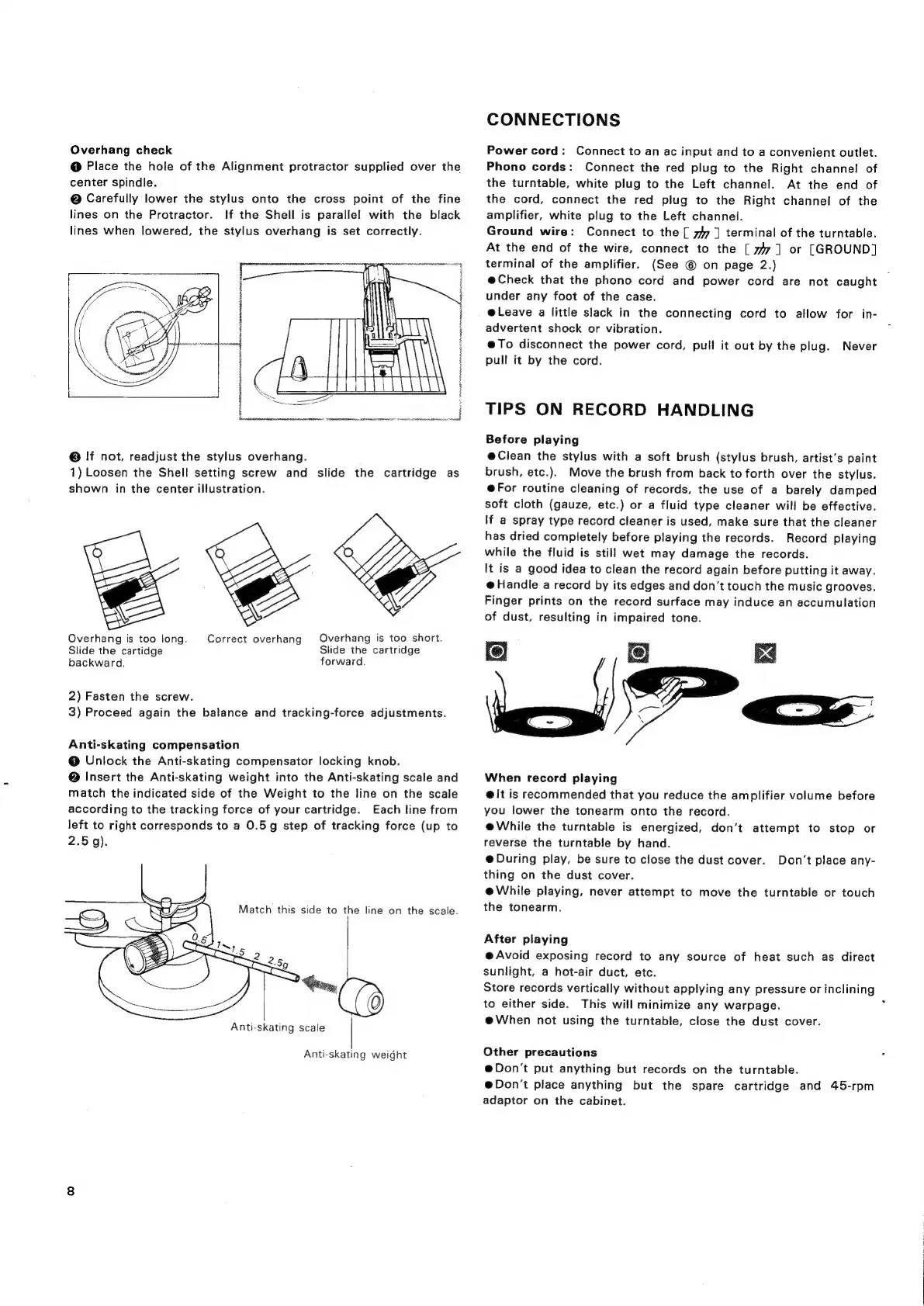
Overhang
check
@
Place
the
hole
of
the
Alignment
protractor
supplied
over
the
center
spindle.
@
Carefully
lower
the
stylus
onto
the
cross
point
of
the
fine
lines
on
the
Protractor.
If
the
Shell
is
parallel
with
the
black
lines
when
lowered,
the
stylus
overhang
is
set
correctly.
©
If
not,
readjust
the
stylus
overhang.
1)
Loosen
the
Shell
setting
screw
and
slide
the
cartridge
as
shown
in
the
center
illustration.
wee
Overhang
is
too
short.
Slide
the
cartridge
forward.
Overhang
is
too
long.
Slide
the
cartidge
backward.
Correct
overhang
2)
Fasten
the
screw.
3)
Proceed
again
the
balance
and
tracking-force
adjustments.
Anti-skating
compensation
@
Unlock
the
Anti-skating
compensator
locking
knob.
@
Insert
the
Anti-skating
weight
into
the
Anti-skating
scale
and
match
the
indicated
side
of
the
Weight
to
the
line
on
the
scale
according
to
the
tracking
force
of
your
cartridge.
Each
line
from
left
to
right
corresponds
to
a
0.5g
step
of
tracking
force
(up
to
Anti-skating
scale
(e
|
Anti-skating
weight
CONNECTIONS
Power
cord:
Connect
to
an
ac
input
and
to
a
convenient
outlet.
Phono
cords:
Connect
the
red
plug
to
the
Right
channel
of
the
turntable,
white
plug
to
the
Left
channel.
At
the
end
of
the
cord,
connect
the
red
plug
to
the
Right
channel
of
the
amplifier,
white
plug
to
the
Left
channel.
Ground
wire:
Connect
to
the
[
77
]
terminal
of
the
turntable.
At
the
end
of
the
wire,
connect
to
the
[
747]
or
[GROUND]
terminal
of
the
amplifier.
(See
©
on
page
2.)
@Check
that
the
phono
cord
and
power
cord
are
not
caught
under
any
foot
of
the
case.
e@Leave
a
little
slack
in
the
connecting
cord
to
allow
for
in-
advertent
shock
or
vibration.
@To
disconnect
the
power
cord,
pull
it
out
by
the
plug.
pull
it
by
the
cord.
Never
TIPS
ON
RECORD
HANDLING
Before
playing
@Clean
the
stylus
with
a
soft
brush
(stylus
brush,
artist's
paint
brush,
etc.).
Move
the
brush
from
back
to
forth
over
the
stylus.
@For
routine
cleaning
of
records,
the
use
of
a
barely
damped
soft
cloth
(gauze,
etc.)
or
a
fluid
type
cleaner
will
be
effective.
\f
a
spray
type
record
cleaner
is
used,
make
sure
that
the
cleaner
has
dried
completely
before
playing
the
records.
Record
playing
while
the
fluid
is
still
wet
may
damage
the
records.
It
is
a
good
idea
to
clean
the
record
again
before
putting
it
away.
@
Handle
a
record
by
its
edges
and
don’t
touch
the
music
grooves.
Finger
prints
on
the
record
surface
may
induce
an
accumulation
of
dust,
resulting
in
impaired
tone.
le!
When
record
playing
@
It
is
recommended
that
you
reduce
the
amplifier
volume
before
you
lower
the
tonearm
onto
the
record.
e@While
the
turntable
is
energized,
don’t
attempt
to
stop
or
reverse
the
turntable
by
hand.
@
During
play,
be
sure
to
close
the
dust
cover.
thing
on
the
dust
cover.
@While
playing,
never
attempt
to
move
the
turntable
or
touch
the
tonearm.
<
Don’t
place
any-
After
playing
@
Avoid
exposing
record
to
any
source
of
heat
such
as
direct
sunlight,
a
hot-air
duct,
etc.
Store
records
vertically
without
applying
any
pressure
or
inclining
to
either
side.
This
will
minimize
any
warpage.
@When
not
using
the
turntable,
close
the
dust
cover.
Other
precautions
@Don’'t
put
anything
but
records
on
the
turntable.
@Don't
place
anything
but
the
spare
cartridge
and
45-rpm
adaptor
on
the
cabinet.

Related product manuals