EasyManua.ls Logo

Sony PS-6750 - Record Playing Operations; Speed Adjustment Guide; Troubleshooting Common Issues

Sony PS-6750
24 pages
Print Icon
To Next Page IconTo Next Page
To Previous Page IconTo Previous Page
Loading...
RECORD
PLAYING
Amplifier
With
the
volume
lowered,
turn
on
the
amplifier
and
set
the
input
selector
to
PHONO.
After
lowering
the
arm
onto
the
record,
adjust
the
sound
level,
stereo
balance
and
tone
quality
according
to
your
preference.
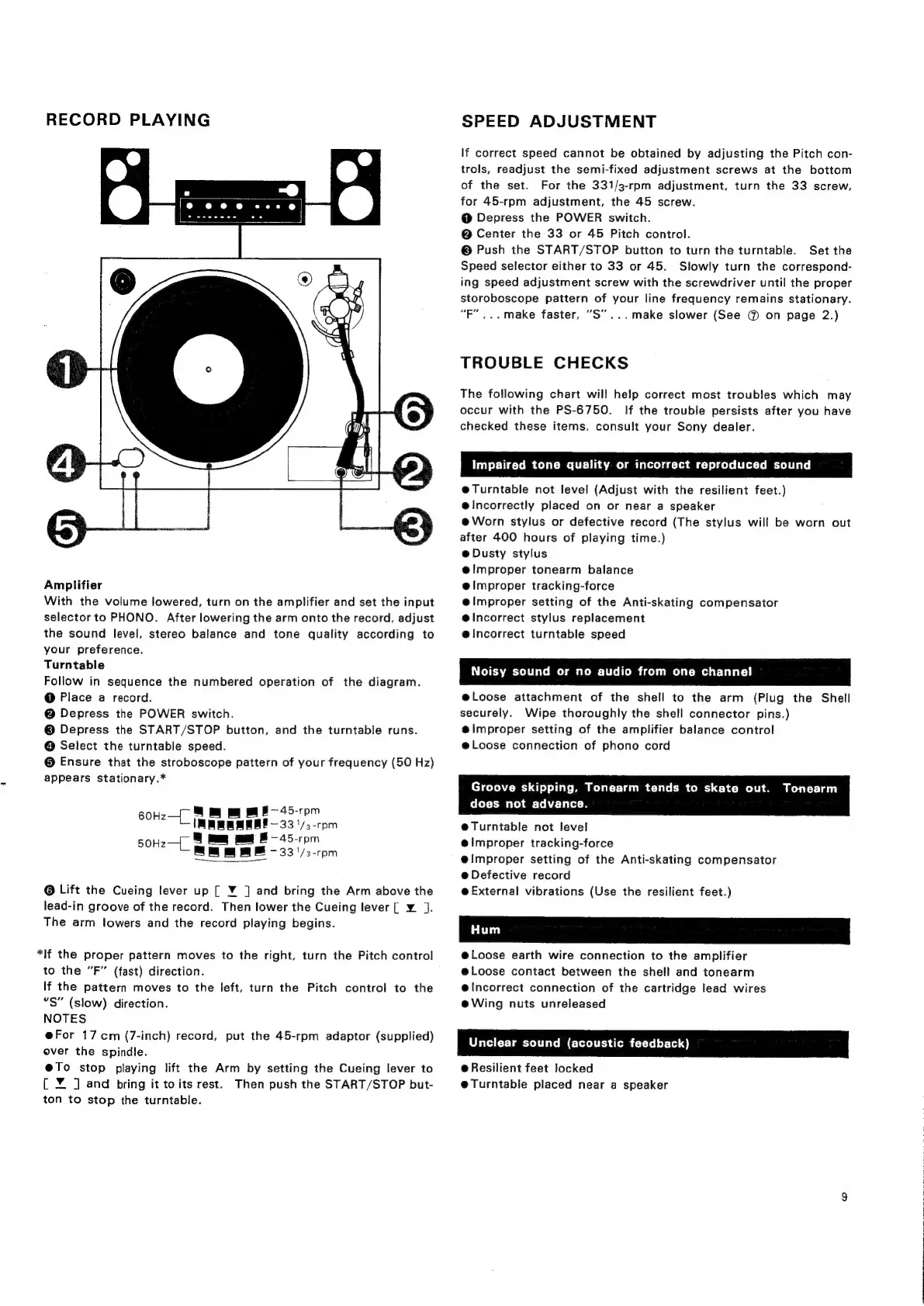
Turntable
Follow
in
sequence
the
numbered
operation
of
the
diagram.
@
Place
a
record.
@
Depress
the
POWER
switch.
©
Depress
the
START/STOP
button,
and
the
turntable
runs.
@
Select
the
turntable
speed.
©
Ensure
that
the
stroboscope
pattern
of
your
frequency
(50
Hz)
appears
stationary.*
60H-—{_
mm
mF
45-rpm
1
—45-rpm
a
5
50Hz—
i
-33'/3-rpm
@
Lift
the
Cueing
lever
up
[
¥
]
and
bring
the
Arm
above
the
lead-in
groove
of
the
record.
Then
lower
the
Cueing
lever
[
¥.
].
The
arm
lowers
and
the
record
playing
begins.
*|lf
the
proper
pattern
moves
to
the
right,
turn
the
Pitch
control
to
the
“F”
(fast)
direction.
If
the
pattern
moves
to
the
left,
turn
the
Pitch
control
to
the
“S”
(slow)
direction.
NOTES
e@For
17cm
(7-inch)
record,
put
the
45-rpm
adaptor
(supplied)
ever
the
spindle.
@To
stop
playing
lift
the
Arm
by
setting
the
Cueing
lever
to
{
¥
J
and
bring
it
to
its
rest.
Then
push
the
START/STOP
but-
ton
to
stop
the
turntable.
SPEED
ADJUSTMENT
If
correct
speed
cannot
be
obtained
by
adjusting
the
Pitch
con-
trols,
readjust
the
semi-fixed
adjustment
screws
at
the
bottom
of
the
set.
For
the
331/3-rpm
adjustment,
turn
the
33
screw,
for
45-rpm
adjustment,
the
45
screw.
@
Depress
the
POWER
switch.
@
Center
the
33
or
45
Pitch
control.
©
Push
the
START/STOP
button
to
turn
the
turntable.
Set
the
Speed
selector
either
to
33
or
45.
Slowly
turn
the
correspond-
ing
speed
adjustment
screw
with
the
screwdriver
until
the
proper
storoboscope
pattern
of
your
line
frequency
remains
stationary.
“PF...
make
faster,
“S”...make
slower
(See
@
on
page
2.)
TROUBLE
CHECKS
The
following
chart
will
help
correct
most
troubles
which
may
occur
with
the
PS-6750.
If
the
trouble
persists
after
you
have
checked
these
items.
consult
your
Sony
dealer.
Impaired
tone
quality
or
incorrect
reproduced
sound
e@Turntable
not
level
(Adjust
with
the
resilient
feet.)
elncorrectly
placed
on
or
near
a
speaker
e@Worn
stylus
or
defective
record
(The
stylus
will
be
worn
out
after
400
hours
of
playing
time.)
e@
Dusty
stylus
@Ilmproper
tonearm
balance
e@lmproper
tracking-force
e@lmproper
setting
of
the
Anti-skating
compensator
@lncorrect
stylus
replacement
e@lncorrect
turntable
speed
Noisy
sound
or
no
audio
from
one
channel
e@Loose
attachment
of
the
shell
to
the
arm
(Plug
the
Shell
securely.
Wipe
thoroughly
the
shell
connector
pins.)
@improper
setting
of
the
amplifier
balance
control
@loose
connection
of
phono
cord
Groove
skipping,
Tonearm
tends
to
skate
out.
Tonearm
does
not
advance.
e@Turntable
not
level
e@lmproper
tracking-force
@improper
setting
of
the
Anti-skating
compensator
e@
Defective
record
@
External
vibrations
(Use
the
resilient
feet.)
@Loose
earth
wire
connection
to
the
amplifier
@Loose
contact
between
the
shell
and
tonearm
@Incorrect
connection
of
the
cartridge
lead
wires
eWing
nuts
unreleased
Unclear
sound
(acoustic
feedback)
@
Resilient
feet
locked
@Turntable
placed
near
a
speaker
;
|

Related product manuals