Adjustment Using the Menus
22
Submenu Setting
[Dual Link] Sets the dual link. Select from [422
YCbCr], [444 RGB], [444 YCbCr] or
[Off].
Enter the link A signal of the SDI dual
link signal to the SDI IN connector
and the link B signal of the SDI dual
link signal to the SDI IN connector.
When [Dual Link] is set to a setting
other than [Off], both LEDs of the
SDI 1 and SDI 2 buttons on the front
panel are lit.
When [Dual Link] is set to a setting
other than [Off], the SDI (3G/HD/
SD) signal of the single link cannot
be displayed while the SDI 1 or SDI 2
button on the front panel is pressed.
To display the signal of the single
link, be sure to set [Dual Link] to
[Off].
[SDI RGB Range] Sets the black level and white level for
the RGB format of SDI input.
[Limited]: [64] (black level) to [940]
(white level)
[Full]: [0] (black level) to [1023]
(white level)
[DVI RGB Range] Sets the black level and white level for
the RGB format of DVI input.
[Limited]: [16] (black level) to [235]
(white level)
[Full]: [0] (black level) to [255] (white
level)
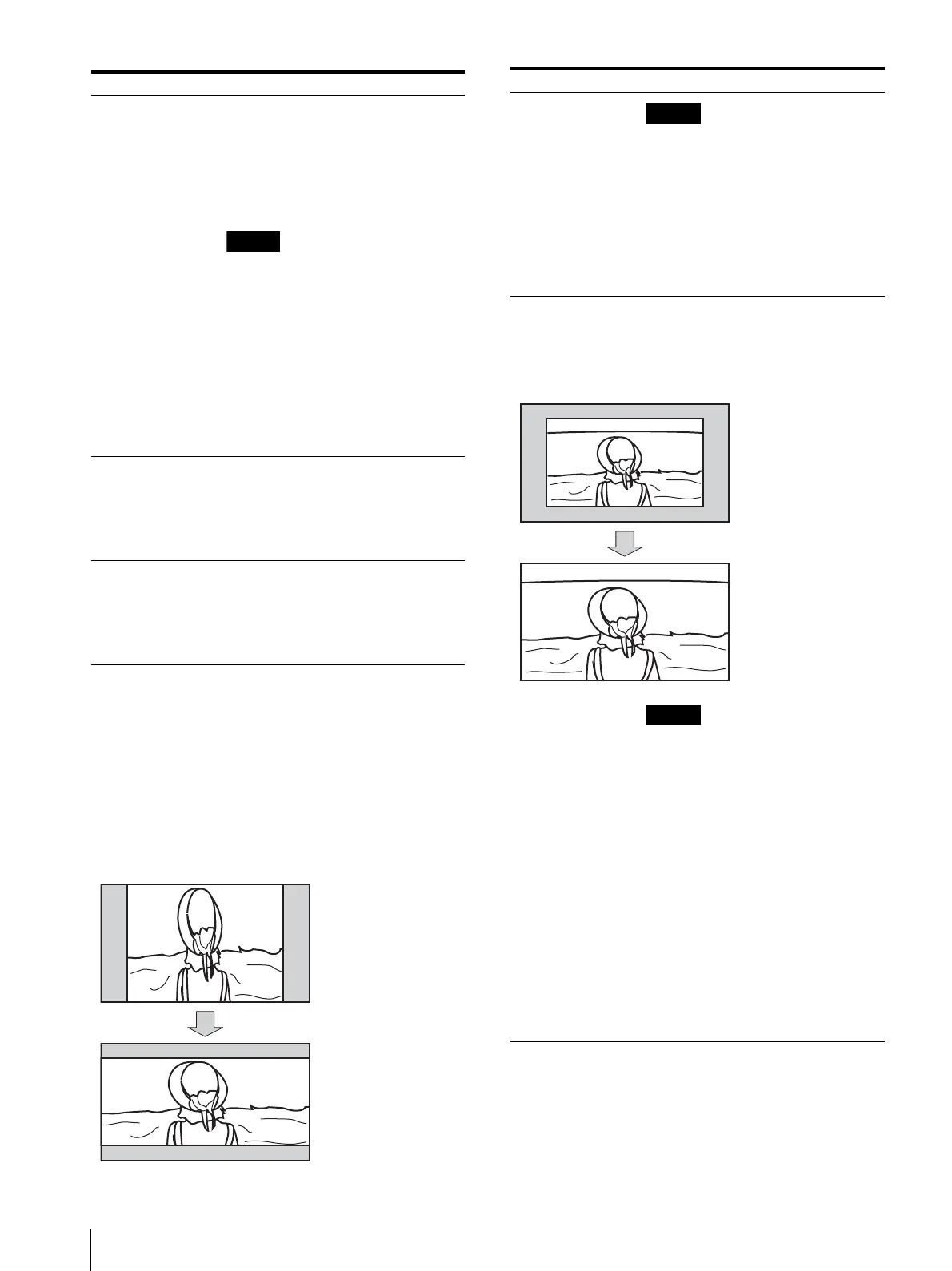
[Anamorphic] Set to confirm the content using the
anamorphic lens.
Depending on the magnification of the
lens or the aspect ratio of the imager,
you can select from the following:
[Off]
[2.0X_4:3]
[2.0X_16:9]
[2.0X_17:9]
[1.3X_4:3]
[1.3X_16:9]
[1.3X_17:9]
Stretched in a longitudinal
direction due to the
anamorphic lens.
2.39:1 Aspect display
[2.0X_4:3]
When [Anamorphic] is set to a setting
other than [Off], the following
functions cannot be used:
[Side by Side]
[Wipe]
[Blending]
[Difference]
[Auto SDI Switch]
[Time Code]
[Closed Caption]
[AFD] When you perform screen scaling
automatically in the AFD flag setting on
the ANC data of the SDI signal, set to
[On]. When you do not perform scaling
automatically, set to [Off].
When [AFD] is set to [On], the scan
setting is disabled when a valid
command is received.
When the AFD flag is in the ANC data
of the SDI signal, setting [AFD] to [On]
turns off the following functions:
[Side by Side]
[Wipe]
[Auto SDI Switch]
[Blending]
[Difference]
[Line Doubler]
[Time Code]
[Closed Caption]
The aspect setting is disabled and is
displayed with the normal scan mode
according to the AFD flag setting.
Submenu Setting
With the AFD flag, provides
a full screen display of an
16:9 image within an SD 4:3
screen.


 To Next Page