1-23
33
Playing Discs
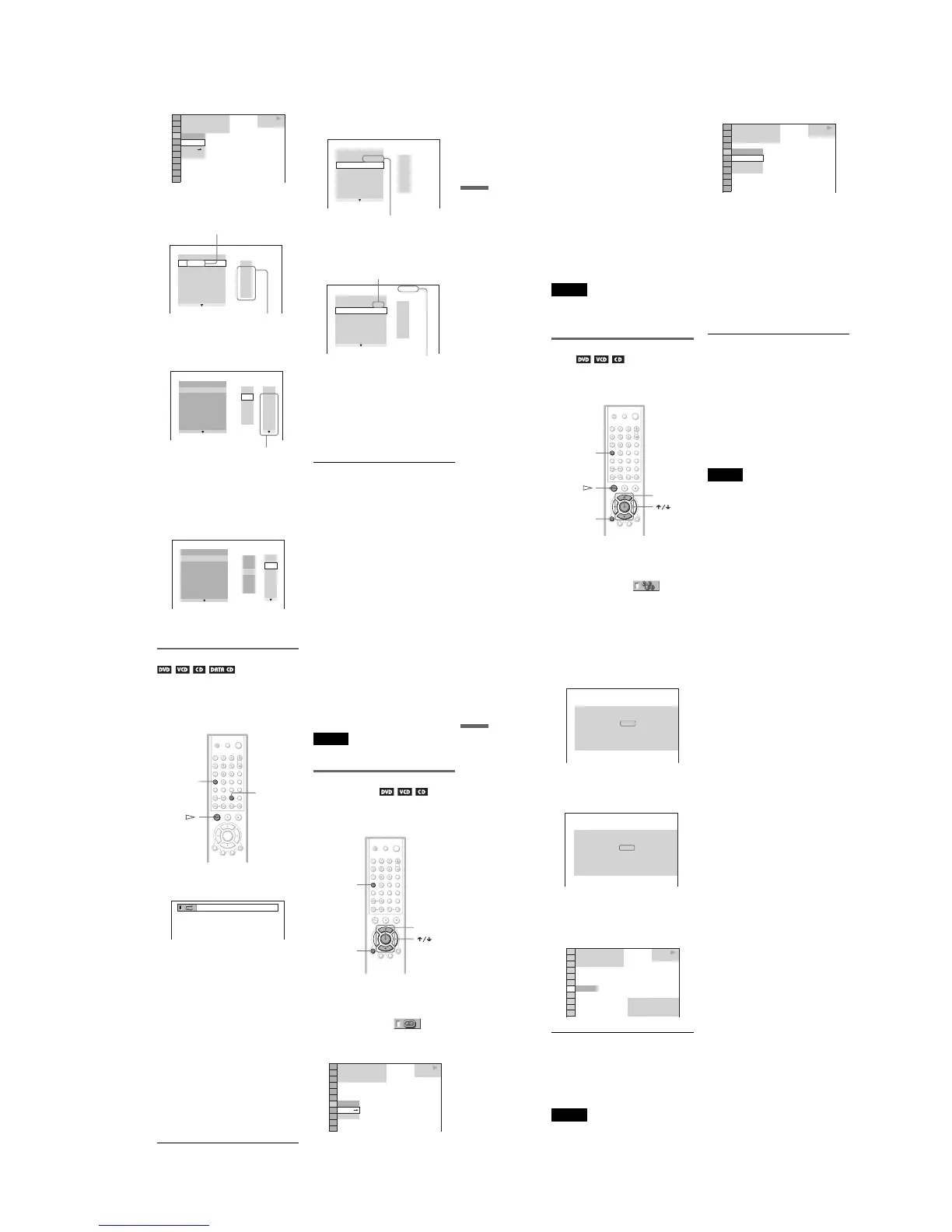
3 Press X/x to select “SET
t
,” then
press ENTER.
4 Press c.
The cursor moves to the title or track row
“T” (in this case, “01”).
5 Select the title, chapter, or track you
want to program.
◆ When playing a DVD
For example, select chapter “03” of title
“02.”
Press X/x or the number buttons to select
“02” under “T,” then press ENTER.
Next, press X/x or the number buttons to
select “03” under “C,” then press
ENTER.
◆ When playing a VIDEO CD or CD
For example, select track “02.”
Press X/x or the number buttons to select
“02” under “T,” then press ENTER.
6 To program other titles, chapters, or
tracks, repeat Steps 4 to 5.
The programmed titles, chapters, and
tracks are displayed in the selected order.
7 Press H to start Program Play.
Program Play begins.
When the program ends, you can restart
the same program again by pressing H.
To return to normal play
Press CLEAR, or select “OFF” in Step 3. To
play the same program again, select “ON” in
Step 3 and press ENTER.
To turn off the display
Press DISPLAY repeatedly until the display
is turned off.
To change or cancel a program
1 Follow Steps 1 through 3 of “Creating
your own program (Program Play).”
2 Select the program number of the title,
chapter, or track you want to change or
OFF
OFF
SET
ON
1 8
(
3 4
)
1 2
(
2 7
)
T
1 : 3 2 : 5 5
DVD VIDEO
PLAY
PROGRAM
1. TITLE
ALL CLEAR
2. TITLE
– –
3. TITLE
– –
4. TITLE
– –
5. TITLE
– –
6. TITLE
– –
7. TITLE
– –
T
– –
01
02
03
04
05
“TRACK” is displayed when you play
a VIDEO CD or CD.
Titles or tracks
recorded on a disc
PROGRAM
1. TITLE
– –
ALL CLEAR
2. TITLE
– –
3. TITLE
– –
4. TITLE
– –
5. TITLE
– –
6. TITLE
– –
7. TITLE
– –
T
C
ALL
01
02
03
04
05
06
– –
02
03
04
05
01
Chapters recorded on a disc
PROGRAM
1. TITLE
– –
ALL CLEAR
2. TITLE
– –
3. TITLE
– –
4. TITLE
– –
5. TITLE
– –
6. TITLE
– –
7. TITLE
– –
C
ALL
03
04
05
06
T
– –
01
02
03
04
05
02
01
T
– –
01
02
03
04
05
PROGRAM
1. TITLE 0 2
–
0 3
ALL CLEAR
2. TITLE
– –
3. TITLE
– –
4. TITLE
– –
5. TITLE
– –
6. TITLE
– –
7. TITLE
– –
Selected title and chapter
PROGRAM
1. TRACK 0 2
ALL CLEAR
2. TRACK
– –
3. TRACK
– –
4. TRACK
– –
5. TRACK
– –
6. TRACK
– –
7. TRACK
– –
0:15:30
– –
01
02
03
04
05
T
Selected track
Total time of the programmed tracks
,continued
34
cancel using X/x or the number buttons,
and press c.
3 Follow Step 5 for new programming. To
cancel a program, select “--” under “T,”
then press ENTER.
To cancel all the titles, chapters, or tracks
in the programmed order
1 Follow Steps 1 through 3 of “Creating
your own program (Program Play).”
2 Press X and select “ALL CLEAR.”
3 Press ENTER.
z Hint
You can do Repeat Play or Shuffle Play of the
programmed titles, chapters, or tracks. During
Program Play, follow the Steps of “Repeat Play”
(page 35) or “Shuffle Play” (page 34).
Notes
• When playing Super VCDs, the total time of the
programmed tracks does not appear on the screen.
• You cannot use this function with VIDEO CDs
with PBC playback.
Playing in random order (Shuffle
Play)
You can have the player “shuffle” titles,
chapters, or tracks. Subsequent “shuffling”
may produce a different playing order.
1
Press DISPLAY twice during playback
(when playing a CD, press once).
The Control Menu appears.
2
Press X/x to select
(SHUFFLE), then press ENTER.
The options for “SHUFFLE” appear.
3
Press X/x to select the item to be
shuffled.
◆ When playing a DVD
• TITLE
• CHAPTER
◆ When playing a VIDEO CD or CD
• TRACK
◆ When Program Play is activated
• ON: shuffles titles, chapters, or tracks
selected in Program Play.
4
Press ENTER.
Shuffle Play starts.
To return to normal play
Press CLEAR, or select “OFF” in Step 3.
To turn off the Control Menu
Press DISPLAY repeatedly until the Control
Menu is turned off.
z Hints
• You can set Shuffle Play while the player is
stopped. After selecting the “SHUFFLE” option,
press H. Shuffle Play starts.
• Up to 200 chapters in a disc can be played in
random order when “CHAPTER” is selected.
Note
You cannot use this function with VIDEO CDs with
PBC playback.
ENTE
CLEAR
DISPLAY
1 8
(
3 4
)
1 2
(
2 7
)
T
1 : 3 2 : 5 5
OFF
CHAPTER
TITLE
OFF
DVD VIDEO
PLAY
35
Playing Discs
Playing repeatedly (Repeat Play)
You can play all of the titles or tracks on a
disc or a single title, chapter, or track
repeatedly.
You can use a combination of Shuffle or
Program Play modes.
1 Press REPEAT during playback.
The following display appears.
2 Press REPEAT repeatedly to select the
item to be repeated.
◆ When playing a DVD
• DISC: repeats all of the titles.
• TITLE: repeats the current title on a
disc.
• CHAPTER: repeats the current
chapter.
◆ When playing a VIDEO CD or CD
• DISC: repeats all of the tracks.
• TRACK: repeats the current track.
◆ When playing a DATA CD (MP3 audio)
• DISC: repeats all of the albums.
• ALBUM: repeats the current album.
• TRACK: repeats the current track.
◆ When Program Play or Shuffle Play is
activated
• ON: repeats Program Play or Shuffle
Play.
To return to normal play
Press CLEAR, or select “OFF” in Step 2.
z Hints
• You can set Repeat Play while the player is
stopped. After selecting the “REPEAT” option,
press H. Repeat Play starts.
• You can also select “REPEAT” from the Control
Menu (page 12).
Note
You cannot use this function with VIDEO CDs with
PBC playback.
Repeating a specific portion (A-
B Repeat Play)
You can play a specific portion of a title,
chapter or track repeatedly. (This function is
useful when you want to memorize lyrics, etc.)
1 Press DISPLAY twice during playback
(when playing a CD, press once).
The Control Menu appears.
2 Press X/x to select (A-B
REPEAT), then press ENTER.
The options for “A-B REPEAT”
appear.
CLEAR
REPEA
DISPLAY
SET
OFF
OFF
1 8
(
3 4
)
1 2
(
2 7
)
T
1 : 3 2 : 5 5
DVD VIDEO
PLAY
,continued
36
3 Press X/x to select “ SET t,” then
press ENTER.
The “A-B REPEAT” setting display
appears.
4 During playback, when you find the
starting point (point A) of the portion to
be played repeatedly, press ENTER.
The starting point (point A) is set.
5 When you reach the ending point
(point B), press ENTER again.
The set points are displayed and the
player starts repeating this specific
portion.
To return to normal play
Press CLEAR, or select “OFF” in Step 3.
To turn off the Control Menu
Press DISPLAY repeatedly until the Control
Menu is turned off.
Note
When you set A-B Repeat Play, the settings for
Shuffle Play, Repeat Play, and Program Play are
canceled.
Set point A with
.
A-B REPEAT
ENTER
A: 18 – 1 : 32 : 55
CHAPTER
TIME
Set point B with .
ENTER
A-B REPEAT
1 8
(
3 4
)
1 2
(
2 7
)
DVD VIDEO
PLAY
A: 18 – 1 : 32 : 55
B: 18 – 1 : 34 : 30
CHAPTER
TIME
ON
T
1 : 3 4 : 3 0



 To Next Page