EasyManua.ls Logo

Sony S-Frame DPF-D70 - Troubleshooting File Operations and Connectivity

Sony S-Frame DPF-D70
48 pages
Print Icon
To Next Page IconTo Next Page
To Previous Page IconTo Previous Page
Loading...
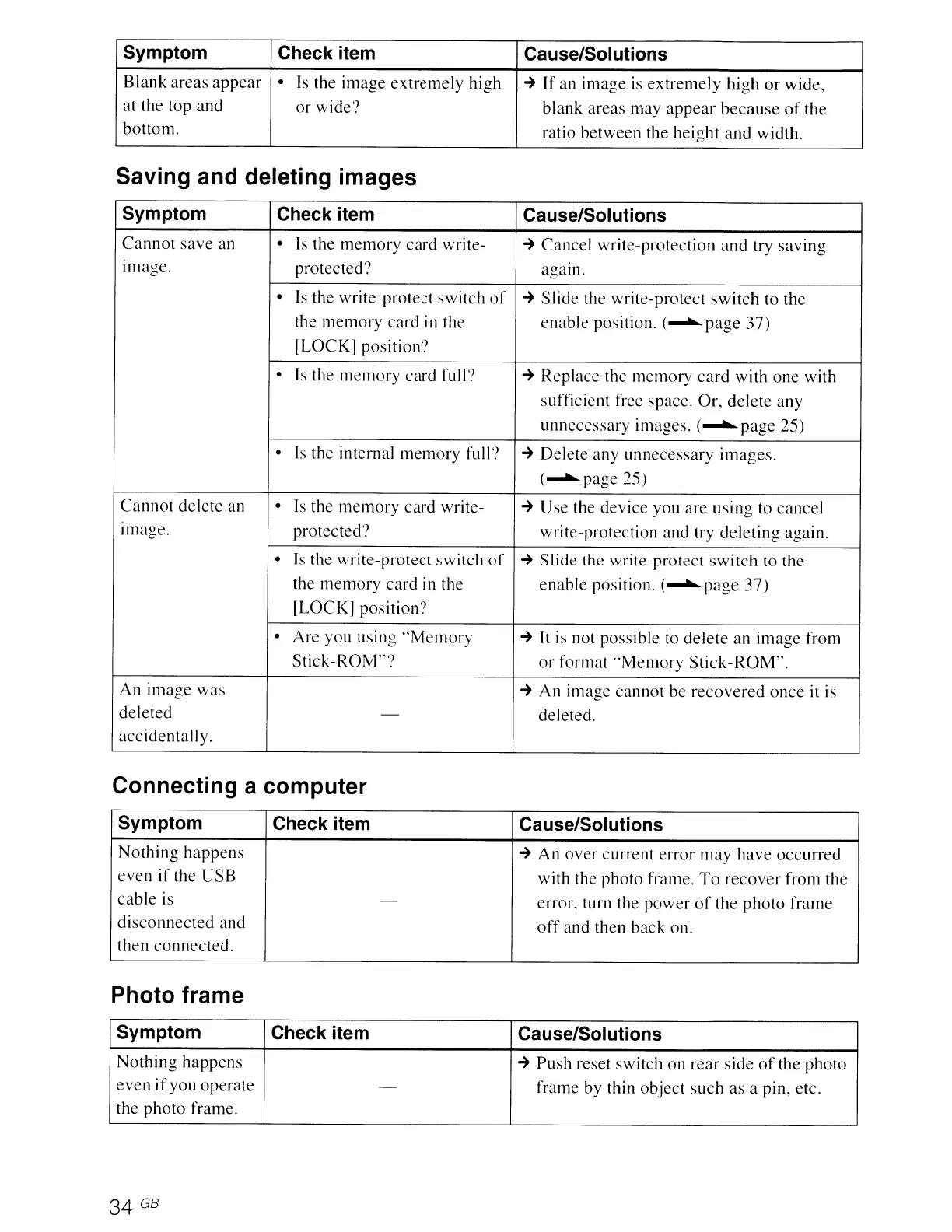
Symptom
Check item Cause/Solutions
Blank
areas
appear
Is the
image
extremely
high
~
If
an
image
is
extremely
high
or
wide,
at the top
and
or
wide?
blank areas may
appear
because
of
the
bottom.
ratio
between
the
height
and
width.
Saving and deleting images
Symptom
Check item Cause/Solutions
Cannot
save
an Is the
memory
card
write-
~
Cancel write-protection
and
try
saving
Image.
protected? agam.
Is
the write-protect
switch
of
~
Slide
the write-protect
switch
to the
the
memory
card
in the
enable
position.
(~page
37)
lLOCK]
position?
Is the
memory
card
full?
~
Replace the
memory
card
with
one
with
sufficient free space.
Or,
delete
any
unnecessary images.
(~page
25)
Is the internal
memory
full?
~
Delete any unnecessary
images.
(~page
25)
Cannot
delete
an
Is the
memory
card
write-
~
Use the
device
you are
using
to cancel
Image.
protected?
write-protection and try
deleting
again.
Is
the
write-protect
switch
of
~
Slide
the write-protect
switch
to the
the
memory
card
in the
enable
position.
(~page
37)
[LOCK]
position')
Are you using
"Memory
~
It is not possible to
delete
an
image
from
Stick-ROM"?
or
format
"Memory
Stick-ROM".
An
image
was
~
An
image
cannot
be
recovered
once
it is
deleted
-
deleted.
accidentall
y.
Connecting a computer
Symptom Check item
Cause/Solutions
Nothing
happens
~
An
over
current
error
may
have
occurred
even
if the USB
with the
photo
frame.
To
recover
from the
cable
is
-
error. turn the
power
of
the
photo
frame
disconnected
and
off
and then back on.
then
connected.
Photo frame
Symptom Check item Cause/Solutions
Nothing
happens
~
Push
reset switch
on
rear
side
of
the
photo
even
if
you operate
-
frame by thin
object
such
as a pin, etc.
the
photo
frame.
34
GB

Related product manuals