10
GB
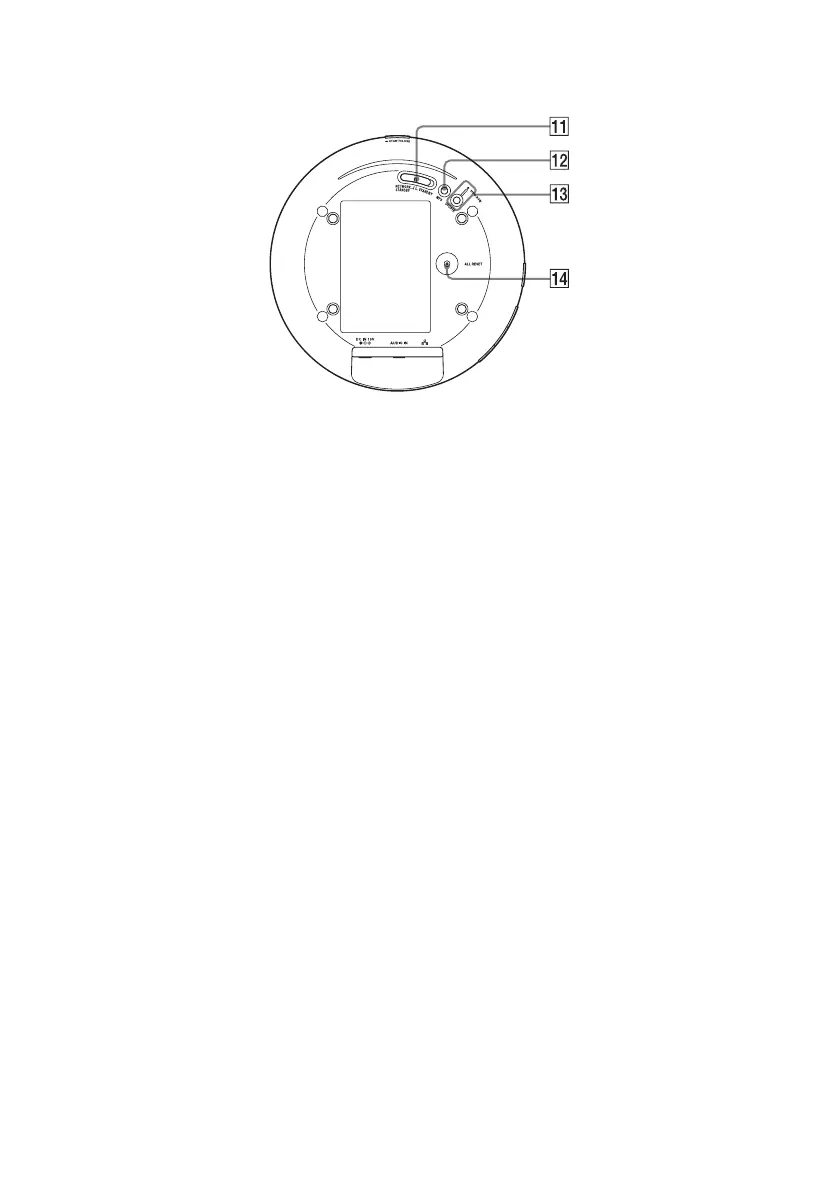
Bottom
For details on each indicator, see “Indicator information” (page 39).
K NETWORK STANDBY / STANDBY
switch
Switch between the network standby mode
and the standby mode (page 13).
L WPS button
Use to make the network settings for the
WPS push button configuration (page 14).
M UPDATE button, indicator
Press to start updating the software of the
unit (page 28).
Indicates the update status of the unit.
Green (lit): The unit can be updated.
Green (flashing): The unit is updating.
Red (flashing): An error has occurred.
Not lit: The unit does not need updating.
N ALL RESET button
Press and hold for more than three seconds
to reset the unit to its factory default
settings when the unit is turned on.
Use a thin object, such as a small pin.
The previously registered settings or
information will be reset.
Note
Network settings are also reset when you
press ALL RESET button.



 To Next Page