19
GB
Network Connections
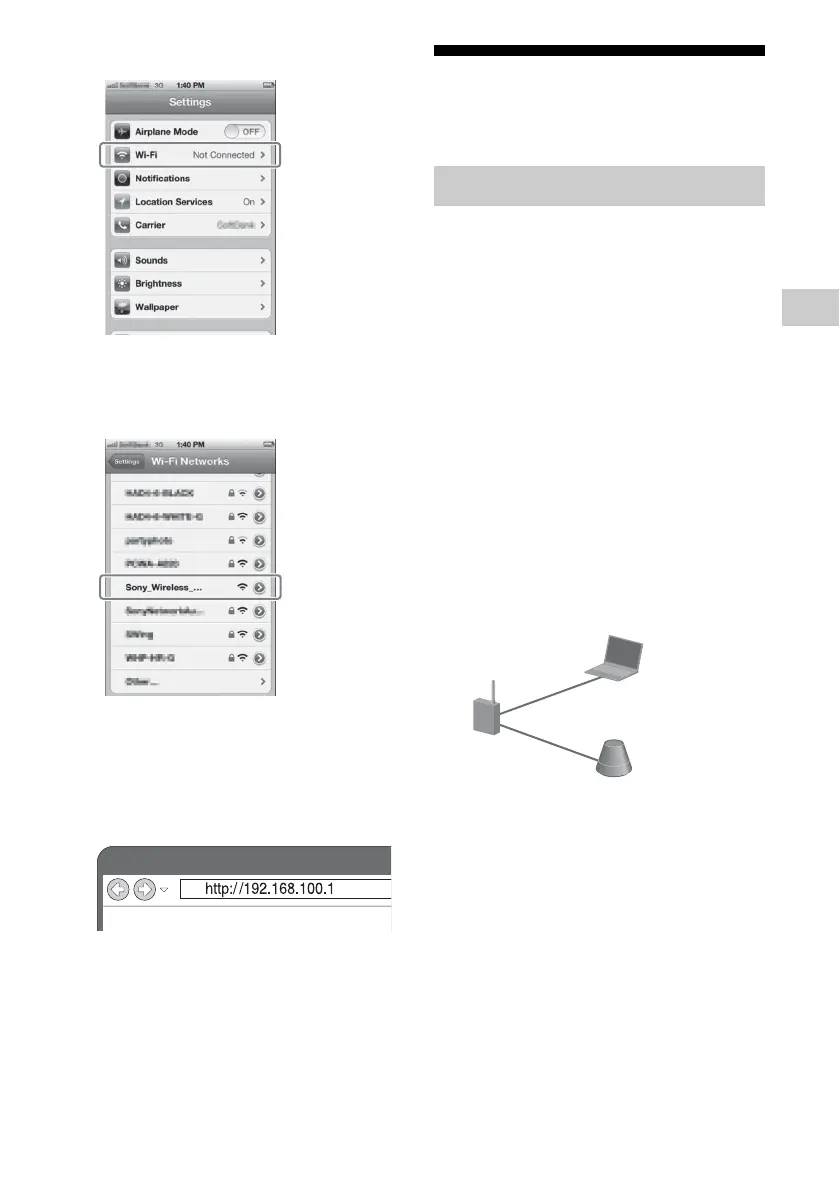
3 Tap [Wi-Fi].
4 Tap
[Sony_Wireless_Audio_Setup]
on the network list.
5 Access the [Sony Network
Device Setting] screen.
Start the browser (Safari) and input either
of the following URLs into the browser’s
address bar.
6 Repeat steps 5 to 9 of
“Option 3-1.”
After restarting the unit, confirm the
wireless settings of iPhone/iPad/iPod
touch restore.
Setting Up Wired
Networks
Usually, the DHCP setting is set to ON when
you connect your computer to the network.
Try the following method if you are using a
wired network.
Set the DHCP setting of your computer to ON
in advance.
1 Check whether your computer
and router are turned on.
2 Connect the unit and the router
using a network (LAN) cable
(not supplied).
3 Connect the router and your
computer using a second
network (LAN) cable (not
supplied).
4 Turn the unit on.
The LINK indicator lights up in amber
when the connection is made.
Option 4: DHCP method
Network (LAN) cable
(not supplied)
Network
(LAN) cable
(not supplied)



 To Next Page