23
GB
Listening to Audio Content Over Your Home Network
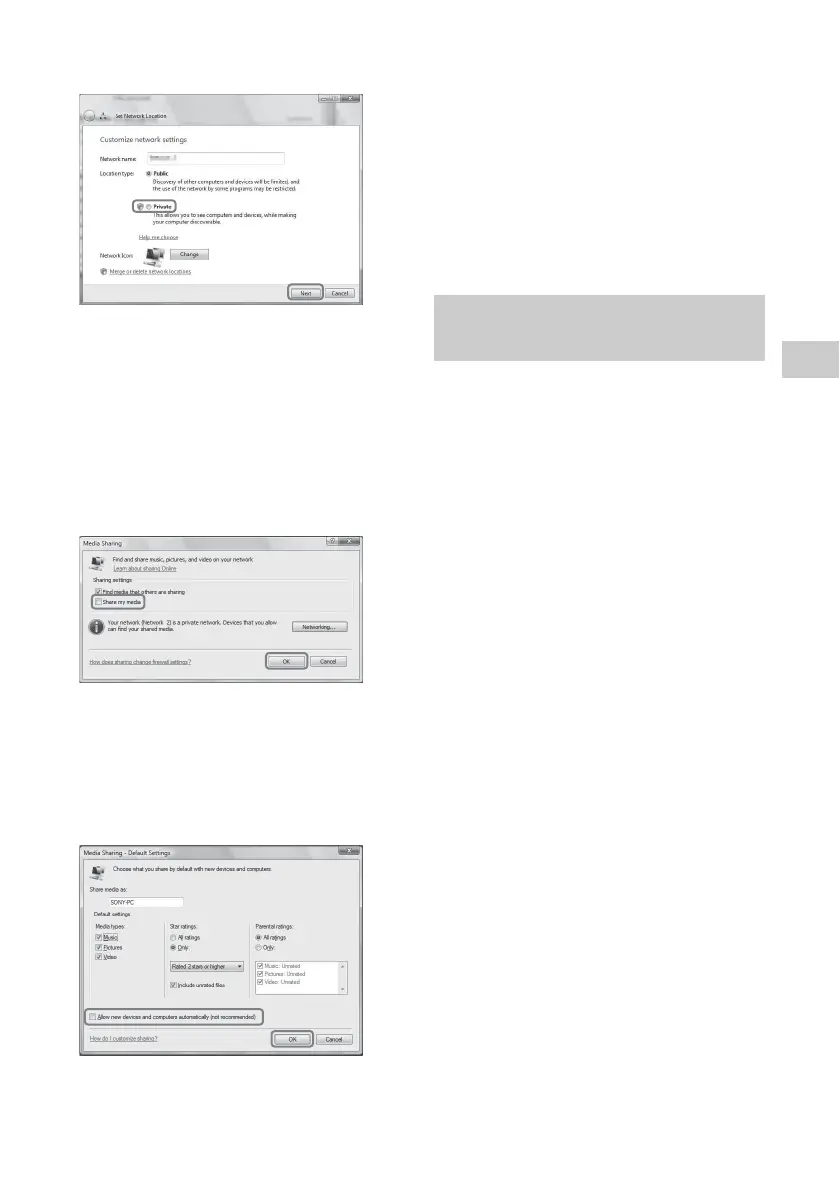
5 Add a check next to [Private] and select
[Next].
6 Confirm that the [Location type] has been
changed to [Private] and select [Close].
7 Confirm that [(Private network)] is
displayed in the [Network and Sharing
Center] window and close the window.
8 If a check is not added next to [Share my
media] in the [Media Sharing] window that
is displayed in step 2, add a check next to
[Share my media], then select [OK].
A list of connectable devices is displayed.
9 Select [Settings...] that appears beside
[Share my media to:].
10Add a check next to [Allow new devices
and computers automatically] and select
[OK].
Note
Uncheck this item after you confirm that the unit can
connect to the computer and play audio data on the
computer.
Listening to audio content
stored on a computer with
Windows Vista/ Windows XP
You can play back audio content, using the
DLNA controller (page 20).
The operation is different depending on the
device. Refer to the operating instructions of
your server or controller.
Listening to audio content on a
server



 To Next Page