28
GB
Updating software
When a new update is available, the UPDATE
indicator lights up in green while the unit is
connected to the Internet.
Check the following customer support website
about the update:
http://www.esupport.sony.com/
Notes
• Perform the following operations after confirm the
message and also read and agree the “END-USER
LICENSE AGREEMENT FOR SONY
SOFTWARE” (page 42).
• Make sure you do not attempt any of the following
operations while the update is in progress.
– Turning the unit off
– Connecting or disconnecting the network (LAN)
cable (not supplied)
– Disconnecting the AC adaptor
• You must set up a proxy server if you use the
Internet environment via a proxy server (page 14).
1 Quit all operations before
updating.
Tip
If you do not quit those, the unit will quit or
stop all operations automatically.
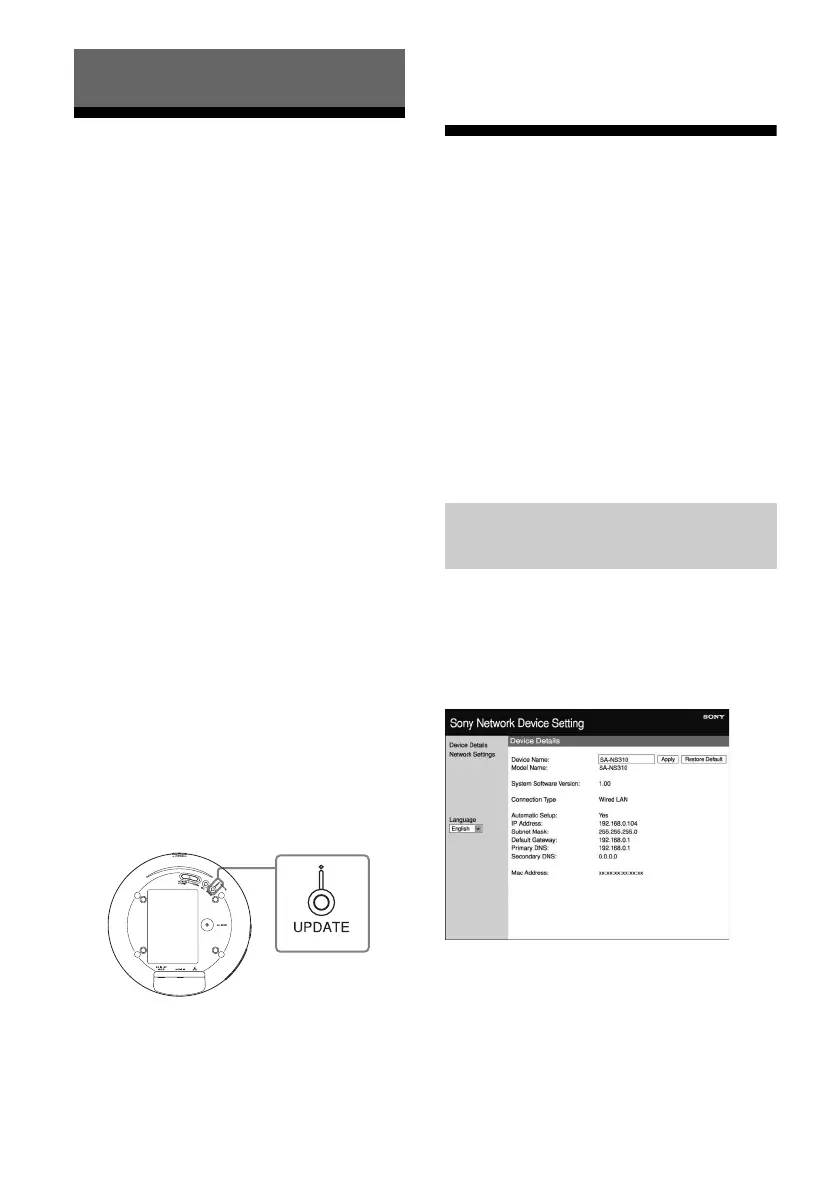
2 Press UPDATE on the bottom
of the unit for three seconds.
The update starts.
The UPDATE indicator flashes during
the update.
Notes
• It takes for a while to finish updating.
• You cannot operate the unit until updating has
completed.
• It may take several minutes to update the software
of the unit. The time required depends on the size
of the update content and type of Internet
connection you are using.
Setting Screen on the
Browser
To display the [Setting Screen] in your
browser, refer to the following:
• Option 3-1: Manual setting method using an
Access Point Scan (for PC/Mac) (page 15)
• Option 3-2: Manual setting method using an
Access Point Scan (for Android device)
(page 17)
• Option 3-3: Manual setting method using an
Access Point Scan (for iPhone/iPad/iPod
touch) (page 18)
You can make the various settings of this unit
using the setting screen on the browser.
Device Details screen
You can check the information on this unit.
Others
bottom
Using the setting screen on the
browser



 To Next Page