16
GB
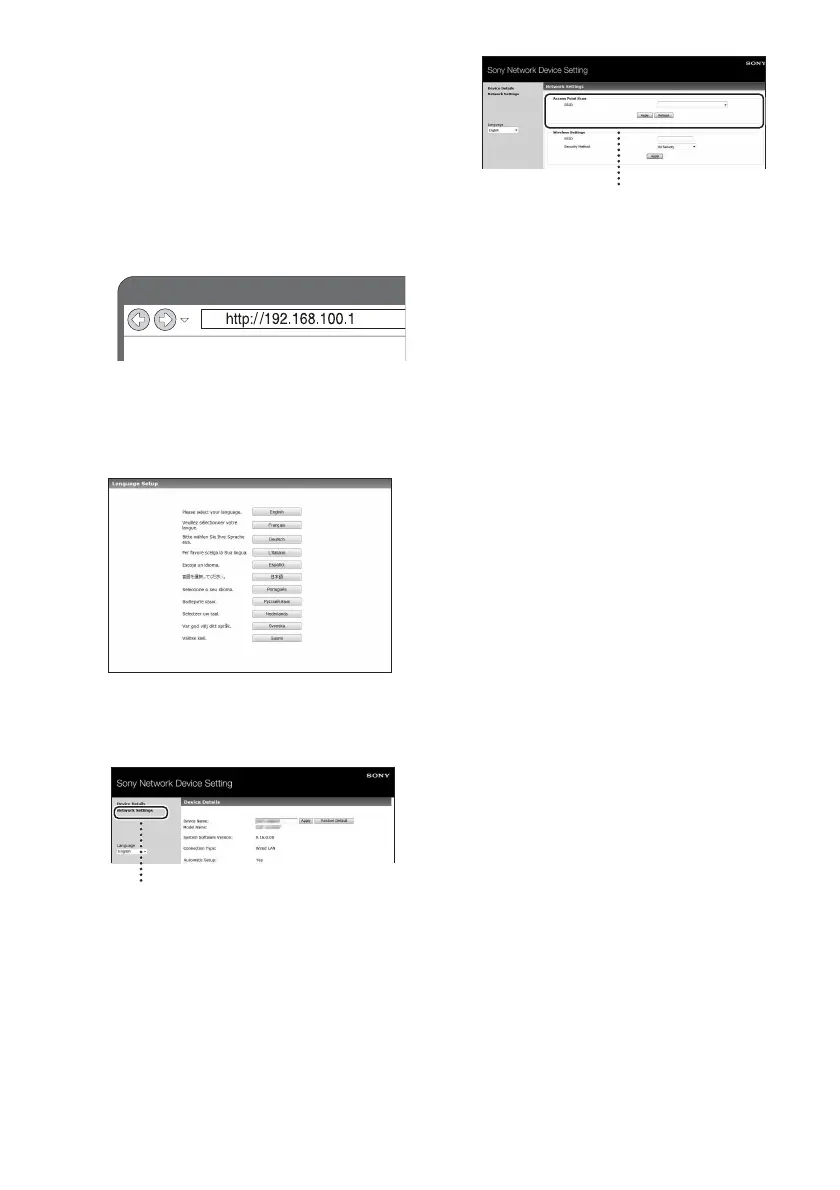
6 Access the [Sony Network
Device Setting] screen.
For Mac
Start Safari and select [Bonjour] under
[Bookmarks], then select [SA-NS310].
For PC
Start the browser and input either of the
following URLs into the browser’s
address bar.
7 Select the desired language
when the [Language Setup]
screen appears.
8 Select [Network Settings] from
the menu.
9 Select the SSID of the wireless
LAN router/access point, then
input the Security Key (if
applicable).
10Select [Apply].
11Click [OK] in the displayed
window.
The unit restarts automatically, then the
LINK indicator lights up green when the
connection is established.
12Reconnect the Mac or PC to
your network.
Note
This procedure needs to be completed within 30
minutes. If you cannot complete, start over from
step 3.
Network Settings
SSID



 To Next Page