21
GB
Listening to Audio Content Over Your Home Network
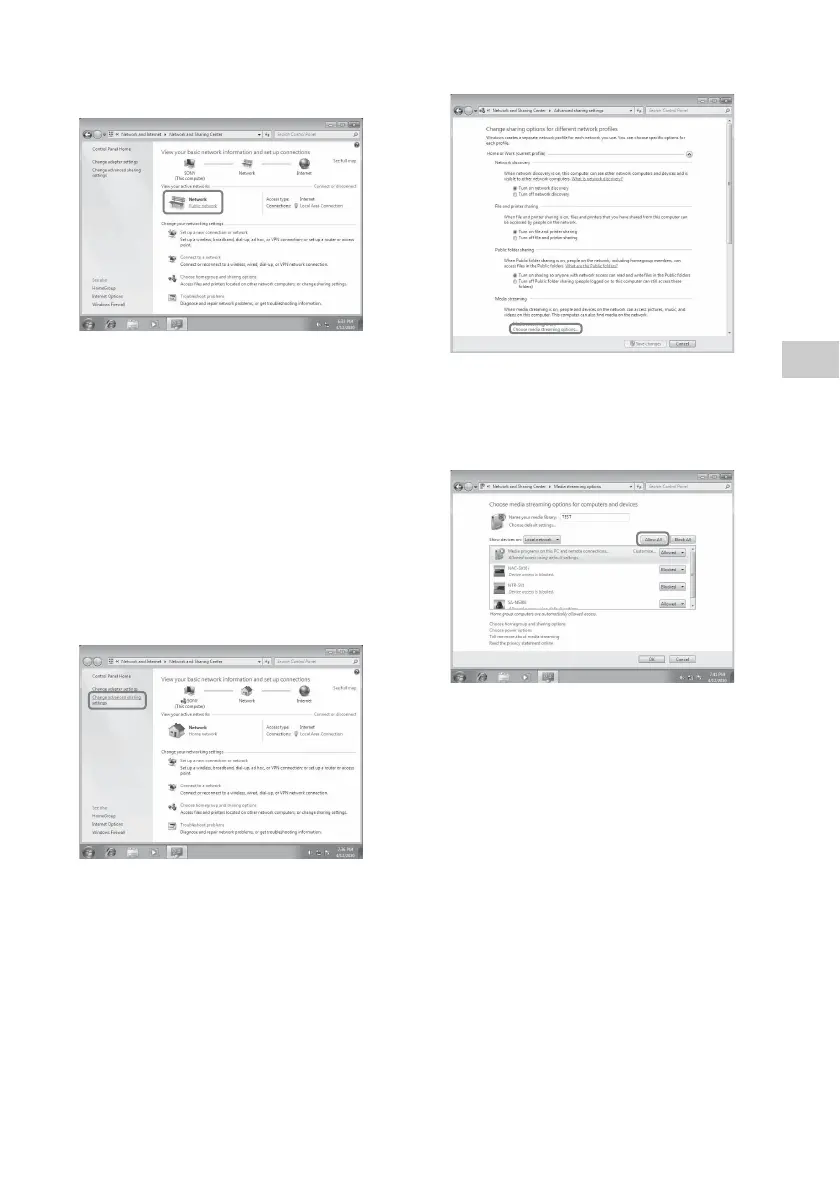
2 Select [Public network] under [View your
active networks]. If the display shows other
than [Public network], go to step 5.
The [Set Network Location] window appears.
3 Select [Home network] or [Work network]
according to the environment in which the
speaker is used.
4 Follow the instructions that appear on the
display according to the environment in
which the speaker is used.
When the change is completed, confirm that
the item under [View your active networks]
has been changed to [Home network] or
[Work network] in the [Network and
Sharing Center] window.
5 Select [Change advanced sharing settings].
6 Select [Choose media streaming options...]
from [Media streaming].
7 If [Media streaming is not turned on]
appears in the Media streaming options
window, select [Turn on media streaming].
8 Select [Allow All].
The [Allow all media devices] window
opens. If all the devices in the local network
are [Allowed] to access your network, select
[OK] and close the window.
9 Select [Allow all computers and media
devices].
10Select [OK] to close the window.
Listening to audio content
stored on a computer with
Windows 7
1 Start [Windows Media Player] of Windows
7.
2 Turn on media streaming.
3 Select the desired audio content, then click
the right mouse button.



 To Next Page