58
Unlocking Your Receiver
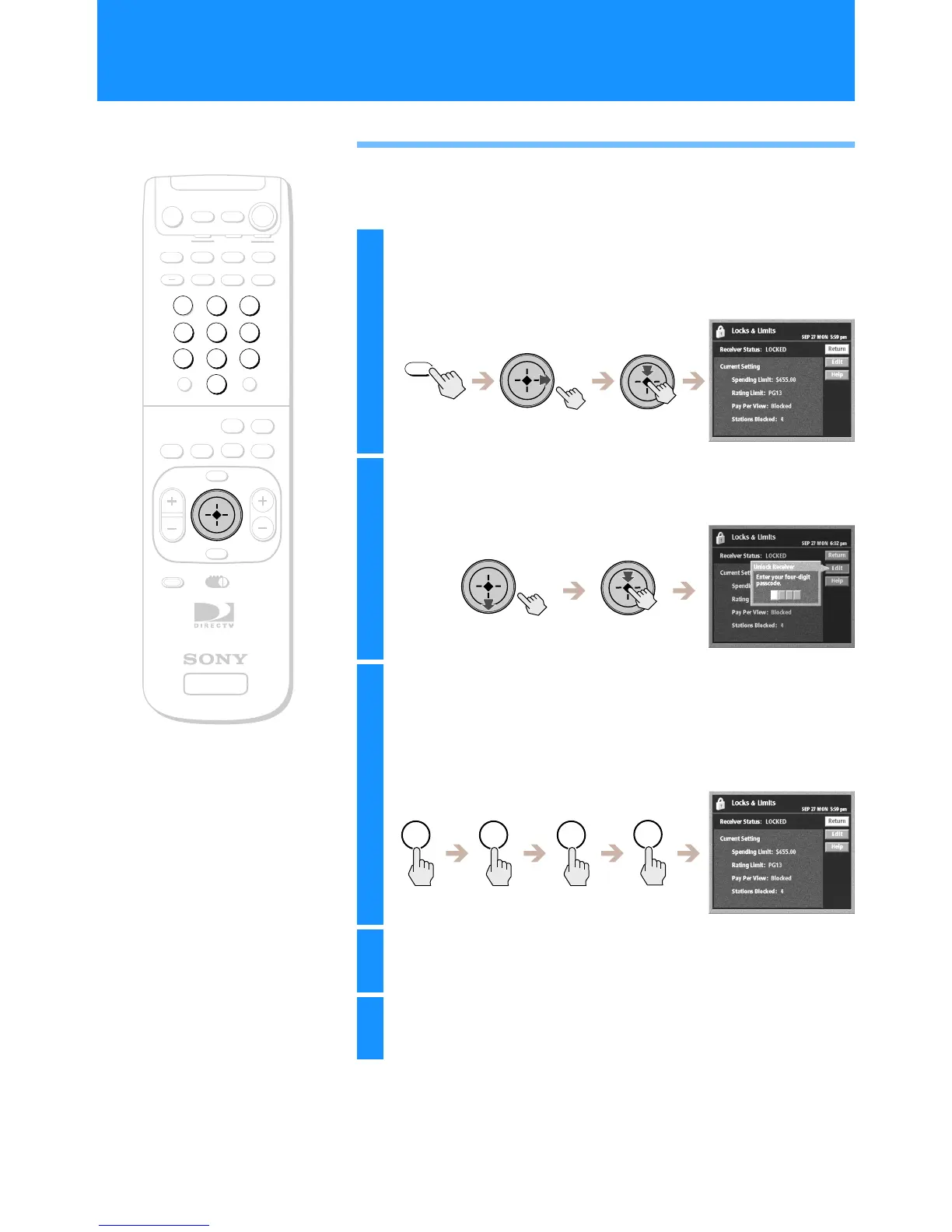
If you want to make changes to the Locks & Limits settings, you must
enter your passcode to unlock the receiver.
+
SATELLITE
RECEIVER
2
8
3
4
5
6
9
SLEEP
TV/SAT
TV/VIDEO
FUNCTION
SAT
CABLE
AUDIO
VOLUME
ENTERDISPLAY
MUTING
CABLE
ALT AUDIO
JUMP
GUIDE
INDEXFAVORITE
VOL
RM-Y802
VTR3 2 DVD AMP
MENU
EXIT
CH
1
7
TV
TV
CATEGORY
CODE SET
0
POWER
SAT
z
Tip
You can temporarily unlock your Digital
Satellite Receiver with your passcode if
you select a program from a guide and the
station is blocked or a limit has been
reached.
RM-Y802
Remote Control
1
Press the MENU button, then highlight and select
LOCKS & LIMITS.
The Locks & Limits display appears.
2
Highlight and select “Edit”.
The Unlock Receiver pop-up appears.
3
Enter your four digit passcode using the 0–9
buttons.
Each number you enter appears as an asterisk (*) which keeps your
passcode secret.
The Locks & Limits edit display appears.
4
Highlight and select “Unlock”.
Your receiver is now unlocked.
5
Highlight and select “Return”.
The Main Menu appears.
MENU
1 2 3
4
Setting Locks and Limits (LOCKS & LIMITS) (continued)

 To Next Page
 Loading...