63
Using the On-Screen Displays
Editing Timer Events
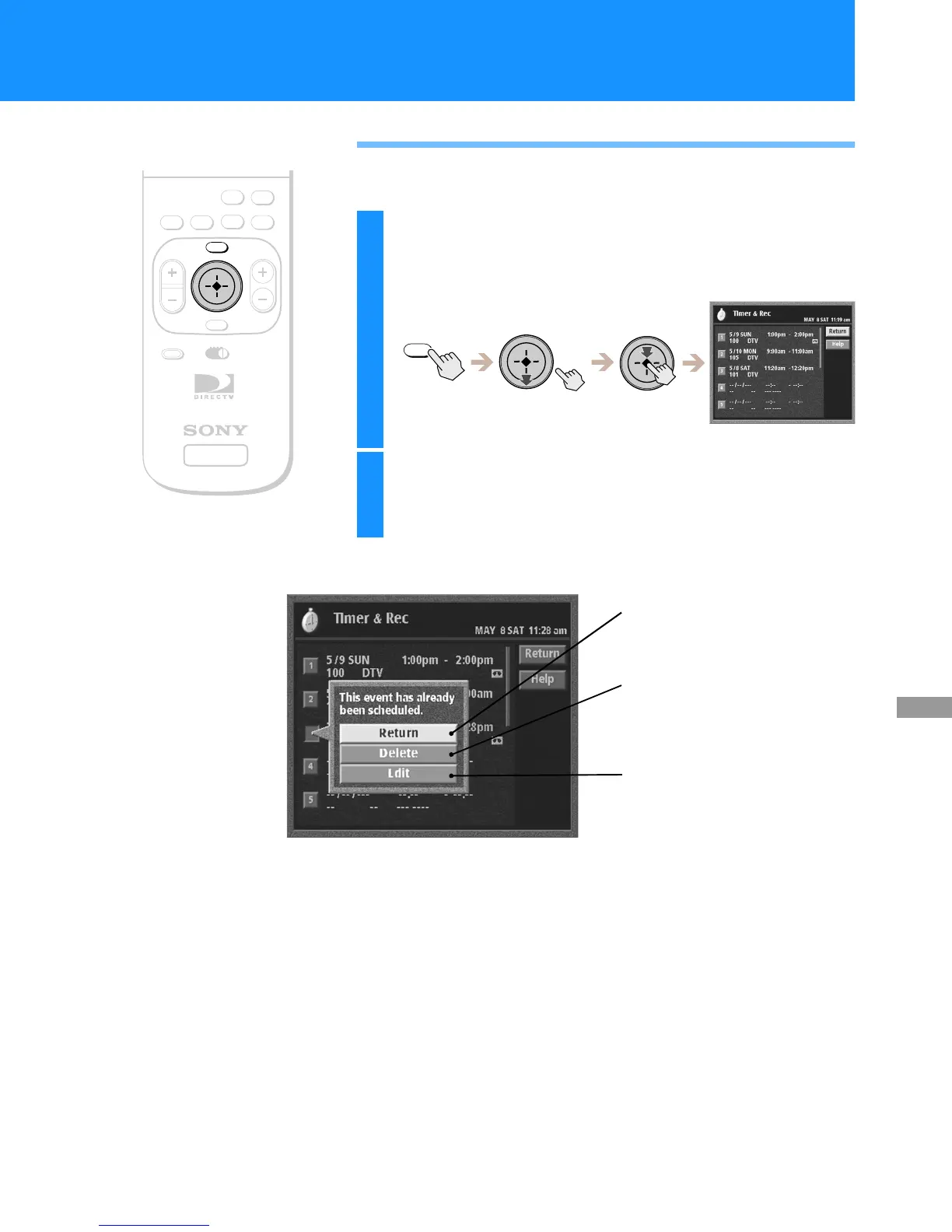
You can easily edit or delete timer events.
SATELLITE
RECEIVER
ALT AUDIO
JUMP
GUIDE
INDEXFAVORITE
VOL
RM-Y802
VTR3 2 DVD AMP
MENU
EXIT
CH
CATEGORY
CODE SET
1
Press the MENU button, then highlight and select
TIMER & REC.
The Timer & Rec display appears.
2
Highlight and select the number of the event you
want to edit.
The edit pop-up appears.
MENU
Return
Closes the edit pop-up to show the Timer
&Recdisplay.
Delete
Removes the event from the list. Higher
numbered events move up to fill the gap.
Edit
Closes the edit pop-up to highlight the
date of that event.
Seepage62forinstructionsonhowto
change the timer settings.
RM-Y802
Remote Control


 To Next Page
 Loading...